For the uninitiated…
VisualHG is a Mercurial source control plugin for MS Visual Studio

I had a bit of a problem with VisualHG a couple of weeks ago.
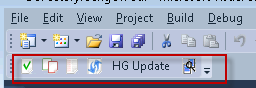
The overlay icons work in Visual Studio, but the context menu had no VisualHG icons and the VisualHG toolbar was inactive (had all the buttons greyed out).
Tried uninstalling / reinstalling visualhg.
Version: Visual Studio 2010 Version 10.0.30319.1 RTMRel Premium.
OS used: Windows 7 Enterprise x64.
VisualHG 1.1.0 installed.
Seems to work in VS 2008 though.
Solution
Remove all instances of VisualHG in Programs and Features.
Search the Program Files and Program Files (x86) for instances of visualhg and remove if they exist.
Search the registry for VisualHG related items (entries as well as keys). Delete them all.
Reinstall the latest version of VisualHG (currently 1.1.0).
Posts and links that provided resolution:
http://visualhg.codeplex.com/Thread/View.aspx?ThreadId=209792
http://visualhg.codeplex.com/workitem/36
Tags: Microsoft, Version Control
 Binarymist
June 1, 2011 at 02:45 |
This solved it for me, thanks!
March 2, 2013 at 13:01 |
[…] Using VisualHG in Visual Studio […]
May 5, 2014 at 12:53 |
Very good post! We will be linking to this great content
on our site. Keep up the good writing.