Archive for the ‘Microsoft’ Category

Excluding ads from your browsing experience

June 6, 2011

If you like the idea of

  • Saving bandwidth
  • Removing annoying adds while browsing the web
  • Minimising the likelihood of having your privacy compromised, by way of spy-ware, unwanted analytics, Cross-Site Scripting (XSS), and others
  • Gaining control over who can download what
  • Monitoring what exactly is being downloaded or even attempted

Keep reading, if you’d like to know the process I took to acquire the above.

hosts file

Most/all Operating Systems have a hosts file.

You can add all the dodgy domains you want blocked, to your hosts file and direct them to localhost.
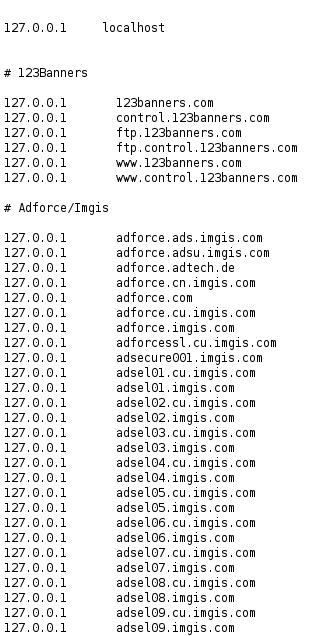
Example of hosts file with blocked domains

Providing your hosts file is kept up to date.
This is one alternative to blocking these domains.

Example host files

http://hostsfile.mine.nu/downloads/
http://winhelp2002.mvps.org/hosts.htm
http://someonewhocares.org/hosts/

On some systems if you add the dodgy sites to your hosts file, you may experience the “waiting for the ad server” problem.
As far as your browser is concerned, these URL’s don’t exist (because it’s looking at localhost).
Your browser may wait for a timeout for the blocked server.
In this case you could use eDexter to serve up a local image instead of waiting for a server timeout.
At this time, only OS X and Windows versions are available.

There is an alternative.
JavaDog will apparently run on all platforms that have the Java VM.
This doesn’t appear to be in the Debian repositories. At least not the ones I’m using.
I read here “As for Edexter, Firefox in Linux doesn’t seem to have the “waiting for the ad server” problem Mozilla in windows had.”

From my experience it does.

I had a quick look at JavaDog for Linux.
Found this site

It can be an administrative pain to keep the hosts file up to date with the additions and removals of domains.
Although Linux users could use the script here to do the updating.
This could be added to a Cron job in Linux.

If your on a windows box you may run into another type of slow down every 25 minutes for 5 minutes with apparently 100% CPU usage resulting in the described DNS cache timeout error.
There is a workaround, but I wouldn’t be very happy with it. Disabling the DNS client service.
If you rely on Network Discovery (enables you to see other computers on your network and for them to see you), this is not going to be a solution.

As stated here
A better Win7/Vista workaround would be to add two Registry entries to control the amount of time the DNS cache is saved.

  • Flush the existing DNS cache (see above)
  • Start > Run (type) regedit
  • Navigate to the following location:
    HKEY_LOCAL_MACHINE\SYSTEM\CurrentControlSet\Services\Dnscache\Parameters
  • Click Edit > New > DWORD Value (type) MaxCacheTtl
  • Click Edit > New > DWORD Value (type) MaxNegativeCacheTtl
  • Next right-click on the MaxCacheTtl entry (right pane) and select: Modify and change the value to 1
  • The MaxNegativeCacheTtl entry should already have a value of 0 (leave it that way – see screenshot)
  • Close Regedit and reboot …
  • As usual you should always backup your Registry before editing … see Regedit Help under “Exporting Registry files”

If you decide to give the hosts file a go
On Linux it’s found in /etc
On Windows it’s location is defined by the following registry key
HKEY_LOCAL_MACHINE\SYSTEM\CurrentControlSet\Services\Tcpip\Parameters\DataBasePath

 Usually here

Windows 7/Vista/XP    =    C:\WINDOWS\SYSTEM32\DRIVERS\ETC
Windows 2K               =    C:\WINNT\SYSTEM32\DRIVERS\ETC

Make sure you backup the hosts file in case anything goes wrong.
Make sure you don’t remove what’s already in your default hosts file. especially the first line that has the loop back address

127.0.0.1              localhost
127.0.1.1              [MyComputerName].local          [MyComputerName]

Just add the new entries at the bottom of the hosts file.
Remove any duplicate entries.
You will then have to flush your DNS cache if you have one.

If your on windows

Clear your browsers cache.
Close all browsers.
From a cmd prompt run the following

ipconfig /flushdns

or reboot the machine.

If your on Linux (Debian)

Clear your browsers cache.
That may be all you need to do.
Otherwise
At the command prompt (as root) try

/etc/init.d/nscd restart

or for other Linux distros
“killall -hup inetd” (without the quotes) which will restart the inetd process and should not require a reboot.
I found that just updating the file was enough to see the changes,
as my default Debian Lenny install doesn’t have a DNS cache.

Adblock Plus

 I decided to just give the Firefox add-on Adblock Plus a try
as I thought it would be allot easier and less (zero) administrative overhead.
Just make sure you’ve got a good filter subscription selected. I used EasyList (English).
As I was on Lenny. Adblock Plus wasn’t available for Iceweasel (firefox on debian) 3.0.6 unless I installed the later version of Iceweasel from the backports.debian.org repository.
I looked in the Tools->Add-ons->Get Add-ons and searched for Adblock Plus.
I was planning on performing a re-install of Debian testing soon anyway, but was keen on giving Adblock Plus a try now.

Installing Iceweasel (firefox) from backports

Most won’t have to do this, but I’m still on old stable.
This site is quite helpful
For most people they will just have to make a change to their /etc/apt/sources.list
If you are running Debian Lenny you would have to add the following line:

deb http://backports.debian.org/debian-backports lenny-backports main contrib non-free

For later versions of Debian substitute the version specific part with your versions code name.
As I’m using apt-proxy to cache my packages network wide, I had to make sure I had the following section in the /etc/apt-proxy/apt-proxy-v2.conf file

[backports]
 ;; backports
 backends = http://backports.debian.org/debian-backports
 min_refresh_delay = 1d

and the following in the client pc’s /etc/apt/sources.list

deb http://[MyAptProxyServer]:[MyAptProxyServersListeningPort]/backports lenny-backports main contrib non-free

You can see how the directory structure works for the repositories.
In this case have a look at http://backports.debian.org/debian-backports/
in dists you will see lenny-backports as a subdirectory.
Within lenny-backports you’ll see main, contrib and non-free
Now just add the below section to the client pc’s /etc/apt/preferences file
In my case I didn’t have this file, so created it.
What’s this for?
If a package was installed from Backports and there is a newer version there,
it will be upgraded from there.
Other packages that are also available from Backports will not be upgraded to the Backports version unless explicitly stated with
-t lenny-backports
Check the apt_preferences man page as usual for in depth details.

# APT PINNING PREFERENCES
 Package: *
 Pin: release a=lenny-backports
 Pin-Priority: 200

Now as root

apt-get update
apt-get -t lenny-backports install iceweasel

Now because we’ve added the /etc/apt/preferences file,
when ever there are updates to the backported version of iceweasel,
we’ll get them for Iceweasel when we do a

apt-get upgrade

Now through iceweasel’s Tools->Add-ons->Get Add-ons
and a search for Adblock Plus now revealed the plugin.
Installed it and selected the EasyList (English) filter subscription.
Browsed some sites I knew there were popups and ads I didn’t want and it worked great!
Adblock Plus gives good visibility for each request made,
as to what it’s blocking, could possibly block etc, through it’s Close blockable items menu Ctrl+Shift+V

So personally I think I’d stick with the add-on (for firefox users that is) going forward, as it seemed like it just worked.
Not sure about other browser platforms.

Now I use this with the NoScript pluggin also,
which I find great at stopping javascript, flash and other executable code from being run from domains I’m not expecting it to be run from.

I’m also using OpenDNS as name servers.
They provide allot of control over what can be accessed by way of domain.
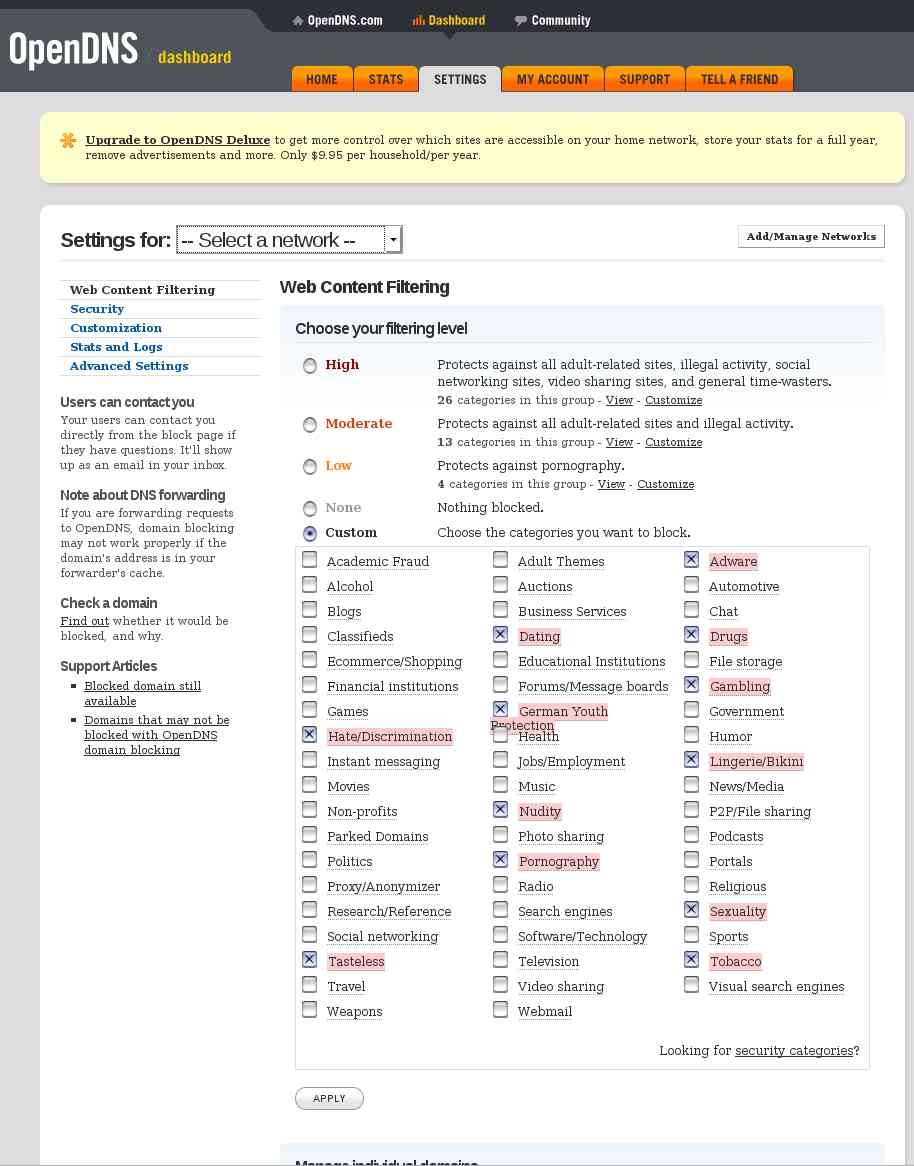
You can also provide custom images and messages to be displayed for requested sites that you don’t want to allow.
Statistics of who on your network is accessing which sites and which sites they are attempting to access.
Plus allot more.

I’m looking into using
Squid with
Snort or
Privoxy
and  to take care of allot more.
Provide anonymous web browsing.
Content caching.

Resources

http://hostsfile.mine.nu/
http://winhelp2002.mvps.org/hosts.htm
http://www.accs-net.com/hosts/hostsforlinux.html

There is also a good pod-cast on the hosts file by Xoke here.
Using PSCredentials

June 2, 2011

I’ve been working on a small project that shuts down machines attached by network and of course power feed to an APC Smart-UPS.
The code that was shutting down the guests required authentication to be passed to the receiving services.

I decided to give the following PowerShell cmdlets a try.

  • Get-Credential
  • ConvertTo-SecureString

———————————————————————————-

Script that creates the password file

(Set-Credential.ps1) looks like this:

Param($file)
$credential = Get-Credential
$credential.Password | ConvertFrom-SecureString | Set-Content $file

Get-Credential prompts for a username and password and creates the PSCredential associating the password with the username.
ConvertFrom-SecureString from the PS documentation…
The ConvertFrom-SecureString cmdlet converts a secure string
(System.Security.SecureString) into an encrypted standard string (System.String).
Then writes the string to the file specified.

Set-Credential can be invoked like this:

C:\Scripts\UPS\Set-myCredential.ps1 C:\Scripts\UPS\mp.txt

———————————————————————————-

Script that reads the password file

(Get-Credential.ps1) into a SecureString.
Then creates the PSCredential based on the username provided and the password as a SecureString.
Then returns the PSCredential:

Param($user,$passwordFile)
$password = Get-Content $passwordFile | ConvertTo-SecureString
$credential = New-Object System.Management.Automation.PsCredential($user,$password)
$credential

———————————————————————————-

By the look of it, when creating the encrypted password Get-Credential adds some machine specific information.
As the password file is not machine agnostic (can’t be shared or tranfered).

From my PowerShell script that loaded the assembly into memory and started the shutdown procedure, it looked something like this.

param (
   [parameter(Mandatory=$true, position=0)][string] $scriptPath,
   [parameter(Mandatory=$true, position=1)][string] $fileServerName,
   [parameter(Mandatory=$true, position=2)][string] $fileServerUser,
   [parameter(Mandatory=$true, position=3)][string] $vSphereServerName,
   [parameter(Mandatory=$true, position=4)][string] $vSphereServerUser
)

Set-StrictMode -Version 2.0
# Creates a .net assembly in memory containing the PowerOffUPSGuests class.
# Then we call the InitShutdown passing the details of the machines that need to be shutdown.

$credentialRetrievalScript = Join-Path -Path $scriptPath -ChildPath 'Get-Credential.ps1'
$fileServerUserPwLocation = Join-Path -Path $scriptPath -ChildPath 'FileServerPw.txt'
$vSphereServerUserPwLocation = Join-Path -Path $scriptPath -ChildPath 'VMHostPw.txt'

# names of the ServerController's I.E. the collection of servers that will be shutdown
# these class's need to exist in the $scriptPath and derive from ServerController
$freeNASController = 'FreeNASController'
$vMServerController = 'VMServerController'

# instantiate the credential objects
$fileServerCredential = & $credentialRetrievalScript $fileServerUser $fileServerUserPwLocation
$vSphereServerCredential = & $credentialRetrievalScript $vSphereServerUser $vSphereServerUserPwLocation

# add the assembly that does the work.
Add-Type -Path .\PowerOffUPSGuests.dll

# instantiate a ServerAdminDetails for each server we want to shutdown
$fileServerAdminDetailsInstance = New-Object -TypeName BinaryMist.Networking.Infrastructure.ServerAdminDetails -ArgumentList $freeNASController, $fileServerName, $fileServerCredential
$vSphereServerAdminDetailsInstance = New-Object -TypeName BinaryMist.Networking.Infrastructure.ServerAdminDetails -ArgumentList $vMServerController, $vSphereServerName, $vSphereServerCredential

# instantiate a PowerOffUPSGuests
$powerOffUPSGuestsInstance = New-Object -TypeName BinaryMist.Networking.Infrastructure.PowerOffUPSGuests

# create generic queue and populate with each of the ServerAdminDetail items
# ServerAdminDetails is the base class of FileServerAdminDetails and vSphereServerAdminDetails
$serverAdminDetailsQueueInstance = .\New-GenericObject System.Collections.Generic.Queue BinaryMist.Networking.Infrastructure.ServerAdminDetails
$serverAdminDetailsQueueInstance.Enqueue($fileServerAdminDetailsInstance)
$serverAdminDetailsQueueInstance.Enqueue($vSphereServerAdminDetailsInstance)

$powerOffUPSGuestsInstance.InitShutdownOfServers($serverAdminDetailsQueueInstance)

To debug my library code, I needed to run it somehow.
So I just wrote a small test which passed the PSCredential instance to the code that was going to shutdown the UPS guest.

private PSCredential GetMyCredential(string userName, string pWFileName) {

   string encryptedPw;
   using (StreamReader sR = new StreamReader(pWFileName)) {
   //read the encrypted bytes into a string
   encryptedPw = sR.ReadLine();
   }

   PSCredential pSCredential;
   using(SecureString pW = new SecureString()) {
      char[] pWChars = encryptedPw.ToCharArray();
      foreach(char pWChar in pWChars) {
         pW.AppendChar(pWChar);
      }
      pSCredential = new PSCredential(userName, pW);
   }
   return pSCredential;
}

[TestMethod]
public void TestInitFileServerShutdown() {
   _powerOffUPSGuests = new PowerOffUPSGuests(ConfigurationManager.AppSettings[LogFilePath]);

   PSCredential fileServerCredential = GetMyCredential(
      ConfigurationManager.AppSettings[FileServerUser],
      Path.GetFullPath(ConfigurationManager.AppSettings[FileServerUserPwFile])
   );

   _powerOffUPSGuests.InitFileServerShutdown(ConfigurationManager.AppSettings[FileServer], fileServerCredential);
}

Inspiration

VisualHG works nicely in VS 2010 rtm

November 20, 2010


For the uninitiated…
VisualHG is a Mercurial source control plugin for MS Visual Studio


I had a bit of a problem with VisualHG a couple of weeks ago.
The overlay icons work in Visual Studio, but the context menu had no VisualHG icons and the VisualHG toolbar was inactive (had all the buttons greyed out).

Tried uninstalling / reinstalling visualhg.
Version: Visual Studio 2010 Version 10.0.30319.1 RTMRel Premium.
OS used: Windows 7 Enterprise x64.
VisualHG 1.1.0 installed.
Seems to work in VS 2008 though.

Solution

Remove all instances of VisualHG in Programs and Features.
Search the Program Files and Program Files (x86) for instances of visualhg and remove if they exist.
Search the registry for VisualHG related items (entries as well as keys). Delete them all.
Reinstall the latest version of VisualHG (currently 1.1.0).

Posts and links that provided resolution:
http://visualhg.codeplex.com/Thread/View.aspx?ThreadId=209792
http://visualhg.codeplex.com/workitem/36

Java C# Similarities

November 14, 2010
Part 1

In this post, I’m just going to go over setting up command line compilers for C# and Java.

I was recently helping someone with a Java based project, so had to brush up on my skills in that area.
I haven’t had a need to use Java for a while.
Java is quite similar to C# in many ways.
When it comes to working out the similarities, I think it’s actually easier to work out the differences, because there are less of them.
It often feels like C# is just a more mature Java, with more features and bigger libraries.
In saying that, Java also has benefits over C#.
We’ll explore some of these in this series.

Without further ado, let’s get started.
The first thing I looked at doing, which I’d been meaning to for a while, was to set up command line compilation for both C# and Java on Windows 7.
The idea is that you can just run a command prompt and the directory that cmd puts you in (C:\Users\Me>), you have access to a source file or files you can build, debug and run.
This saves littering the world with Visual Studios File->New->Project->Console Application’s.

C# compiler setup

You’ll want to make sure you have the .net framework installed.

You’ll need to make sure you have your path variable included for csc.exe (the C# compiler).
There are several ways you can get to your path setup.
I normally just hit the keys [Windows] + [Pause-Break] combination, which brings up System Properties.


Go to the Advanced tab, and click the Environment Variables button.
I normally just enter the location of the compiler into the variables for the current user.
Select path, click edit.


I’m using .net 4. My path was C:\Windows\Microsoft.NET\Framework\v4.0.30319
If you already have other paths in the text field, past the same path in at the end of the line, but with a semi colon immediately before it.
Like so…

;C:\Windows\Microsoft.NET\Framework\v4.0.30319

If there is no existing path, add one by clicking the New button instead of the Edit button.
OK and apply all of that.
Now at your command prompt if you run path

C:\Users\Me>path

you will see all your path variables.
Now you can just add a file into C:\Users\Me\
This can be the file that you put your C# code into (I just called this “scratch”).

Once you think you’ve got your C# code compilable.
From the command prompt, type.

C:\Users\Me>csc scratch

That’s it, providing you have no errors your assembly is built.
If you’d like to know what’s in your assembly have a look here

Now if you want to debug with the likes of cordbg.exe, you’ll need the .NET SDK
You can find it here
At 600MB… I passed on this.
If you do decide to install the SDK, you’ll need to add the path, then you should be good to start using cordbg.exe.
Details on how to use cordbg.exe are here

I found the following links helpful.
http://www.johnsmiley.com/cis18/Smiley037.pdf
http://msdn.microsoft.com/en-us/library/ms379563%28VS.80%29.aspx
http://blogs.msdn.com/b/windowssdk/archive/2010/05/25/released-windows-sdk-for-windows-7-and-net-framework-4.aspx

Java compiler setup

If you haven’t already got it installed, you’ll need the Java Development Kit (JDK).
If you have the Java Runtime Environment (JRE) installed, this doesn’t mean you have the JDK.
If you have the JDK installed, you’ll have the JRE also.
In Windows you can see if you have these installed in Programs and Features in the Control Panel.

I got mine from here.
Once again open System Properties.
Go to the Advanced tab, and click the Environment Variables button.
Under the System variables, select Path, click edit.
As we did for csc.exe add the path with the semi colon in the front if there are already paths in there.

;E:\Program Files\Java\jdk1.6.0_18\bin

OK and apply all of that.
From then on, I just stick my java files in a directory in C:\Users\Me\
This way I just run cmd and cd into my dir that has my java files and I’m ready to go.

To compile your code into a bytecode file with a .class extension…

C:\Users\Me\MyDir>javac HelloWorld.java

To run your new bytecode…

C:\Users\Me\MyDir>java HelloWorld

Details here.

Now if you want to debug your java code on the command line,
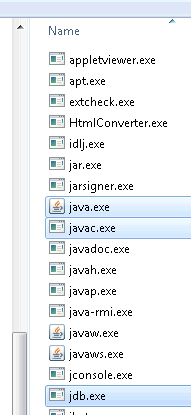
it’s a breeze because the jdb.exe is in the same directory as java.exe and javac.exe.


All the commands and switches for jdb are here.

The Java documentation is very good, you won’t often not be able to find answers quickly.

There are also online options

Atlassian has some very comprehensive products that may suit.

Or you could go with a very light weight option.
compilr is a good one for C#, VB and Java.

Next post on this topic we’ll go into the language details.

Cya.

Garbage Collection in .NET 4.0

October 17, 2010

GC prior to .NET 4.0

Most of us know how the GC generations work, but I’ll give a very brief rundown for those that haven’t looked at them yet, or may need a refresher.
There are 3 of them. 0, 1, 2.
When an item is first created, it’s considered a gen 0 item.
If it survives subsequent collections (because it’s still in use), it becomes a gen 1 item and so on.
gen 0 items mainly consist of instance variables, where as the later generation items are generally of a more global scope.
gen 2 items often stick around for the duration of the application.

The GC operates in the following modes

server or workstation.

You can change the modes in either your app.config (that’s per app) or in the machine.config (that’s machine wide)
See here.


<Configuration>
	<runtime>
      <gcServer enabled="false" />
      <gcConcurrent enabled="true" />
   </runtime>
</Configuration>

As discussed by Tess Ferrandez (champion ASP.NET debugger)
The restrictions here are

  • you can not run the server version on a single proc box, it will default to workstation
  • you can not run concurrent while also running server
  • if the runtime is hosted, the hosts GC mode will override the configuration

workstation (the default mode), concurrent workstation (the default if >0 multi core procs exist),
Each of these modes are optimised for different scenarios.

Generally, it’s best not to change these settings, and especially on the machine level.
The .NET 4.0 GC is considerably smarter than previous versions of the framework, and there is even less reason to contemplate changing it.

Before .NET 4.0 the GC on a concurrent workstation could do most but not all of gen 0 and gen 1 reclaim at the same time as the gen 2 items.
The GC was unable to start additional collections when a current collection was in progress.
This meant that only memory in the current segment or block could be reclaimed.

In .NET 4.0 background GC has been introduced

This allows another GC (gen 0 and 1) to start at the same time as an existing full GC (gen 0, 1 and 2) is running.
This is able to significantly reduce the time a full GC takes.
Concurrent workstation GC has been replaced by background GC.
Server modes currently don’t support the background GC, but the CLR team is aiming to have this introduced in the next version of the framework.
GC in .NET 4.0 has been tested on machines with up to 128 CPU cores, with confirmed efficiency improvements.
Apparently they’ve reduced the time needed to suspend managed threads.

A couple of good informative links on background GC
http://blogs.msdn.com/b/ukadc/archive/2009/10/13/background-and-foreground-gc-in-net-4.aspx
http://channel9.msdn.com/shows/Going+Deep/Maoni-Stephens-and-Andrew-Pardoe-CLR-4-Inside-Background-GC/

Garbage Collection Notifications

In .NET 3.5SP1 onwards we’re provided with GC.RegisterForFullGCNotification.

Only available when concurrent GC is disabled (not the default).
Does not support concurrent garbage collection because memory allocations are allowed while concurrent garbage collection is in progress. See the <gcConcurrent> runtime setting for information about how to disable concurrent garbage collection.
Have a look at this example Microsoft has provided for Garbage Collection Notifications.
I’m not sure why MS has decided to implement notifications this way.
I would have thought a much better way to do this would be to simply subscribe to a notification event providing a delegate with WaitForFullGCProc (your conditional logic), rather than spin up a new thread which takes a ThreadStart delegate of WaitForFullGCProc (your conditional logic) and blocks on GC.WaitForFullGCApproach.

Thoughts / Feedback welcome.

LSP / DbC and .NET’s support

October 12, 2010
Part 2

Some Examples

Bear in mind, there are additional overloads for most/all of the following procedures.
Be sure to check them out.

Examples of Preconditions

Contract.Assert

Ensures that a condition is true when in debug mode.


Contract.Assert(MyInput != null);

Contract.Assume

Instructs code analysis tools to assume that the condition supplied as an argument is true, even if it can not be statically proven to always be true.
Good example of how this can be used.


Contract.Assume(MyInput != null);

Contract.Requires

Must be at the beginning of a method or property. Ensures that a condition is true before any other code.
The following example ensures that MyInput parameter is valid (not null in this case) before any other code is run on the same thread.


Contract.Requires(MyInput != null);

Contract.EndContractBlock

Is used to inform the compiler to treat all code before it as if it was a code contract.
This is useful for legacy code.
For example if you have parameter validation code that does not use Code Contract’s.
The contract tools recognise if/then/throw statements as preconditions when the statements appear first inside a method or property,
and the set of such statements are followed by a Contract method call, such as Requires, Ensures, EnsuresOnThrow or EndContractBlock.


if(MyInput == null)
    throw new NullReferenceException("The input is null");
Contract.EndContractBlock();

Examples of Postconditions

Contract.Ensures

Ensures that a condition is true on exit of a method or property.


Contract.Ensures(0 <= speed && speed <= 800);

Contract.EnsuresOnThrow

This method call must be at the beginning of a method or property, before any other code.
If an exception is thrown, the specified condition must be true and the exception being thrown is of the specified type parameter.


public bool AddAndProcessItem(T item)
{
	Contract.EnsuresOnThrow(!item.Added);

	try
	{
		 // add item to a collection and set it's Added property to true
	}
	catch (AdditionException)
	{
		 item.Added = false;
		 throw;
	}

	// ... other operations
	return true;
}

Contract.ForAll

Allows the iteration through a collection to ensure all members meet a specific requirement.


// first param MyCollection is of type IEnumerable
// second param is a delegate, or lambda (often called a predicate when used like this)
Contract.ForAll(MyCollection, x=>x!=null);

Object Invariants

Used to mark methods that contain object invariant specifications.
Defined by decorating a method with the ContractInvariantMethodAttribute.
ContractInvariantMethodAttribute can only be used on a single method per class.
The method must return void and carry out no operations other than a sequence of calls to Contract.Invariant


[ContractInvariantMethod]
void ObjectInvariant ()
{
   Contract. Invariant ( _y >= 0 );
   Contract. Invariant ( _x > _y );
   ...
}

Code Contract Values

There are also some useful pseudo variables that can be used when writing postconditions.

Contract.Result

A methods or properties return value can be refered to by Contract.Result<T>()
Contract.Result<T>() can be used only in the conditional expression for the Ensures contract.
Methods with a return type of void cannot refer to Contract. Result<T>() within their postconditions for the obvious reason.


Contract.Ensures(0 < Contract.Result());

Contract.OldValue

Contract.OldValue<T>(T value) can be used only in the conditional expression for the Ensures contract.
The generic type argument may be omitted whenever the compiler is able to infer its type.
There are a few restrictions around the use of OldValue. Have a look at the User Manual document. Listed at the end of the post.


Contract.Ensures(MyInput != Contract.OldValue(MyInput));

Pure

Using the PureAttribute indicates that a type, method, property, etc is pure, that is, It has no visible side-effects for callers.
You can only use a method/property/etc in a contract if it is declared Pure.
If the method/property/etc is not decorated with this attribute when called from within a contract, a warning will be given “Detected call to impure method”.

See this post, it has a good example.

Interface Contracts

Contracts for interfaces must be defined in a separate class decorated with the ContractClassForAttribute.
The interface sporting the contract must be decorated with the ContractClassAttribute specifying the type that has the interfaces contract.
The class that implements the interfaces contract is expected to be abstract.
The User Manual listed at the end of this post has some good examples of how to set up Interface Contracts.


[ContractClass(typeof(ContractForInteface))]
interface IDoSomething
{
	int DoSomething(int value);
}

[ContractClassFor(typeof(IDoSomething))]
sealed class ContractForInteface : IDoSomething
{
	int IDoSomething.DoSomething(int value)
	{
		Contract.Requires( value != 0);
		//contracts require a dummy value
		return default(int);
	}
}

There’s plenty of good documentation around Code Contracts

System.Diagnostics.Contracts Namespace
http://msdn.microsoft.com/en-us/library/system.diagnostics.contracts.aspx
The Contract Class
http://msdn.microsoft.com/en-us/library/system.diagnostics.contracts.contract.aspx
Brief description of Code Contracts and how to use them
http://msdn.microsoft.com/en-us/library/dd264808.aspx
The User Manual
http://download.microsoft.com/download/C/2/7/C2715F76-F56C-4D37-9231-EF8076B7EC13/userdoc.pdf
Code Contracts on DevLabs
http://msdn.microsoft.com/en-us/devlabs/dd491992.aspx
DimeCasts has a few web casts on Code Contracts
http://dimecasts.net/Casts/ByTag/Code%20Contracts

LSP / DbC and .NET’s support

October 11, 2010
Part 1

Two design principle’s I believe go hand in hand are

  1. Dr. Barbara Liskov’s Liskov Substitution Principle (LSP)
  2. Dr. Bertrand Meyer’s Design by Contract (DbC)

Lets keep our Object Oriented relationships adhering to the LSP and the DbC.
The LSP and the DbC provide both theory and practical guidelines of how we as software engineers can design…

  • Hierarchical components that behave the same across all layers.
  • Systems that produce predictable results on a layer, from changes made on another layer (providing architecture that can be reasoned about).
    As programmers, we need to be able to make correct assumptions about the behaviour of abstract data types and their derivatives.
    LSP and DbC provide us with the ability to create intuitive class hierarchies that support the object oriented architectural reasoning process.
  • Extensible code. Ability to add functionality without having to change existing code, but rather extending it.

LSP

The LSP states that you shouldn’t inherit from a base class unless the derived class truly “is a” more specific version of the base class (Liskov 1988).
Subtype objects must be behaviourally substitutable for supertype objects.
Programmers must be able to reason correctly about and rely upon the behaviour of subtypes using only the specification of the supertype behaviour.

Robert C. Martin wrote this excellent article on LSP.
Which I found here along with many other great articles.

Andy Hunt and Dave Thomas summarise LSP like this: “Subclasses must be usable through the base class interface without the need for the user to know the difference.”
In other words, all the routines defined in the base class should mean the same thing when they’re used in each of the derived classes.

As Steve McConnell in Code Complete puts it:
If you have a base class of Account and derived classes of CheckingAccount, SavingsAccount, and AutoLoanAccount.
A programmer should be able to invoke any of the routines derived from Account on any of Account’s subtypes without caring about which subtype a specific account object is.

If a program has been written so that the LSP is true, inheritance is a powerful tool for reducing complexity because a programmer can focus on the generic attributes of an object without worrying about the details.
If a programmer must be constantly thinking about semantic differences in a subclass implementation, then inheritance is increasing complexity rather than reducing it.
This goes against software’s primary technical imperative of managing complexity.
Suppose a programmer has to think this
“If I call the InterestRate() routine on CheckingAccount or SavingsAccount,
it returns the interest the bank pays,
but if I call InterestRate() on AutoLoanAccount I have to change the sign because it returns the interest the consumer pays to the bank.”
According to LSP, AutoLoanAccount should not inherit from the Account base class in this example
because the semantics of the InterestRate() routine are not the same as the semantics of the base class’s InterestRate() routine.

DbC

From my understanding. DbC provides constraints which enforce the LSP.
LSP is notional. DbC provides us with the practical approach.

.Net 4.0 gives us Code Contracts which directly support the DbC principle.
In looking at what the .Net framework 4.0 provides us with in the System.Diagnostics.Contracts namespace.
Bear in mind, this is not a language extension or a runtime extension. It’s just a library.
I think that using the static class’s in your code, that System.Diagnostics.Contracts provides would be a prime candidate for Aspect Oriented Programming.
It looks like the .Net CLR has support for AOP, although it doesn’t sound like it has been implemented very cleanly.
Have a look at this.
IMHO, when using AOP, the actual business code utilising the aspects, should not show any signs of the aspects (Code Contracts (in our case)).
Although it looks like there are some open source alternatives that do the job quite nicely.
Anyway, without diving into AOP, lets save it for another post and move on.

DbC is actually a registered trademark of Eiffel Software.
Bertrand Meyer when designing the Eiffel programming language came up with this term.
DbC provides us with class invariants, preconditions and postconditions.

C# for artists by Rick Miller has a good explanation of these.

Class Invariant

A class invariant is an assertion about an object property that must hold true for all valid states the object can assume.
For example, suppose an airplane object has a speed property that can be set to a range of integer values between 0 and 800.
This rule should be enforced for all valid states an airplane object can assume.
All methods that can be invoked on an airplane object must ensure they do not set the speed property to less than 0 or greater than 800.

Precondition

A precondition is an assertion about some condition that must be true before a method can be expected to perform it’s operation correctly.
For example, suppose the airplane object’s speed property can be incremented by some value and there exists in the set of airplane’s public interface methods one that increments the speed property any where from 1 to 5 depending on the value of the argument supplied to the method.
For this method to perform correctly, it must check that the argument is in fact a valid increment value of 1,2,3,4, or 5.
If the increment value tests valid then the precondition holds true and the increment method should perform correctly.
The precondition must be true before the method is called, therefore it is the responsibility of the caller to make the precondition true, and the responsibility of the called method to enforce the truth of the precondition.

Postcondition

A postcondition is an assertion that must hold true when a method completes its operations and returns to the caller.
For example, the airplane’s speed increment method should ensure that the class invariant speed property being 0<=speed<=800 holds true when the increment method completes its operations.

Code Contracts can run on .Net 4.0 or previous versions.

Code Contracts as a whole include

1)   Static methods from the Contract class

  • Express assumptions and constraints, I.E. the object invariants, pre and post conditions.

2)   Static analyzer or static checker

  • Provide compile-time analysis.
  • Checks for implicit contracts, such as null dereferences and checking array bounds, as well as the explicit developer provided contracts.
  • Only available in Microsoft’s Premium edition or above of Visual Studio.

3)   Runtime analyzer or binary rewriter

  • modifies the IL by injecting the contracts.
  • performs runtime checking.

Once you’ve installed either the Standard or Premium Edition of the managed code contracts from DevLabs.
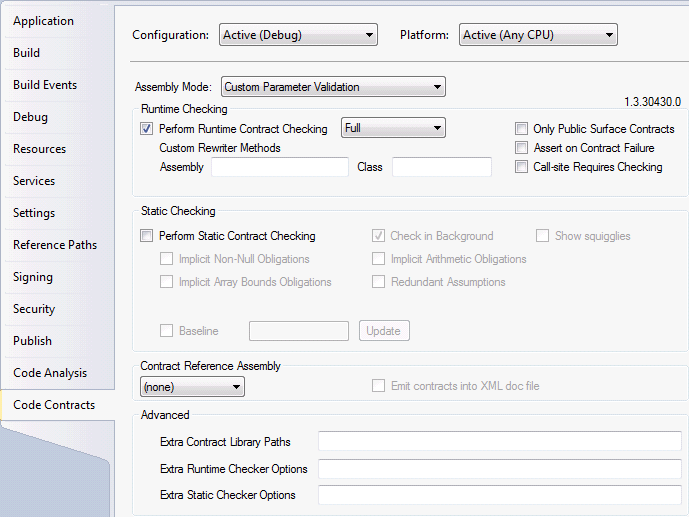
Projects within Visual Studio will now have an extra property pane entitled “Code Contracts”.
This pane provides configuration options for both static and runtime contract checking.

I think the idea is that if your project is targeting:

  1. A .Net framework version prior to 4.0, the System.Diagnostics.Contracts namespace is in the Microsoft.Contracts.dll.
  2. The .Net framework version is 4.0, the System.Diagnostics.Contracts namespace is in the mscorlib.dll.

Distributed Version Control the solution?

October 3, 2010

Due to the fact that I am starting to need a Version Control System at home for my own work and the company I currently work for during the day could potentially benefit from a real Version Control System.

I’ve set out to do an R&D spike on what is available and would best suite the above mentioned needs.
I’ve looked at a large range of products available.

At this stage, due to my research and in talking to some highly regarded technical friends and other people about their experiences with different systems, I’ve narrowed them down to the following.

Subversion, Git and Mercurial (or hg)
Subversion is server based.
Git and hg are distributed (Distributed Version Control System (DVCS)).

The two types of VCS and some of their attributes.

Centralised (or traditional)

  • Is better than no version control.
  • Serves as a single backup.
  • Server maintenance can be time consuming and costly.
  • You should be able to be confident that the server has your latest changeset.

Distributed

  • Maintenance needs are significantly reduced, due to a number of reasons. One of which is… No central server is required.
  • Each peer’s working copy of the codebase is a complete clone.
  • There is no need to be connected to a central network. Which means users can work productively, even when network connectivity is unavailable.
  • Uses a peer-to-peer approach rather than a client-server approach that the likes of Subversion use.
  • Removes the need to rely on a single machine as a single point of failure.
    Although it is often a good idea to have a server that is always online and ready to accept changesets.
    As you don’t always know whether another peer has accepted all your changes or is online.
  • Most operations are much faster than the centralised model, as no network is involved.
  • Each copy of the repository effectively acts as a remote backup. Which has multiple benefits.
  • There is no canonical code base, only working copies.
  • Operations such as commits, viewing history and rolling back are fast, because there is no need to communicate with a central server.
  • A web of trust is used to merge code from disparate repositories.
  • Branching and Merging made easier.
  • No forced structure: a central server can be implemented or peers can control the codebase.
  • Although I don’t see huge benefits for a central server in my target scenario.
  • Buddy builds. A team member can pass a change set to another member to try before committing to a central location.
    This would stop broken CI builds.
  • There is a huge amount of flexibility with your layout.
  • With a well planned layout a Distributed Version Control System can do anything a Centralised system can do, with the additional benefit of easy merges.

In weighing up the pros and cons of distributed versus the centralised model.

I think for my target requirements,
a distributed system has more to offer in the way of time savings and hardware savings.
This page has a good explanation of the differences between Centralised and Distributed.
Here is a detailed list of comparisons of some of the more common systems.

Mercurial is ticking quite a few boxes for me.
Mercurial has a VisualStudio plug-in.
There is a GUI available for windows platforms and others that integrates Mercurial directly into your explorer.
It’s free, open, and being actively maintained.
Projects using Mercurial.

Mercurial is written in Python, which is another plus for me.
Binaries are freely available for Windows, GNU/Linux, Mac OS X, OpenSolaris.
The source is also available, so you can build it for most platforms.

Plenty of documentation here, plus the book.

Installation and Configuration. Covering Windows, Debian and more.
TortoiseHg has binaries for windows and debian, but only for Squeeze onwards by the look of it.
If your running Lenny, you can just use hg. apt-get install mercurial.
When I downloaded and installed the 64 bit version of TortoiseHg (v1.1.3 hg v1.6.3), it came with 4 comprehensive documents.

  1. Mercurial: The Definitive Guide 2010-02-21 as pdf
  2. TortoiseHg v1.1.3 Documentation in both pdf and chm
  3. Mercurial Command Reference

Very nice!
Turn off the indexing service on the working copies and repositories, and exclude them from virus scans
.
Can also get TortoiseHg here (For Debian, TortoiseHq isn’t available for Lenny).
Click the Tutorial link for the Quick start guide to TortoiseHg.

Once installed, start working through the following links.
http://tortoisehg.bitbucket.org/manual/1.1/quick.html
http://mercurial.aragost.com/kick-start/basic.html

Comments or thoughts?

Metadata Exchange options for WCF

September 5, 2010

There are two options for publishing metadata from a WCF service.
By default, the services metadata is not published.
In order to make the services information about itself public, you must do either of the following.

  1. Provide the metadata over HTTP-GET automatically.
  2. Use a dedicated endpoint.

Thankfully, the ServiceHost already knows all about the services metadata.

Metadata exchange (whether using HTTP-GET or a dedicated endpoint) can be enabled Programmatically or administratively.
I find the second option by far the most popular, due to being able to modify, turn on/off after compilation, deployment.
The examples I’m going to show are how to enable the metadata exchange administratively (via the config files).

Bear in mind, that HTTP-GET is a WCF feature (may not be supported by all platforms).
Where as using a dedicated metadata exchange endpoint is an industry standard (WS-MetadataExchange).

Often the best way of explaining something is by example, so that’s what I’ll do here.
Most of the examples are shown using the HTTP transport.
Although, I also show the TCP and IPC transports using the mexTcpBinding and mexNamedPipeBinding respectively.

The solution layout looks like this

We’re pretty much just going to focus on the config files in the services project, that’s ServiceConsoleHost.

HTTP-GET examples

AppUsingHTTP-GET1.config

<?xml version="1.0" encoding="utf-8" ?>
  <configuration>
    <system.serviceModel>
      <services>
        <!--service must reference the custom behavior-->
        <service name="Tasks.Services.TaskManagerService"
            behaviorConfiguration="Tasks.Services.TaskServiceBehavior">
          <host>
            <baseAddresses>
              <!--now we browse to the baseAddress to get out metadata-->
              <!--By default, the address the clients need to use for HTTP-GET is the registered HTTP base address of the service.
              If the host is not configured with an HTTP base address, loading the service will throw an exception.
              You can also specify a different address (or just a URI appended to the HTTP base address)
              at which to publish the metadata by setting the httpGetUrl property of the serviceMetadata tag-->
              <add baseAddress = "http://localhost:8080/Tasks" />
            </baseAddresses>
          </host>
          <endpoint address ="TaskManager"
              binding="basicHttpBinding"
              contract="Tasks.Services.ITaskManagerService" />
        </service>
      </services>
      <behaviors>
        <serviceBehaviors>
          <behavior name="Tasks.Services.TaskServiceBehavior">
            <!--publishing metadata over HTTP-GET.
            explicit service behavior must be added.
            no metadata endpoint needed-->
            <serviceMetadata httpGetEnabled="true"/>
            <serviceDebug includeExceptionDetailInFaults="True" />
          </behavior>
        </serviceBehaviors>
      </behaviors>
    </system.serviceModel>
</configuration>

AppUsingHTTP-GET2.config

<?xml version="1.0" encoding="utf-8" ?>
<configuration>
  <system.serviceModel>
    <services>
      <!--service must reference the custom behavior-->
      <service name="Tasks.Services.TaskManagerService"
          behaviorConfiguration="Tasks.Services.TaskServiceBehavior">
        <host>
          <baseAddresses>
            <!--now we browse to the baseAddress to get out metadata-->
            <add baseAddress = "http://localhost:8080/Tasks" />
          </baseAddresses>
        </host>
        <endpoint address ="TaskManager"
            binding="basicHttpBinding"
            contract="Tasks.Services.ITaskManagerService" />
      </service>
    </services>
    <behaviors>
      <serviceBehaviors>
        <behavior name="Tasks.Services.TaskServiceBehavior">
          <!--publishing metadata over HTTP-GET.
          explicit service behavior must be added.
          no metadata endpoint needed-->
          <!--for the httpGetUrl, an absolute or relative address can be used
          MSDN states:
          If the value of HttpGetUrl is absolute,
            the address at which the metadata is published is the value of HttpGetUrl value plus a ?wsdl querystring.
          If the value of HttpGetUrl is relative,
            the address at which the metadata is published is the base address and the service address plus a ?wsdl querystring.-->
          <serviceMetadata httpGetEnabled="true" httpGetUrl="http://localhost:8081"/> <!--generate proxy like this C:\>SvcUtil http://localhost:8081 /out:proxy.cs-->
          <!--<serviceMetadata httpGetEnabled="true" httpGetUrl="my"/>--> <!--generate proxy like this C:\>SvcUtil http://localhost:8080/Tasks/my /out:proxy.cs-->
          <serviceDebug includeExceptionDetailInFaults="True" />
        </behavior>
      </serviceBehaviors>
    </behaviors>
  </system.serviceModel>
</configuration>

Dedicated Endpoint examples

AppUsingDedicatedEndpoint1.config

<?xml version="1.0" encoding="utf-8" ?>
<configuration>
  <system.serviceModel>
    <services>
      <!--If the service does not reference the behavior, the host will expect your service to implement IMetadataExchange.
          While this normally adds no value, it is the only way to provide for custom implementation of the IMetadataExchange.-->
      <service name="Tasks.Services.TaskManagerService"
          behaviorConfiguration="Tasks.Services.TaskServiceBehavior">
        <host>
          <baseAddresses>
            <add baseAddress = "http://localhost:8080/Tasks" />
          </baseAddresses>
        </host>
        <endpoint address ="TaskManager"
            binding="basicHttpBinding"
            contract="Tasks.Services.ITaskManagerService" />
        <!--Don't need an address in the mex endpoint as the service uses the baseAddress anyway-->
        <endpoint
            binding="mexHttpBinding"
            contract="IMetadataExchange" />
      </service>
    </services>
    <behaviors>
      <serviceBehaviors>
        <behavior name="Tasks.Services.TaskServiceBehavior">
          <!--It's not necessary to have the ServiceMetadataBehavior's HttpGetEnabled property set to true, as we now use the mex endpoint.-->
          <!--By simply adding the serviceMetadata behavior below and creating an endpoint with a mex binding and using the IMetadataExchange interface,
          WCF has the service host automatically provide the implementation of IMetadataExchange, providing the service references the behavior,
          in order to see serviceMetadata.-->
          <serviceMetadata/>
          <serviceDebug includeExceptionDetailInFaults="True" />
        </behavior>
      </serviceBehaviors>
    </behaviors>
  </system.serviceModel>
</configuration>

AppUsingDedicatedEndpoint2.config

<?xml version="1.0" encoding="utf-8" ?>
<configuration>
  <system.serviceModel>
    <services>
      <service name="Tasks.Services.TaskManagerService"
          behaviorConfiguration="Tasks.Services.TaskServiceBehavior">
        <host>
          <baseAddresses>
            <!--Don't need a baseAddress in order to get metadata, but if you want to browse the service (not the service's end point),
            you need a baseAddress.-->
          </baseAddresses>
        </host>
        <endpoint address ="http://localhost:8081/TaskManager"
            binding="basicHttpBinding"
            contract="Tasks.Services.ITaskManagerService" />
        <!--To get metadata using SvcUtil.exe:
        svcutil http://localhost:8081/mex /out:myProxy.cs
        or
        svcutil http://localhost:8081/ /out:myProxy.cs-->
        <endpoint
            address="http://localhost:8081/mex"
            binding="mexHttpBinding"
            contract="IMetadataExchange" />
      </service>
    </services>
    <behaviors>
      <serviceBehaviors>
        <behavior name="Tasks.Services.TaskServiceBehavior">
          <serviceMetadata/>
          <serviceDebug includeExceptionDetailInFaults="True" />
        </behavior>
      </serviceBehaviors>
    </behaviors>
  </system.serviceModel>
</configuration>

AppUsingDedicatedEndpoint3.config

<?xml version="1.0" encoding="utf-8" ?>
<configuration>
  <system.serviceModel>
    <services>
      <service name="Tasks.Services.TaskManagerService"
          behaviorConfiguration="Tasks.Services.TaskServiceBehavior">
        <host>
          <baseAddresses>
            <add baseAddress="net.tcp://localhost:8080/"/>
            <add baseAddress="net.pipe://localhost/"/>
            <!--The http baseAddress can reside here or be removed and added to the mex endpoint as an absolute address-->
            <add baseAddress="http://localhost:8081/"/>
          </baseAddresses>
        </host>
        <endpoint address ="TaskManager"
            binding="basicHttpBinding"
            contract="Tasks.Services.ITaskManagerService" />
        <!--To get metadata using SvcUtil.exe:
        svcutil net.tcp://localhost:8080/mex /out:myProxy.cs
        or
        svcutil net.tcp://localhost:8080/ /out:myProxy.cs-->
        <endpoint
            address="mex"
            binding="mexTcpBinding"
            contract="IMetadataExchange" />
        <!--To get metadata using SvcUtil.exe:
        svcutil net.pipe://localhost/mex /out:myProxy.cs
        or
        svcutil net.pipe://localhost/ /out:myProxy.cs-->
       <endpoint
           address="mex"
           binding="mexNamedPipeBinding"
           contract="IMetadataExchange" />
       <!--Don't need an address in the mex endpoint as the service uses the baseAddress anyway-->
       <!--To get metadata using SvcUtil.exe:
       svcutil http://localhost:8081/ /out:myProxy.cs-->
       <endpoint
           binding="mexHttpBinding"
           contract="IMetadataExchange" />
     </service>
   </services>
   <behaviors>
     <serviceBehaviors>
       <behavior name="Tasks.Services.TaskServiceBehavior">
         <serviceMetadata/>
         <serviceDebug includeExceptionDetailInFaults="True" />
       </behavior>
     </serviceBehaviors>
   </behaviors>
 </system.serviceModel>
</configuration>

In order to use any of the above shown config files,
just rename and remove any text in the App.config file name between the App and the .config.
So for example AppUsingHTTP-GET1.config would become App.config

Click on link below to download full source code.

MetadataExchangeExamples.zip

This solution was created in Visual Studio 2008.

Installation of SSH on 64bit Windows 7 to tunnel RDP

August 26, 2010

This post covers two scenarios.

Scenario one

With this setup I have a Windows 7 VM (the server) on the same network segment as the client PC which will be taking over any work I would normally do on my Windows XP box.
My existing XP box is used for any development that is easier to do on a Windows machine than a *nix machine.
Mostly .Net development.

Scenario two

Includes tunneling to a NATed Windows 7 machine on a different network

Access to my existing Windows XP box:
Is by way of RDP session tunneled through SSH.
SSH link being established from one of my Debian eeepc’s (The computer I use most of the time) to the existing Windows XP machine.

Used OpenSSH for the existing Windows XP machine.
http://sshwindows.sourceforge.net/ which is no longer supported.
Couldn’t get key pair authentication working though when I set it up.

I thought I’d give OpenSSH a try on the Windows 7 machine and see how far we could get.
Once followed all directions in the ssh readme.txt and comparing with the setup on my existing Windows XP box.
The OpenSSH Server service wouldn’t start.
Followed directions here.
Tried everything I could think of and still couldn’t get the service to start.

So going on some others advise, decided to give copSSH a try, as it is an implementation of OpenSSH, but currently being maintained.
Thanks to Tevfik Karagülle.
This worked out well and was a very easy setup.
The version of CopSSH used for this was 4.1.0 from here.

Initial sites used for copSSH install

http://www.sevenforums.com/customization/19864-ssh-windows-7-a.html
http://www.itefix.no/i2/copssh

Installation of copSSH

When you add a user to the CopSSH Control Panel, make sure you run the CopSSH Control Panel as an administrator (probably best to runas administrator for any actions),
else the user appears to be added, but when you try to SSH to the server, you get something along the lines of…
Unable to authenticate
Failed password for invalid user
See http://www.itefix.no/i2/node/12494#comments

Setup for the tunnel

Create a file in your ~ dir. TunnelToWin7Box for example, and put the following command in it.

ssh -v -f -L 3391:localhost:3389 -N MyUserName@MyWindows7Box

Turn the executable bit on.
Make sure owner and group is correct.

chmod 750 TunnelToWin7Box
chown MyUserName:MyGroupName TunnelToWin7Box

Add a command drawer to the task bar.
Add a Custom Application Launcher to the drawer that points to the TunnelToWin7Box file.
You can even add an image that makes sense to the drawer.
Mine looks like this, with 3 command launchers…

The first port there can be any port not currently in use.
The second port is the port that RDP listens on in Windows.
You also need to add an inbound rule to open port 22 or a port of your choosing on the Windows Firewall.
Also close the Remote Desktop port TCP 3389 on the Windows box.
If the server you are trying to tunnel to is behind a NAT and not on your network, I.E. you are trying to tunnel to your work machine from home for example, There is a little more involved in setting up the firewall rule and a change to the sshd_config.
You’ll need to add an inbound rule. I called it SSH. In the Programs and Services tab… selected “All programs that meet the specified conditions”.
For the Service Settings, only one that would work was “Apply to services only”. I thought it would be best to select only the ssh service, but this wouldn’t allow SSH in.
General tab just had Enabled on. Computers tab was untouched. Users and Scope was untouched. Advanced tab only needed to select Private check box.
“Protocols and ports” tab Protocol type is TCP, Local port is port 22, Remote port is All Ports.
Edit the C:\Program Files (x86)\ICW\etc\sshd_config as an administrator.
Add the line… GatewayPorts yes
Or uncomment it and set to yes rather than no if it already exists.

Command I used for the NATed scenario

ssh -v -f -L 3392:localhost:3389 -N User@YourWorksGateway.com -p 2222

The port is the port that your network admin has setup for you to forward to the machine you want to tunnel to.

When I run the command to try establish the tunnel I was getting an error message.
I made a post here.
So I un-installed copSSH and re-installed a few times trying different things.
Before last un-install, I removed the users that copSSH adds, because it doesn’t remove them on un-install,
and deleted the OpenSSHServer service using the “sc delete OpenSSHServer” command in cmd.exe shell running as administrator.
Installed again using all defaults.
It appears as even though SSH gives the message that it won’t tunnel, if you then try and open the port forwarded RDP session, it works.
In saying that, sometimes it didn’t work.
This happens if you click the command launcher more than once and you end up with more than one tunnel established.
In which case you just kill one of them and your away laughing.

Setup your Remote Desktop Session now

I’ve been using Gnome-RDP for my RDP sessions.
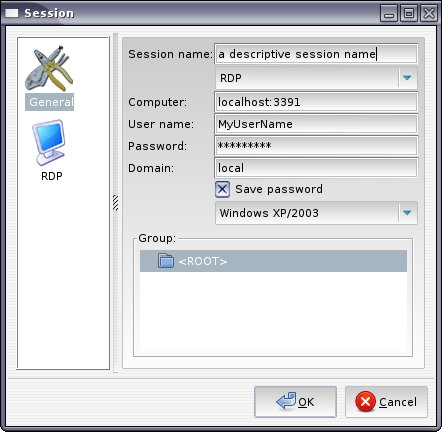
Set the session up to look like this.

Once done, click Connect, and you should have your RDP session from your Linux box to your Windows 7 box secured courtesy of SSH

Setup Key pair authentication

On Debian epc, or any other Debian machine for that matter

Copy the existing public key I used for SSHing to other servers to MyWindows7Box.
This is considerably more difficult if you want to scp the key to a NATed machine on another network.
Read the likes of this if your interested.
It’s the public key, so sniffing it is not such a big deal.

scp ~/.ssh/id_rsa.pub MyUserName@MyWindows7Box:

Make sure you have the Colan at the end of the above command, else the file won’t be copied.
You may receive a prompt that the authenticity of the server you are trying to scp to can’t be established and you want to continue.
The server you are trying to connect to is added to the list of known hosts on the local machine.
Thats /home/MyUserName/.ssh/known_hosts
I didn’t get that with scp’ing to MyWindows7Box because my known_hosts already knew about MyWindows7Box from my previous OpenSSH install.

On MyWindows7Box

In the dir C:\Program Files (x86)\ICW\home\MyUserName\.ssh\
I copied the authorized_keys file to authorized_keys-OrigWithInstall (rename).
Wasn’t allowed to edit the authorized_keys file for some reason, so opened a Bash shell that comes with copSSH
and edited ~/.ssh/authorized_keys with nano. Deleting the public key.
When I tried to open this file in file explorer, it didn’t appear to have been edited.
This is because the file I thought I had edited (C:\Program Files (x86)\ICW\home\MyUserName\.ssh\authorized_keys)
was actually C:\Users\MyUserName\AppData\Local\VirtualStore\Program Files (x86)\ICW\home\MyUserName

From C:\Program Files (x86)\ICW\home\MyUserName\.ssh (or at least what I thought was there),
the public key needs to be put into the list of authorized clients that may connect to the ssh daemon.
Can do this using the Bash shell that comes with copSSH.

$ cat id_rsa.pub >> .ssh/authorized_keys

You can now delete the id_rsa.pub on the target machine.

Copied C:\Users\MyUserName\AppData\Local\VirtualStore\Program Files (x86)\ICW\home\MyUserName\authorized_keys
to C:\Program Files (x86)\ICW\home\MyUserName\.ssh\authorized_keys

With scenario two, there were a few differences.
I’m thinking some of which were probably due to a more recent version of CopSSH (4.1.0).
For starters there was no authorized_keys file anywhere, so I created one (in C:\Program Files (x86)\ICW\home\User\.ssh).
As stated above, it’s considerably more difficult to scp the id_rsa.pub from a remote pc to a NATed server.
Put id_rsa.pub in C:\Program Files (x86)\ICW\home\User\.ssh along with the authorized_keys I created, and from the bash shell
(accessible from the Copssh folder in the start menu) who’s root dir is C:\Program Files (x86)\ICW\
ran the cat command shown above.

This is probably a better way to copy the public key:

ssh-copy-id MyUserName@MyWindows7Box

Anapnea showed me this.

Could now connect via key pair auth

Made the usual changes to C:\Program Files (x86)\ICW\etc\sshd_config on MyWindows7Box

I.E. turn root access off, password auth off,
set
AllowUsers MyUserName
Although this is done by the CopSSH Control Panel in version 4.1.0
I think a service restart is required to reload changes.
When you make changes to the sshd_config, you’ll need to do them as an administrator (similar to how you would on a *nix system as root).
This site has example of setting up SSH to be even more secure by modifying the sshd_config.
It’s specific to copSSH.
There are many items on the net that show and describe the options when it comes to the sshd_config.
The available options are in the man page http://unixhelp.ed.ac.uk/CGI/man-cgi?sshd_config+5

Enjoy!


Design a site like this with WordPress.com
Get started