Built-in MSMQ Bindings

April 5, 2010

NetMsmqBinding, MsmqIntegrationBinding.

NetMsmqBinding only works if you have WCF on both sides of the Queue-to-Queue transfer.

MsmqIntegrationBinding is targeted toward existing MSMQ applications that use COM, native C++ APIs or the types defined in the System.Messaging namespace (as stated by MSDN).

.

Messages from one of the bindings are not compatible with the other binding type.

MsmqIntegrationBinding uses a pre-WCF serialization format, by way of the SerializationFormat property, which is of type enum MsmqMessageSerializationFormat.

The members being: Xml, Binary, ActiveX, ByteArray, Stream.

.

NetMsmqBinding has the following 2 binding elements:

MsmqIntegrationBinding has only one binding element:

BinaryMessageEncodingBindingElement.MessageVersion which is only available on the NetMsmqBinding specifies the WCF supported versioning information.

How do we set the security mode on the standard msmq bindings?

NetMsmqBinding.Security gets the NetMsmqSecurity associated with this binding.
MsmqIntegrationBinding.Security gets the MsmqIntegrationSecurity associated with this binding.

NetMsmqSecurity has the following properties:
Message, Mode, Transport.
MsmqIntegrationSecurity has the following properties:
Mode, Transport.

The Mode properties return the security modes…
MsmqIntegrationSecurityMode in the case of MsmqIntegrationSecurity.Mode.
NetMsmqSecurityMode in the case of NetMsmqSecurity.Mode.

Imperatively set security mode:

Declaratively set security mode:

<configuration>
   <system.ServiceModel>
      <bindings>
         <netMsmqBinding>
            <binding name="MyNetMsmqBinding">
               <security mode="Message"/>
            </binding>
         </netMsmqBinding>
         <msmqIntegrationBinding>
            <binding name="MyMsmqIntegrationBinding">
               <security mode="Transport"/>
            </binding>
         </msmqIntegrationBinding>
      </bindings>
   </system.ServiceModel>
</configuration>

According to this MSDN post, it appears as if the default security mode is Message for NetMsmqBinding and Transport for MsmqIntegrationBinding.

The default security mode for both NetMsmqBinding and MsmqIntegrationBinding is Transport.


-


-

Adding disks, CIFS/SMB shares to FreeNAS

March 27, 2010

Add Disks:

What I did, was add a disk at a time (one each week, and stressed it for the entire week).
This way the wear on the disk should be staggered and we are less likely to have all drives fail at the same time.
Once I’d physically added all disks (ended up adding 4 x WD7500AACS for now).

Follow directions here.
This set of directions is also useful: http://freenas.org/contrib/sloan/freenas1.htm
I used software RAID 5.
I was keen to setup a raid-z using ZFS, but it’s still only an experiemental release.
Plus when I install the new RAID card, I’ll have to rebuild the array anyway, and by then, hopefully ZFS will be production ready (thanks to Olivier Cochard-Labbé and iXsystems).
Each disk I added I chose to set the Hard disk standby time to 60 minutes.
Turned the S.M.A.R.T. monitoring on.
Chose Unformated for the Preformatted file system for each disk I added as they were new disks.

Format Disks:

Format each of the disks for Software RAID.
Again following directions here

Create the software RAID array:

While the RAID is building you can continue to the next step.
It took about 12 hrs to build the array.

Format the software RAID array:

Format the array as UFS (GPT and Soft Updates).
This is BSD’s native file system.

Create the mount point:

Partition type set to GPT partition.
File system set to UFS.
Called my Share Name “FileServer”.
This will mount the array on /mnt/FileServer

Add the groups and users in the Web GUI

Access|Users:

groups:

family, sons-name, my-name, wifes-name

users:

guest:
Primary group
——guest
Additional group
——none
Other settings as default.
——enter passwords.
sons-name:
Primary group
——sons-name
Additional group
——family
Other settings as default.
——enter passwords.
my-name:
Primary group
——my-name
Additional group
——family, wheel (wheel is like admin in windows)
Other settings as default.
——enter passwords.
——enable bash Shell so I can ssh
wifes-name:
Primary group
——wifes-name
other settings same as sons-name

Enable SSH in web gui:

Services|SSH

Login to the file server and create the directories you will be sharing:

You can do this via the Web GUI (Advanced|File Manager (make sure you login as admin)) or just SSH to the shell.
I find going directly to the shell easier.

ssh [your user name]@<hostname>
Create the directories (family, media, etc) I want to share and set appropriate ownership and permissions.
I set my ownerships and perms up the same as my existing file server. I also had these recorded in a text document.

Enable CIFS/SMB In the Settings:

Authentication set to Local User.
Local Master Browser set to Yes.
Time server set to No, as I have another server doing the honors.
In Auxilary parameters, I added some of the params I used in a smb.conf file from my existing file server.
Some of these parameters in the global section.

Create the smb shares on top of FileServer (family, media, etc).
As is stated in this thread:

Set permissions in the following places:

Disk mount point, set file/directory creation masks, override inheritable permissions option in the CIFS/SMB share itself.
The creation masks I used from a smb.conf I already had setup on another file server (mouse).
These go into Auxiliary parameters on each share.

Setup Email alerts on disk failure and disk heat:

This is done in Disks|Management|S.M.A.R.T.
Heat on each of my first 3 disks Only gets to around 30 tops (in summer (room temp 24 deg c)). The bottle kneck is the 100Mb port on the switch. This only allows 100Mb total to/from the file server.
So the disks never really get a chance to heat up at this stage.
The last (4th) disk I added was getting to around 33 deg c, as it wasn’t sitting behind a fan. So I added an old 80/20mm fan I had, and stuck it in front of it, now the drive runs cooler than all the others.
Enable self monitoring.
Set Check interval to 300 (5 min).
Power mode Standby. I only want the disks checked if they are spining).
Temperature monitoring
Difference set to 5 deg c
Informal set to 33 deg c
Critical 36 deg c
Setup Scheduled self-tests in order to receive email alerts if a disk is offline.
If it’s off line I need to add another disk and re-build the array.
Directions for replacing a failed hard drive here.
Add each disk and select all hours, all days, all months, all week days and choose Offline Immediate Test.
Set the email address you want alearts to be sent to and select the Send TEST warning email on startup until your happy you have it all set up correctly.
You’ll also need to setup the email settings in System|Advanced|Email
The From email is the same as the email recipient.
If using gmail…
Outgoing mail server: smtp.googlemail.com
Port: 465
Security SSL
Username: this will be your email address.
Enter password.
Authentication method: Login
Save and Send test email.
Then back in Disks|Management|S.M.A.R.T.
Save and Restart samba.

Tested this configuration over a week.
Disks never seemed to spin down.
According to Diagnostics|Information|Disks (ATA)
APM (Advanced Power Management) is not supported on my disks (WD750AACS)
In which case there is no point in setting the Advanced Power Management or Acoustic level on Disks|Management|Disk|Edit for each disk.

grammer check for OpenOffice

March 27, 2010

Installing and setting up LanguageTool in OpenOffice on Debian Lenny.

First of all you need to have OpenOffice 3.1 installed.
If you want to install a later version of OpenOffice than the default (2.6.4) supplied with Debian Lenny,
you’ll have to fetch it from the Debian Lenny backports repo.

Edit your /etc/apt/sources.list and add the repo:
deb http://www.backports.org/debian lenny-backports main contrib non-free

Install the debian backports keyring:

#apt-get install debian-backports-keyring
#apt-get update
#apt-get -t lenny-backports install openoffice.org

Make sure openoffice.org-java-common is installed.
Make sure sun-java5-jre is installed and selected in OpenOffice under Tools->Options->OpenOffice.org->Java.
Java versions other than Sun, may not work.

Install LanguageTool:
Download the LanguageTool extension from http://www.languagetool.org/
In OpenOffice Tools menu Extension Manager, Browse to the language tool file you downloaded and select it.

That should be it. Can’t remember if I had to restart OpenOffice.

70-503 Exam Training

February 7, 2010

I’ve done a few projects based around the .Net WCF Framework and have decided it’s time to consolidate some of this knowledge (experience?) and aim for the TS: Microsoft .NET Framework 3.5 – Windows Communication Foundation Certification.
I’m by no means an expert on the technology yet, but who knows, maybe I will be one day.

I’m going through a few books and projects I’ve worked on and I’ll be recording the information I personally see as being important to remember (with a focus on the exam).

Initial setup of (FreeNAS) file server

February 7, 2010

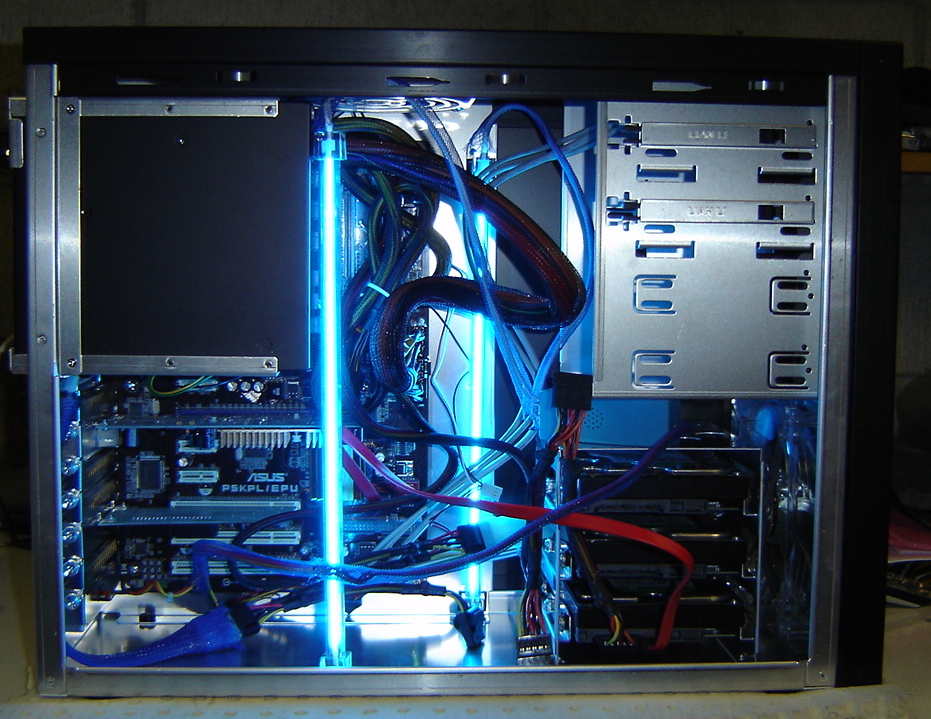
Components used:

AData Speedy Compact Flash card: NZ$30
Lian Li PC-A06FB Aluminium Case: NZ$170
ASUS p5kpl/epu Mobo: NZ$96.40
Celeron 1.8Ghz single core #430: NZ$70
Corsair 2GB KIT (2x1GB) DDR2 800Mhz DIMM PC6400 – Desktop RAM – TWIN2X2048-6400C4: NZ$104
P/S ZM750-HP NZ$257:33
2 x HDD swap trays. 3 SATA 3.5″ in 2 5.25″ bays just under NZ$300 incl shipping (havn’t got these yet).
5 x WD7500AACS HDD’s (already had these)(only using 3 for now).
Cold cathode tubes that were lying around.

The Lian Li case I chose had 4 x 5.25″ bays for HDD trays.
Using the 3 in 2 hot swap trays, I can get 6 HDD’s in to 4 5.25″ bays.

At this stage I didn’t get the 3 in 2 hot swap trays due to lack of funds.
Plus I’ll only install 3 750GB drives (I already have) at this stage.
I’ll put more drives in once I acquire a decent RAID card.
Something similar to the Adaptec RAID 3805.
The p5kpl/epu has a Gbit LAN interface, which is essential for me, as my ESX server guests will have most of their data on it.
Further down the track I’d like to get another Gbit NIC (maybe with several ports) and use LACP (Link Aggregation Control Protocol) to share the load between the NIC’s.
My current Cisco switch only has 2 Gbit ports though so I’ll need an extra Gbit switch that supports LACP.
Or may use Roundrobin or Loadbalance as the aggregation protocol in FreeNAS.
Yet to be decided.

Had quite a bit of trouble trying to install to a AData Compact Flash 2GB in a CF Card to IDE HDD adapter.

The BIOS (latest revision) wouldn’t detect it.
Tried another adapter/16MB CF SanDisk from one of my other embedded project machines in the file server and it was recognised fine.
Tried previous adapter (the one I purchased for this project) and another 16MB CF SanDisk from one of my other machines in the file server and it was recognised fine.
Tried the previous adapter (the one I purchased for this project) and 2GB CF card in another old machine and it was recognised fine.
So looks like the P5KPL/EPU BIOS has a problem detecting the 2GB AData CF card.

I had an old USB 1GB thumb drive I decided to use, this worked.
I’d rather use a CF Card to IDE HDD adapter with CF card as it’s all hidden inside the case.
May end up trying a SanDisk 128MB CF card.
They have 2 x packs on ebay for US $24 incl shippping.
All I have to do once I acquire a compatible CF card is redo the install (10 seconds)
and replace the config file that I’ll save once I’ve got FreeNAS setup and configured.

The file I used to do the install was from source forge.
You can find it from http://freenas.org/downloads -> http://sourceforge.net/projects/freenas/files/
I got a copy of the FreeNAS-amd64-LiveCD-*.iso.
Burnt the image to a CD.
And used an old CD ROM drive to do the honors.
I chose option 9) Install/Upgrade to hard drive/flash device, etc.
Then option 1) Install ’embedded’ OS on HDD/Flash/USB
I don’t need swap as I have 2GB of RAM, and I don’t want to be writing to my flash memory.
Installed in aprx 10 seconds.
Removed CD and rebooted to FreeNAS.

Now to setup the NIC’s and set the LAN IP address.
Choose option 1) Assign Interface and follow the prompts.
Choose option 2) Set LAN IP address.
Once you’ve done this, you can login to the Web UI. http://<the ip address you chose>
Default username is admin. Default password is freenas.
Make sure you change these credentials as soon as you can.
I was using an old version of the installer, so I downloaded the FreeNAS-amd64-embedded-*.img from sourceforge.
From the FreeNAS WebUI System menu -> Firmware I choose the img I downloaded and hit Upgrade firmware.
It’s important not to interupt the upgrade while it’s working.

Once you have everything setup and configured, you can save the FreeNAS config to a safe place for a restoration at a later stage if the need arises.

Most of the details I used were here:

Informative videos on setting up FreeNAS:


http://freenas.org/contrib/sloan/freenas1.htm

Informative video for ZFS on FreeNAS:

Keeping encapsulation on ones mind.

December 24, 2009

This is another of Steve McConnell’s (author of Code Complete) gems.
Do we do this?
If not, why not?

Anytime you find yourself looking at a class’s implementation to figure out how to use the class, you’re not programming to the interface; you’re programming through the interface to the implementation. If you’re programming through the interface, encapsulation is broken, and once encapsulation starts to break down, abstraction won’t be far behind.

If you can’t figure out how to use a class based solely on its interface documentation, the right response is not to pull up the source code and look at the implementation. That’s good initiative but bad judgment. The right response is to contact the author of the class and say “I can’t figure out how to use this class.” The right response on the class-author’s part is not to answer your question face to face. the right response for the class author is to check out the class-interface file, modify the class-interface documentation, check the file back in, and then say “See if you can understand how it works now. “You want this dialog to occur in the interface code itself so that it will be preserved for future programmers. You don’t want the dialog to occur solely in your own mind, which will bake subtle semantic dependencies into the client code that uses the class. and you don’t want the dialog to occur interpersonally  so that it benefits only your  code but no one else’s.


Design a site like this with WordPress.com
Get started