C#.NET Coding Standards and Guidelines

August 12, 2012

This is the current set of coding standards and guidelines I use when I’m coding in the C#.NET language.
I thought it would be good to share so others could get use out of them also, and maybe start a discussion as to amendments / changes they see that could be useful?

Naming Conventions

  • Do not use Hungarian notation, I.E. a boolian variable may have the name MyBool, but shouldn’t be called bMyBool.
  • Do prefix member variables with the underscore ‘_’. Do not prefix member variables with “this”. also use camelCasing for member variables. The underscore is easy to see, is one key stroke.
  • Do prefix interfaces names with “I”
  • Do not prefix enums, classes, or delegates with any letter.

Key:

c” = camelCase
P” = PascalCase
“_” = Prefix with _Underscore
“x” = Not Applicable.

Identifier Public Protected Internal Private Notes
Project File P x x x Match Assembly and Root Namespace
Project Folder P x x x Match Project File
Source File P x x x Match contained class
Test Source File P x x x Append the word Test if it contains tests
Image File c x x x
Other Files P x x x Apply where possible
Namespace P  x x x Partial Project/Assembly match.(Also see the namespace section)
Solution File P x x x CompanyNameSolutionDescription
Solution Folder P x x x CompanyNameSolutionDescription (if multiple solutions in repository). Source (if single solution)
SpecFlow Feature File P x x x USn_BriefUserStoryName where n is the user story number
oject Folder P  x x x Same as Project file
Class or Struct P P P P Add suffix of subclass.
Interface P P P P Prefix with a capital I.
Generic Class P P P P Use T (type) or K (key) as Type identifier.
Method P P P P Use a Verb or Verb-Object pair.
Test Method P x x x MemberUnderTest_StateUnderTest_ExpectedBehavior . StateUnderBehavior can be leftout if not applicable.
Property P P P P Do not prefix with Get or Set.
Field P P P _c Only use Private fields.
Constant P P P _c
Static Field P P P _c Only use Private fields.
Enum P P P P Options are also PascalCase.
Delegate P P P P See under Events, Delegates for naming Dot NET
Event P P P P See under Events, Delegates for naming Dot NET
Inline Variable x x x c Avoid single-character and enumerated names.
Parameter x x x c

Coding Style

Commenting

Comment Style

Block comments should usually be avoided

/* Line 1
* Line 2
* Line 3
*/
/* … */

Begin comment text with an upper case character. End comment text with a period.

If you have to comment your code, consider refactoring, so that it is easier to read.
Prefer not to use inline-comments to explain obvious code. Well written code is self-documenting.
Rather fix or clean up code now, than put a // Todo in.

You can access // Todo‘s in Visual Studio via

View menu -> Task List
The Tokens can be setup in Tools -> Options… -> Environment->Task List

or for ReSharper

ReSharper menu -> Tools -> To-do Items (or use the key shortcuts)

Use the following tokens:

  • Todo
  • Note
  • Bug
  • Not Implemented

XML Documentation

  • Always apply C# comment-blocks (///) to public, protected, and internal declarations.
  • Only use C# comment-blocks for documenting the API I.E the interface.
  • include <summary> comments. Include <param>, <return>, and <exception> comment
    sections where applicable.
  • Include <see cref=””/> and <seeAlso cref=””/> where possible.
  • Always add CDATA tags to comments containing code and other embedded markup in order to avoid
    encoding issues.
    Example:

    ///
    /// Add the following key to the appSettings” section of your config:
    /// <code><![CDATA[
    ///   <configuration>
    ///     <appSettings>
    ///       <add key=”mySetting” value=”myValue”/>
    ///     </appSettings>
    ///   </configuration>
    /// ]]></code>
    ///
    

File Organisation

Group internal class implementation by type in the following order:

  1. Member variables.
  2. Constructors & Finalizers.
  3. Nested Enums, Structs, and Classes.
  4. Properties
  5. Methods

Sequence declarations within type groups based upon access modifier and visibility:

  1. Public
  2. Protected
  3. Internal
  4. Private
  • Do not use #region statements
  • Always match class name and file name where ever possible. Avoid including more than one class per file.

Formatting

Bracing

  • Place first brace of the block at the end of the line preceded with a space.
    In languages like C, C++, C#, Java, it doesn’t matter where you put the first curly brace, it’s just personal preference or based on vote.
    In languages like JavaScript, it does matter. I use quite a bit of JavaScript, so just find it easier to use the same convention. Although at work, we use the “opening brace on a new line convention, simply because it won the vote”.
  • Always use curly braces ({ and }) in conditional statements. Unless there is a very simple statement, like return bla.
  • Recursively indent all code blocks contained within braces.

Spacing

Use white space (CR/LF, Tabs, etc) liberally to separate and organize code.

Only declare related attribute declarations on a single line, otherwise stack each attribute as a separate declaration.

Example:

// Bad!
[Attrbute1, Attrbute2, Attrbute3]
public class MyClass {
   …
}

// Good!
[Attrbute1, RelatedAttribute2]
[Attrbute3]
[Attrbute4]
public class MyClass {
   …
}

Tabs and Indenting

Tab characters (x09) should not be used in code. All indentation should be done with 3 space characters.

Language Usage

Access Modifiers

Do not omit access modifiers.
Explicitly declare all identifiers with the appropriate access modifier instead of allowing the default.
Example:

// Bad!
Void WriteEvent(string message) {
   …
}

// Good!
private Void WriteEvent(string message) {
   …
}
Prefer explicit to implicit Both the above definitions are private.
Prefer explicit to implicit.

Calling Routines

When calling a routine that takes a bool or a number.
Don’t pass litterals, as it’s unclair what they represent.
Instead create a variable with a meaningful name.

// calling MethodTakingExampleArgs
MethodTakingExampleArgs(true, 12);

// instead do the following

bool temperatureHasChanged = true;
int temperatureInCelcius = 12;

// calling MethodTakingExampleArgs
MethodTakingExampleArgs(temperatureHasChanged, temperatureInCelcius);

The intent becomes clearer, thus making for code that’s easier to read, thus we work faster.

If a routine call has its parameters spread over more than a single line due to being to long, place each parameter on its own line.
Also consider how many arguments are being passed, if it’s over 5, consider other ways to pass the information needed.

Class

Avoid putting multiple classes in a single file.

Events, Delegates

The delegate type should be prefixed with “Handler”.
The name of the procedure that does the work should be a verb.

public class MyDelegateExample {
   delegate void ChangeHandler();
   event ChangeHandler _change;

   private void OnChange() {
      if (_change != null)
         _change();
   }
}
Prefer explicit to implicit Rather than checking for null, you can add an empty delegate to your _change event
so that you don’t have to check the event for null before you raise it.

The traditional null check followed by the next action is not atomic, so not thread safe. Discussed in more depth here.

public class MyDelegateExample {

   delegate void ChangeHandler();
   event ChangeHandler _change = delegate{};

   public void Attach(ChangeHandler update) {
      Change += update;
   }

   public void Detach(ChangeHandler update) {
      Change -= update;
   }

   private void OnChange() {
      _change();
   }
}

Exceptions

  • Do not use try/catch blocks for flow-control. Only use for exceptional cases.
  • Only catch exceptions that you can handle.
  • Never declare an empty catch block.
  • Avoid nesting a try/catch within a catch block.
  • Always catch the most derived exception via exception filters.
  • Order exception filters from most to least derived exception type.
  • Avoid re-throwing an exception. Allow it to bubble-up instead.
  • If re-throwing an exception, preserve the original call stack by omitting the exception argument from the throw statement.Example:
    // Bad!
    catch(Exception e) {
       Log(e);
       throw e;
    }
    
    // Good!
    catch(Exception e) {
       Log(e);
       throw;
    }
    
  • Only use the finally block to release resources from a try statement.
  • Always use validation to avoid exceptions.
    Example:

    // Bad!
    try {
       conn.Close();
    }
    Catch(Exception ex) {
       // handle exception if already closed!
    }
    
    // Good!
    if(conn.State != ConnectionState.Closed) {
       conn.Close();
    }
    
  • Always set the innerException property on thrown exceptions so the exception chain & call stack are maintained.
  • Avoid defining custom exception classes if there is an existing Exception derived class available in the .NET library.
  • Always suffix exception class names with the word “Exception”.
  • Always add the SerializableAttribute to exception classes.
  • Always implement the standard “Exception Constructor Pattern”:
    public MyCustomException ();
    public MyCustomException (string message);
    public MyCustomException (string message, Exception innerException);
    
    Prefer explicit to implicit Or better… if using .NET 4.0 or greater, use optional parameters.
  • Always implement the deserialization constructor:
    protected MyCustomException(SerializationInfo info, treamingContext contxt);
    

Flow Control

Case Statements

  • Only use switch/case statements for simple operations with parallel conditional logic.
  • Prefer nested if/else over switch/case for short conditional sequences and complex conditions.
  • Prefer polymorphism over switch/case to encapsulate and delegate complex operations.
    Don’t fall into the trap of writing procedural code in an OO language.

Conditions

Avoid evaluating Boolean conditions against true or false.
Example:

// Bad!
if(isValid == true) {
   …
}

// Good!
if(isValid) {
   …
}

Use braces {} as shown above in all situations but for the most simple.
If you have more than a single line statement in a conditional, surround it with braces.

Implicit typing using the var keyword

Some background on var:

The compiler simply takes the compile time
type of the initialization expression and makes the variable have that type too.
An example:

var stringVariable = "Hello, world."
stringVariable = 0;
The above code is invalid.

The var keyword should only be used with LINQ and Anonymous types.
Unless there’s a significant gain in code simplicity, use explicit typing.

It is recommended to use var only when it is necessary, that is, when the variable will be used to store an anonymous type or a collection of anonymous types.
See Microsofts reference on var.

Sometimes you actually want the code to break when a type is changed.

Consider a control system. Many elements have On() and Off() methods. there are many cases where there is no relationship between the types (i.e. no common base classes or interfaces), there is only the similarity that both have methods with those signatures.

Writting code:

var thing = SomeFactory.GetThing();  // Returns something that is safe to turn off...
thing.Off();

Then later a change is made to the Factory and that method now returns something completely different, which happens to have severe consequences if it is arbitrarily turned off having such a design is debatable for many reasons.

By using var, the previous code will compile without complaint. Even though the return type may have changed from ReadingLamp to LifeSupportSystem.

I believe that there are more times when there is the possibility of an “unintended side-effect” caused by a change in the type than there are times where the change in type has no bearing on the code that consumes it. As a result, I very rarely use var. Even when the return type is obvious (such as the LHS of a new), I find it easier to be consistent.

Namespace

  • CompanyName.SolutionDescription.AssemblyDescription
  • Never declare more than 1 namespace per file.
  • Append folder-name to namespace for source files within sub-folders.
  • Also see the Naming conventions table.
  • Place namespace “using” statements together at the top of file. Group .NET namespaces above custom namespaces.
  • Followed by grouping of external namespaces.
  • Followed by grouping of organisation namespaces.
  • Order namespace “using” statements alphabetically.

Variables and Types

  • Declare and preferably initialize local variables at the same point and as close to where you first use them.
  • Always choose the simplest data type, list, or object required.
  • Always use the built-in C# data type aliases, not the .NET common type system (CTS).
    Example:
short NOT System.Int16
int NOT System.Int32
long NOT System.Int64
string NOT System.String
  • Declare one variable per line.
  • Only declare member variables as private. Use properties to provide access to them with public, protected, or internal access modifiers.
  • Prefer to use the as operator and check for null, rather than directly casting, and having to handle potential InvalidCastException.
    object dataObject = LoadData();
    DataSet ds = dataObject as DataSet;
    if(ds != null) {
       …
    }
    
  • Avoid boxing and unboxing value types.
    Especially in loops, or where performance matters.Example:

    int count = 1;
    object refCount = count; // Implicitly boxed.
    int newCount = (int)refCount; // Explicitly unboxed.
    

Strings

  • Use the “@” prefix for string literals instead of escaped strings.
  • Prefer String.Format() or StringBuilder over string concatenation.
    StringBuilder performs many times faster (thousands in fact)
  • Never concatenate strings inside a loop. Remember, string’s are immutable. Each time you concatenate, a new instance of string is created.
  • Checking whether a string is empty?
    String.Length == 0 or “” is faster than String.Empty, but… beware of null strings, if null when you perform a String.Length, you’ll get a NullReferenceException.
    The safest technique is to use the static IsNullOrEmpty function on string.
    Using “” does not create a new object. Due to string interning, it will be created either once per assembly or once per AppDomain.

Guidance on Running Retrospectives

July 28, 2012

Following is the five steps we use to run our Retrospectives.
I’ve purposely made these as terse as possible,
so it can be used as a check list as the retrospective progresses.
Below the five steps I’ve added some extra info and tips.

What’s a Retrospective?

  • A Retrospective is a planned event where a team leader
    (or in the world of Scrum, a Scrum Master)
    guides the team through a process of looking inward.
    In the world of Scrum, we hold a Retrospective at the end of every Sprint.
    What’s Scrum?
    I made a post a while back outlining why an organisation aiming to deliver products that had complex elements, would use Scrum.
    Check it out here.
  • Locating impediments and working out what to do in order to remove them.
  • Move the team along the path of…
    Forming -> Storming -> Norming -> Performing.
  • Make the team a more fun place to be for all members.
  • Implement Kaizen.
  • Increases operational efficiencies for the stake holders.
  • Another opportunity to inspect and adapt.

Structure

  1. Set the stage
  2. Gather data
  3. Generate insights
  4. Decide what to do
  5. Close the retrospective

1. Set the stage

Time expected (time box)
  • Ask everyone in room to speak a word or two about what’s going on / how they’re feeling.
    This encourages everyone to have a voice and speak early.
    If anyone chooses to remain silent, they must remain silent for duration of Retrospective.
  • Request for amendments to our working agreements?
    These belong to the team.
    They are the teams responsibility.
    Social contract (> 10 points is too many).
    Check whether the Definition of Done (DoD) needs any modifications.
  • Establish environment where people can bring up difficult topics and have challenging conversations.
    Confirm (and establish if not already) the goal of this Retrospective.
    Remind team that Social contract applies for retrospective as it does at any other time.
    Teams personal Social contract should not contain abstract statements,
    but working statements and agreements that help the team talk about emotional, tough issues.
  • If someone is doing to much talking, just say “Lets hear from someone else”.
    Some Product Owners can have this tendency.
  • Review Action Points taken from last Retrospective.

2. Gather data

Time expected (time box)
  • Hard
  • events
  • metrics
  • features or PBI’s completed
  • Soft
  • feelings
    Rather than asking directly about how people felt, you can get the same info in other ways.
    When were you excited to come to work?
    When was coming to work “just a job”?
    When did you dread coming to work?
    What were the high points?
    What were the low points?
    How was it to be in this iteration?
    When where you mad, sad, surprised?

3. Generate insights

Time expected (time box)
  • Question why, and encourage team to start thinking about what to do differently.
  • Lead team to examine the conditions, interactions, surprises and patterns that contributed to the Sprint outcome.
  • Record all insights on the white board or a wall.
    insights are potential experiments and improvements taken from the gathered data.

4. Decide what to do

Time expected (time box)
  • Team picks the top 2 – 3 insights.
    These become the action points.
    Make sure each action point is assigned to someone and dated.
    The best way to make sure these happen is to include them in the next Sprints Backlog as PBI’s.

5. Close the Retrospective

Time expected (time box)
  • Make mention of the Sprint report and that all should read through it at least once to keep the decisions made in their mind.
  • The learning’s belong to the team. Not the CEO and Not the SM.
  • Show appreciation for the hard work everyone did during the Sprint and the Retrospective.
  • Perform Retrospective on Retrospective (a few minutes).
    It pays to inspect and adapt Retrospectives too.
    Or as the military call it, OODA loop.
    Observe -> Orient -> Decide -> Act

That’s basically it.

Additional Retrospective info and tips

The Retrospective is generally the last event in a Scrum Sprint.
The official Scrum Guide has a terse section on the Retrospective.

Time boxing

Scrum values time box’s.
Generally time boxed to 1.5 hours for a 2 week Sprint.
Proportionally shorter / longer for shorter / longer Sprints.
A general guideline for the 5 steps are:

  1. Set the stage 5%
  2. Gather data 30-50%
  3. Generate insights 20-30%
  4. Decide what to do 15-20%
  5. Close the retrospective 10%

Activities

I’m finding it useful building up a collection of activities to use to drive the Retrospectives.
Have an activity pre-defined for each of the five steps, and potentially a fall back activity also.
It pays to spend some time up front before the event,
preparing what you want the stake holders and the Team to get out of it (a goal).
Good activities to use, should include at least the following traits:

  1. Encourage all team members to actively participate.
  2. Help team members to keep discussions focused on the goal.
  3. Assist in producing creative thinking, and looking at things from different angles.

Don’t use the same activities every Retrospective.
If you and / or the Team is getting bored with the current activity, it’ll become less effective.

Breaks

If your running a Retrospective longer than aprx 2 hours,
you should think about factoring in breaks.
Often 10 minutes is all the team will need.
You as the Retrospective leader / Scrum Master, will benefit from a short break.
Especially if your feeling stressed or under tension.
Shake the tension out of your limbs and get the blood moving to the brain again.
Take a few good breaths.

Closing

I’ve found the book “Agile Retrospectives” by Esther Derby very useful.
Check it out for lots of additional info and ideas.

I wanted to keep the five steps really terse (a check list).
This way you can take them into the Retrospective and glance at them while your leading the event to make sure you and the team are on track.

Comments very welcome.

A Handful of Singletons in C#

July 14, 2012

Recently I was involved in an interview where I was queried on the Singleton Creational design pattern.
I thought I’d share what I came up with.
In order of preference from most to least used.

Most used:
System.Lazy introduced in .Net 4.0
Sealing the class can help the Just In Time (JIT) compilation to optimise the IL.
Of course you also don’t want your singletons being extended,
but the fact that your constructor is private and default (takes no arguments),
guards against instantiation and sub-classing

Example 1

public sealed class KimsSingleton {

   // System.Lazy guarantees lazyness and thread safety
   private static readonly Lazy<KimsSingleton> _instance = new Lazy<KimsSingleton>(() => new KimsSingleton());

   // private, preventing any other class's from instantiating.
   // Also prevents creating child class's... which would create another instance, thus violating the pattern.
   private KimsSingleton() {
   }

   // static so client code can call Instance property from class.
   public static KimsSingleton Instance {
      get {
         return _instance.Value;
      }
   }
}

.Net guarantees lazy initialisation if the type is not marked with beforefieldinit.
Although it could be more lazy. See example 3 for one way to do this.
Marking the types constructor as static tells the compiler not to mark the type with beforefieldinit in the IL,
thus giving us laziness.
This is also thread safe.
In C#, static constructor will execute only once (per AppDomain),
either on instantiation, or when a static member is referenced for the first time.

Example 2

public sealed class KimsSingleton {
   private static readonly KimsSingleton _instance = new KimsSingleton();

   static KimsSingleton() {
   }

   private KimsSingleton() {
   }

   public static KimsSingleton Instance {
      get {
         return _instance;
      }
   }
}

Example 3

public sealed class KimsSingleton {
   private KimsSingleton() {
   }

   public static KimsSingleton Instance {
      get {
         return Nested._instance;
      }
   }

   private class Nested {
      static Nested() {
      }
      // This gives us more laziness than than example 2,
      // because the only static member that can initialise is the static instance member in Nested.
      internal static readonly KimsSingleton _instance = new KimsSingleton();
   }
}

One more way that I’ve seen used quite a few times that starts to fall apart.
Even the GoF guys do this example.
Head First Design Patterns do it as well (not good!),
although they use the volatile keyword which helps.
Lets look at where it falls apart.
If performance is an issue, stay away from this way.
If you fail to declare your instance member as volatile,
the exact position of the read / write may be changed by the compiler.
I don’t use this method.

Example 4

public sealed class Singleton {
   private volatile static Singleton _instance;
   private static readonly object _lock = new object();

   private Singleton() {
   }

   public static Singleton getInstance() {
      if (_instance == null) {
         // Lock area where instance is created
         lock(_lock) {
            if (_instance == null) {
               _instance = new Singleton();
            }
         }
      }
      return _instance;
   }
}

There are quite a few other ways of implementing the singleton.
Many of which are flawed to some degree.
So I generally stick with the above implementations.

Sysinternals Bginfo

July 1, 2012

Following is the process I took to set-up Bginfo on one of the servers I’m responsible for.
Bginfo.exe is a Portable Executable (PE) Sysinternals tool that displays configuration info of pretty well anything you want on the desktop.
Often quite useful for dev and test servers.

Why I set Bginfo up

The main reason for doing this was so we could track:

  1. IIS sites
  2. what database each is using
  3. which domain each is using.

All at a glance.

The idea of this was to help make sure no one deployed software to the wrong place,
and also tell us which databases are being used by what at any time.
With the initial set-up, the IISSites.txt needed to be kept up to date.
In saying that, if you wanted to invest the time,
you could write a script to do this,
and have Bginfo run it and subsequently update the desktop bitmap.

Extra configuration info here.

My Basic Steps

  1. Download the Bginfo Portable Executable (PE).
  2. Create a folder that all applicable users have permissions to.
    I used C:\Documents and Settings\All Users\Desktop\BGInfo
  3. In this folder I put the IISSites.txt that I wanted displayed on the desktop.
  4. In this folder I put the Bginfo.exe PE.Setting up Bginfo
  5. Run the Bginfo.exe PE and click Custom.
    Add identifier IIS Sites and path to the IISSites.txt which is now in the same folder.
    Ok -> File -> Save As…
    I saved the config file as configuration.Bginfo editor
  6. Create a shortcut to the C:\Documents and Settings\All Users\Desktop\BGInfo\Bginfo.exe in C:\Documents and Settings\All Users\Start Menu\Programs\Startup
    This allows Bginfo to run on machine boot.
    In this shortcut we need to put the following:
    Target: “C:\Documents and Settings\All Users\Desktop\BGInfo\Bginfo.exe” “C:\Documents and Settings\All Users\Desktop\BGInfo\configuration.bgi” /timer:0
    Start in: “C:\Documents and Settings\All Users\Desktop\BGInfo”
    Comment: Runs Bginfo the Sysinternals tool that updates the desktop bitmap with the info defined in the configuration file. We’ve also got a scheduled task that runs periodicallyBginfo Shortcut in Startup
  7. You can set the timer to 10 while you are editing the settings, so that the UI actually becomes visible to use.
  8. Also set-up a Windows Scheduled Task to run once a day at 10pm, so that any changes are reflected to the desktop automatically.
    You can refresh the desktop image just by running the C:\Documents and Settings\All Users\Start Menu\Programs\Startup\Bginfo.exe shortcut.
  9. To setup the Scheduled Task, you need to use the same settings as the shortcut in the Startup folder, otherwise it won’t run with the configuration file

By default Bginfo saves it’s image file (BgInfo.bmp) to the current users temp directory.
This seems to provide some buggy behavior in which Bginfo can’t delete an image file before creating a new one. This has the effect of overlaying multiple images.
Enough details to work out the fix found here.
What you need to do is run Bginfo with your configuration file so any changes are saved to it. I just used a shortcut with the configuration switch.
Then Bitmap menu -> Loacation… Change radio button to Other directory: and select the same location that the rest of the Bginfo files are.
This allows Bginfo to delete the image file before re-creating. I used the following:
C:\Documents and Settings\All Users\Desktop\BGInfo\

You can update the info in the C:\Documents and Settings\All Users\Desktop\BGInfo\IISSites.txt at any time.
Once you have and saved it, run the C:\Documents and Settings\All Users\Start Menu\Programs\Startup\Bginfo.exe shortcut.
The shortcut contains the config file switch and the timer switch (currently set to 0, so the UI doesn’t run).

The entire suite of Sysinternals tools.

Most, if not all of these are Portable Executables (PE).
No installation required.
They are a great collection of tools.

You can also run the tools directly from online.

A couple of good pod casts on Sysinternals from Xoke from HPR
Part 1
Part 2

Data Centre in a Rack

June 9, 2012

I recently took the plunge to install some of my more used networking components into a server rack.
I’d been putting this off for a few years.
Most of these components have been projects of mine which I’ve already blogged on in various places on this blog.
The obvious places are the following

There are also many other topics I’ve blogged on that form part of the work gone into these components and set-up of.
Check them out.

There’s also a home made router in an old $30 desktop pc run from a CF card.

Small Data Centre

Home Rack Server

HPR Pod cast on a bunch of good tools useful for setting up and maintaining an Open Source Data Centre.
ep0366 :: The Open Source Data Center

Questions welcome.
I’m happy to provide directions and insights from my experience.

Extending, Currying and Monkey Patching. part 3

May 27, 2012

Monkey Patching

Or sometimes known as Duck Punching.

So what we’ve got here is an arbitrary object kimsObject (line 01) thrown in the BINARYMIST global, with a public method kimsMethod (line 03).
The trace method is passed an object and a method name (line 10). It replaces the specified
method with a new method that “wraps” additional functionality around the original method.
The call is made from line 23

var BINARYMIST = {};
BINARYMIST.kimsObject = (function () {
  return {
    kimsMethod: function () {
      alert("Now inside kimsMethod.");
    }
  };
}());

BINARYMIST.trace = (function () {
  return function (targetObject, targetMethod) {
    var originalMethod = targetObject[targetMethod];
    var that = this;
    (function () {
      console.log(new Date(), "Entering:", targetMethod);
      var result = originalMethod.apply(that, arguments);
      console.log(new Date(), "Exiting:", targetMethod);
      return result;
    }(/*execute me!*/));
  };
}());

(function () {
  BINARYMIST.trace(BINARYMIST.kimsObject, 'kimsMethod')
}());

I believe if used with care, and in moderation.
Monkey Patching can support and provide implementation for
Dr. Barbara Liskov’s Liskov Substitution Principle (LSP)

Consider the developer that uses a function he/she thinks does something, but it actually does something entirely unexpected.
Be sure to make known to the team and those what will use your code what you have done, and what they can expect.
Make sure this is documented in code around the API, whether it be with comments or simply in the way you write your code.

monkey patching

Jeff Atwood has a good post on the dangers of using Monkey Patching.
Be sure to check it out.

You may or may not need the Object.create function. It’s part of the ECMA Standard 262
which is the vendor-neutral standard for what was originally Netscape’s JavaScript.
This allows us to specify the object we want to be the prototype for our new object, I.E. our base class.
Properties added to an object‘s prototype are shared, through inheritance, by all objects sharing the prototype.
Alternatively, a new object may be created with an explicitly specified
prototype by using the Object.create built-in function.

This also makes me think of what we try to achieve with Aspect Orientation in .NET.
Below I’ve had an attempt at trying to make the BINARYMIST.createAspectedObjectWithTracing as generic as possible.
So that on the last line you can instantiate a BINARYMIST.kimsObject and call the kimsMethod method.
The way I’ve setup the BINARYMIST.createAspectedObjectWithTracing, you should be able to instantiate any object and call which ever method on it that you desire.
You get the tracing functionality for free.
Using this sort of approach, you should be able to apply any functionality you want to any method you want.

I’m keen on hearing how this could be improved.
Making the call even more transparent.

BINARYMIST.kimsObject = (function () {
  return {
    kimsMethod: function () {
      alert("Now inside kimsMethod.");
    }
  };
}());

BINARYMIST.trace = (function () {
  return function (targetObject, targetMethod) {
    var originalMethod = targetObject[targetMethod];
    var that = this;
    (function () {
      console.log(new Date(), "Entering:", targetMethod);
      // We can pass any number of args to the original method we wanted to call.
      // We also handle any return value. So hopefully this should be able to be used for any method.
      var result = originalMethod.apply(that, arguments);
      console.log(new Date(), "Exiting:", targetMethod);
      return result;
    }(/*execute me!*/));
  };
}());

// Add create method to the Object function
// Gives us dynamic control of what a base class should look like.
// method (create) that takes an object argument, returns a new object that has the parameter assigned to it's prototype.
// Creates a function on Object (create) that takes an object argument.
// Creates a function (Func) and assigns the object parameter to the function definition's prototype.
// Instantiates and assigns the new function (Func) to the "create" function definition on Object.
(function () {
  if (typeof Object.create !== 'function') {
    Object.create = function (o) {
      var Func = function () {};
      Func.prototype = o;
      return new Func();
    };
  }
}());

BINARYMIST.createAspectedObjectWithTracing = (function (anyObject, anyFunction) {
  var localObject = Object.create(anyObject);
  localObject[anyFunction] = function () {
    return BINARYMIST.trace(anyObject, anyFunction);
  };
  return localObject;
});

// Instantiate your object (any object) and call a method on it.
BINARYMIST.createAspectedObjectWithTracing(BINARYMIST.kimsObject, 'kimsMethod').kimsMethod();

Now as you can see again, all of the objects I’ve defined are sitting tidily out of the global object.

javascript global abatement

Now as you can see below, our BINARYMIST.kimsObject is now part of the new object’s (that localObject references) prototype object.
and it’s method is clearly visible.

javascript prototype

On line 42 above, we set the localObject‘s kimsMethod  to reference a wrapped version of BINARYMIST.kimsObject.kimsMethod.
The wrapped version has the tracing added.

We then return the localObject which references BINARYMIST.kimsObject and call the most specific kimsMethod
which has the functionality we just set.

return BINARYMIST.trace(anyObject, anyFunction);

and as you can see below, we’re now ready to start playing with our target method (kimsMethod).

javascript tracing

We then assign the this. We then execute the  anonymous closure.
In doing so, this is bound to the global object.
So to access the outer scope we need the that.
We then apply the originalMethod to that (BINARYMIST in our case).

Extending, Currying and Monkey Patching. part 2

May 14, 2012

Currying

Currying got it’s name from Haskell Curry,

Haskell Curry

originally discovered by Moses Schönfinkel.

schonfinkel

The programming language Haskell named after Haskell Curry is a purely functional language.
So the concept of Currying has it’s roots in functional programming.

It seems that the concepts of Currying and Partial Function Application are often used interchangeably, although they are different.
Lets try and shed some light on the confusion.

Function Application

In carrying on from part 1 of this topic “Extending, Currying and Monkey Patching”
When it comes to functional programming languages, strictly speaking we don’t so much use the terms calling or invoking a function.
We apply functions.
As you can see in the next example, calling or applying a function has the same effect.
Lines 36, 40 and 45 all do the same thing.

// In JavaScript
var coffeeAttributes;
var BINARYMIST;

BINARYMIST = (function (binMist) {
   return binMist;
} (BINARYMIST || {}));

BINARYMIST = (function (binMist) {

  var capitaliseFirstChar = function (target) {
    return target.replace(/^\w/, function (character) { return character.toUpperCase(); });
  };

   binMist.coffeeAttributes = function (myPoison) {
      try {
        // If String.prototype.toLowerCase fails, myPoison isn't a string
        var poison = (myPoison || "").toLowerCase();
      } catch (e) {
        return "Looks like the argument you passed wasn't a string.";
      }

      if(poison === "real coffee")
        return capitaliseFirstChar(poison) + " provides great taste and a good buzz.";
      if(poison === "instant coffee")
        return capitaliseFirstChar(poison) + " provides terrible taste and minimal buzz.";
      if(poison)
        return "I don't recognise " + poison + ". It's attrbutes could be anyones guess.";

      return "well it depends on what type of coffee we're talking about.";
  };
  return binMist;
}(BINARYMIST || {}));

// Call or invoke your function.
coffeeAttributes = BINARYMIST.coffeeAttributes( new String("Real coffee"));
document.writeln(coffeeAttributes + '<br>');
// Real coffee provides great taste and a good buzz.

coffeeAttributes = BINARYMIST.coffeeAttributes('instant Coffee');
document.writeln(coffeeAttributes + '<br>');
// Instant coffee provides terrible taste and minimal buzz.

// Apply your function.
coffeeAttributes = BINARYMIST.coffeeAttributes.apply(null, ["pseudo coffee"]);
document.writeln(coffeeAttributes + '<br>');
// I don't recognise pseudo coffee. It's attrbutes could be anyones guess.

In essence, how we code  a function call / invocation is syntactic sugar for the slightly longer form “function application”.

Partial Application

Or partial function application…

  • returns a function which behaves like the function you pass in but which takes fewer arguments, because the others have been bound into the returned function.
  • takes a function and from it builds a function which takes fewer arguments.

Implementing Partial Application

Now we could continue with the same theme as above, but for the purpose of providing easy understanding, I’m going to use a simpler theme.
I’ve seen the add function used a few times to explain the topic, so I’m going to use it as well.
We’re going to look at the examples in both JavaScript and C#.
Don’t get to caught up on the C# examples, as I’ve never had a need to curry in C#.
They’re just there to provide some contrast.

// In JavaScript
var BINARYMIST;
var fullApplicationResult;
var add9;
var partialApplicationResult;

BINARYMIST = (function (binMist) {
   return binMist;
} (BINARYMIST || {}));

BINARYMIST = (function (binMist) {
  binMist.add = function (firstParam, secondParam) {
    var firstLocal = (typeof firstParam === 'number') ? firstParam : 0;
    var secondLocal = (typeof secondParam === 'number') ? secondParam : 0;
    return firstLocal + secondLocal;
  }
  return binMist;
}(BINARYMIST || {}));

BINARYMIST.partialApply = (function () {
  return function (localFunction, param2) {
    return function (param3) {
      return localFunction(param2, param3);
    }
  }
}());

fullApplicationResult = BINARYMIST.add.apply(null, [9, 6]);
document.writeln('Full Function Application results: ' + fullApplicationResult + '<br>');
// Full Function Application results: 15

add9 = BINARYMIST.partialApply.apply(null, [BINARYMIST.add, 9]);
partialApplicationResult = add9(6);
document.writeln('Partial Function Application results: ' + partialApplicationResult + '<br>');
// Partial Function Application results: 15
// In C#
using System;

namespace BinaryMist {
    class Program {

        static string Add(int firstParam, int secondParam) {
            return (firstParam + secondParam).ToString();
        }

        static Func<T2, TResult> PartialApply<T1, T2, TResult>(Func<T1, T2, TResult> localFunction, T1 param2) {
            return (param3) => localFunction(param2, param3);
        }

        static void Main(string[] args) {
            Func<int, int, string> kimsAdd = Add;

            Func<int, string> add9 = PartialApply(kimsAdd, 9);
            string partialApplicationResult = add9(6);
            Console.WriteLine("Partial Function Application results: {0}", partialApplicationResult);
            // Partial Function Application results: 15
        }
    }
}

Now with an add method that takes 3 arguments:

// In JavaScript
var BINARYMIST;
var add9;
var partialApplicationResult;

BINARYMIST = (function (binMist) {
   return binMist;
} (BINARYMIST || {}));

BINARYMIST = (function (binMist) {
  binMist.add = function (firstParam, secondParam, thirdParam) {
    var firstLocal = (typeof firstParam === 'number') ? firstParam : 0;
    var secondLocal = (typeof secondParam === 'number') ? secondParam : 0;
    var thirdLocal = (typeof thirdParam === 'number') ? thirdParam : 0;
    return firstLocal + secondLocal + thirdLocal;
  }
  return binMist;
}(BINARYMIST || {}));

BINARYMIST.partialApply = (function () {
  return function (localFunction, param2) {
    return function (param3, param4) {
      return localFunction(param2, param3, param4);
    }
  }
}());

add9 = BINARYMIST.partialApply.apply(null, [BINARYMIST.add, 9]);
partialApplicationResult = add9(6, 2);
document.writeln('Partial Function Application results: ' + partialApplicationResult + '<br>');
// Partial Function Application results: 17
// In C#
using System;

namespace BinaryMist {
    class Program {

        static string Add(int firstParam, int secondParam, int thirdParam) {
            return (firstParam + secondParam + thirdParam).ToString();
        }

        static Func<T2, T3, TResult> PartialApply<T1, T2, T3, TResult>(Func<T1, T2, T3, TResult> localFunction, T1 param2) {
            return (param3, param4) => localFunction(param2, param3, param4);
        }

        static void Main(string[] args) {
            Func<int, int, int, string> kimsAdd = Add;

            Func<int, int, string> add9 = PartialApply(kimsAdd, 9);
            string partialApplicationResult = add9(6, 2);
            Console.WriteLine("Partial Function Application results: {0}", partialApplicationResult);
            // Partial Function Application results: 17
        }
    }
}

and again, but broken out into stages:

// In JavaScript
var BINARYMIST;
var add9;
var add6;
var add2;
var partialApplicationResult;

BINARYMIST = (function (binMist) {
   return binMist;
} (BINARYMIST || {}));

BINARYMIST = (function (binMist) {
  binMist.add = function (firstParam, secondParam, thirdParam) {
    var firstLocal = (typeof firstParam === 'number') ? firstParam : 0;
    var secondLocal = (typeof secondParam === 'number') ? secondParam : 0;
    var thirdLocal = (typeof thirdParam === 'number') ? thirdParam : 0;
    // Time to un-wind the call stack
    return firstLocal + secondLocal + thirdLocal;
  }
  return binMist;
}(BINARYMIST || {}));

BINARYMIST.partialApply = (function () {
  // Because of JavaScript's dynamic typing, we don't need to overload our methods.
  return function (localFunction, param2) {
    return function (param3, param4) {
      return localFunction(param2, param3, param4);
    }
  }
}());

add9 = BINARYMIST.partialApply.apply(null, [BINARYMIST.add, 9]);
add6 = BINARYMIST.partialApply.apply(null, [add9, 6]);
add2 = BINARYMIST.partialApply.apply(null, [add6, 2]);
// Time to wind the call stack up.
partialApplicationResult = add2();
document.writeln('Partial Function Application results: ' + partialApplicationResult + '<br>');


// In C#
using System;

namespace BinaryMist {
    class Program {

        static string Add(int firstParam, int secondParam, int thirdParam) {
            // Time to un-wind the call stack.
            return (firstParam + secondParam + thirdParam).ToString();
        }

        // Because of C#'s static typing, we need 3 overloaded methods.
        static Func<T2, T3, TResult> PartialApply<T1, T2, T3, TResult>(Func<T1, T2, T3, TResult> localFunction, T1 param2) {
            return (param3, param4) => localFunction(param2, param3, param4);
        }

        // Because of C#'s static typing, we need 3 overloaded methods.
        static Func<T2, TResult> PartialApply<T1, T2, TResult>(Func<T1, T2, TResult> localFunction, T1 param2) {
            return param3 => localFunction(param2, param3);
        }

        // Because of C#'s static typing, we need 3 overloaded methods.
        static Func<TResult> PartialApply<T1, TResult>(Func<T1, TResult> localFunction, T1 param2) {
            return () => localFunction(param2);
        }

        static void Main(string[] args) {
            Func<int, int, int, string> kimsAdd = Add;

            Func<int, int, string> add9 = PartialApply(kimsAdd, 9);
            Func<int, string> add6 = PartialApply(add9, 6);
            Func<string> add2 = PartialApply(add6, 2);
            // Time to wind the call stack up.
            string partialApplicationResult = add2();
            Console.WriteLine("Partial Function Application results: {0}", partialApplicationResult);
            // Partial Function Application results: 17
        }
    }
}

Currying

  • is creating a function that understands partial application and implements it.
  • builds functions which take multiple arguments by composition of functions which each take a single argument.

Implementing Currying

Now the function that takes the single argument is on line 48.
The composition of functions is performed in the same function where we return that (which is the original add applied to the parameter of 9 for the first test).
So in this function we actually return add applied to 9 concatenated to 6.
The original 9 is held in argumentsArray.
I’ve also modified the add method to be a little more flexible and deal with n number of arguments.

// In JavaScript
// Setup our global
var BINARYMIST;

// Variables for testing
var add9;
var sixteen;
var addOne;
var fortyOne;
var addSix;

// First up we add a method to Function's prototype.
// In JavaScript every object (incl Function) is linked to a prototype object
// This allows us to add any function to Function's prototype
Function.prototype.method = (function (name, func) {
  // Add the function (func) as a property of Function's prototype object.
  this.prototype[name] = func;
  return this;
});

// This is our add method repeated from above.
BINARYMIST = (function (binMist) {
  binMist.add = function () {
    var addend;
    var sum = 0;
    for (arg in arguments) {
      if (arguments.hasOwnProperty(arg)) {
        addend = arguments[arg];
        sum += (typeof addend === 'number') ? addend : 0
      }
    }
    return sum;
  }
  return binMist;
}(BINARYMIST || {}));

// Second we add a function called curry to the global Functions prototype.
Function.method('curry', function ( ) {
  // Because we want to concatenate 2 lots of the arguments, we need arguments to be of type Array.
  // Because the arguments parameter is not a real array, we need to borrow the slice method from Array.prototype.
  var slice = Array.prototype.slice;
  // Create an array from arguments.
  var argumentsArray = slice.apply(arguments);
  // In our case, this is bound to add because it's add's prototype's curry method that we invoked.
  var that = this;
  return function ( ) {
    // We now apply add (which is referenced by that) to the current scope, which is the curried function (add9, in this case).
    return that.apply(null, argumentsArray.concat(slice.apply(arguments)/*Create a real array from arguments.*/)/*Concatenate it with the curry parameter*/);
  };
});

Testing curry

// In JavaScript

// Execute the curry method which is a member of add's prototype.
add9 = BINARYMIST.add.curry(9);
document.writeln("Curry results: " + add9(6) + '<br>'); // Curry results: 15

// Single-step currying. Works with any number of arguments.
addSixteen = BINARYMIST.add.curry(1, 2, 3)(5, 5);
document.writeln("Curry results: " + addSixteen + '<br>'); // Curry  results: 16

// Two-step currying.
addOne = BINARYMIST.add.curry(1);
addSix = BINARYMIST.add.curry(3, 1, 2);
fortyOne = addOne(10, 10, 10, 10);
six = addOne(2, 3);
sixteen = addSix(5, 5);

As you can see from the C# example below, dynamic languages such as JavaScript, make currying less verbose and provide considerably more flexibility.

Currying in C# feels a little awkward.

// In C#
using System;

namespace BinaryMist {
    class Program {

        static int Add(int firstParam, int secondParam, int thirdParam) {
            // Time to un-wind the call stack.
            return firstParam + secondParam + thirdParam;
        }

        static Func<T1, Func<T2, Func<T3, TResult>>> Curry<T1, T2, T3, TResult>(Func<T1, T2, T3, TResult> function) {
            return a => b => c => function(a, b, c);
        }

        // Testing curry
        static void Main(string[] args) {
            Func<int, int, int, int> kimsAdd = Add;

            string curryResult = "Curry results: {0}";

            // Single-step currying.
            var curried = Curry(kimsAdd);
            Console.WriteLine(curryResult, curried(9)(6)(3));
            // Curry results: 18

            // Two-step currying.
            Func<int, Func<int, Func<int, int>>> curryAdd = Curry(kimsAdd);
            Func<int, Func<int, int>> add9 = curryAdd(9);
            Func<int, int> add15 = add9(6);
            Console.WriteLine(curryResult, add15(3));
            // Curry results: 18
        }
    }
}

Why / where would we want to Curry

If you are making calls to a particular function with some of the same arguments every time.
You could dynamically create a function that holds on to the previously repeated parameters, thus saving you the effort of passing them every time.
This function will supply the original function with it’s saved parameters, so the original function has the full set.
Currying is not really needed in C#. The examples provided are for academic purposes only.

To wrap up:

Although I don’t think there is much use for explicit Partial Application or Currying in C#,
Jon Skeet has an interesting blog post on Partial Application and Currying in C#, with:

  1. some sample code useful for stepping through
  2. a good controversial and thought provoking conversation following

This post also provided some clarification.

Other Insights obtained from the excellent:

  1. Doug Crockfords JavaScript The Good Parts
  2. Stoyan Stefanov’s JavaScript Patterns

Extending, Currying and Monkey Patching. part 1

April 29, 2012

Extending

The JavaScript Function.prototype.call and Function.prototype.apply methods allow us to extend an object with additional functionality.
The first argument to Function.prototype.call and Function.prototype.apply is the object on which the function is to be:
temporarily added to, invoked, then removed again.
The first argument is bound to this for the current scope (within the current function body).
Be wary of what this is bound to. I talk a little more about this below.
If you have no arguments to pass to the applied method, call or apply will achieve the same result.

The way I remember how the call and apply functions work, is like the following:

BINARYMIST.extensions.minutes.remaining applied to (BINARYMIST.coffee)
Method on the left is applied to the object on the right.

First we create our single global object (line 01) that will be used as a namespace
On line 05 we declare the extensions object and augment it to our single BINARYMIST object.
You can see on line 07, this is how we create extension methods in JavaScript.
If we replaced the apply method from line 34 with call,  the outcome would be exactly the same.
You’ll also notice on line 34 and 35, that the remaining method of BINARYMIST.extensions.minutes returns a minutes property.
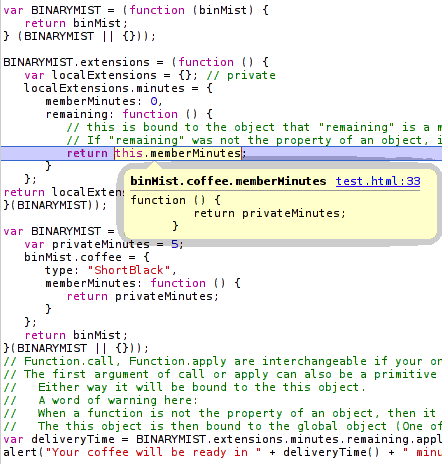
Once BINARYMIST.extensions.minutes.remaining is applied to BINARYMIST.coffee, return this.minutes now returns a function that returns privateMinutes.

javascript binding callback

You can copy past the below code:

var BINARYMIST = (function (binMist) {
   return binMist;
} (BINARYMIST || {/*if BINARYMIST is falsy, create a new object and pass it*/}));

BINARYMIST.extensions = (function () {
   var localExtensions = {}; // private
   localExtensions.minutes = {
      minutes: 0,
      remaining: function () {
         // this is bound to the object that "remaining" is a member of at runtime, because "remaining" is a property of the object "localExtensions.minutes".
         // If "remaining" was not the property of an object, it would be invoked as a function rather than a method. "this" would be bound to the global object.
         return this.minutes;
      }
   };

   return localExtensions;
}());

var BINARYMIST = (function (binMist) {
   var privateMinutes = 5;
   binMist.coffee = {
      type: "ShortBlack",
      member: function () {
         return privateMinutes;
      }
   };
   return binMist;
}(BINARYMIST || {}));
// Function.call, Function.apply are interchangeable if your only using a single parameter.
// The first argument of call or apply can also be a primitive value, null or undefined.
// Either way it will be bound to the this object.
// A word of warning here:
// When a function is not the property of an object, then it is invoked as a function.
// The this object is then bound to the global object (One of the poor design decisions in JavaScript).
var deliveryTime = BINARYMIST.extensions.minutes.remaining.apply(BINARYMIST.coffee);
alert("Your coffee will be ready in " + deliveryTime() + " minutes");

In continuing with the code comment immediately above:
If the first parameter to apply or call is null, then the this is bound to the global object upon invocation.
When you invoke a function that is not a method, this is exactly what happens.

You may have noticed, I’m using the module pattern in the above example.
This pattern is effective for getting our objects nicely nested into a single namespace (or more correctly an object ) that sits in the global object.
This stops us from littering the global space with every object we create.
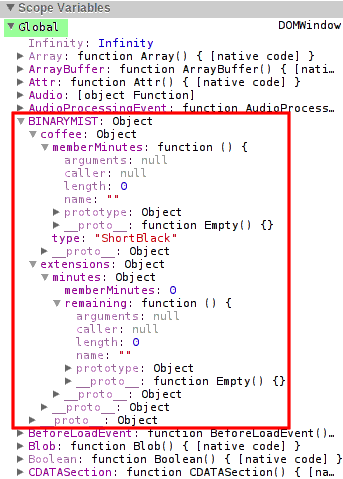
You can also see from the following image, what’s private and what’s public.
So we can easily define accessibility.

JavaScript global scope abatement

What are the differences between apply and call then?

call

You can think of Function.prototype.call as being syntax sugar on top of Function.prototype.apply.
If you only have a single parameter after the first, your better off to use Function.prototype.call as it’s more efficient than creating an array for a single value.

The difference is in the parameters after the first invocation context argument.
With call, an arbitrary number of arguments can be passed.
Following the first argument, each argument will be passed to the extension method. In our case remaining (line 09 above).
So we could make the following changes to the above code.
You’ll notice on line 8 below once applied to BINARYMIST.coffee, no longer returns a function, because we explicitly set this.minutes to a number… 3.
Now in the below example on line 16, if we fail to pass an argument to BINARYMIST.extensions.minutes.remaining, by default our coffee will be ready in 10 minutes.

BINARYMIST.extensions = (function () {
   var localExtensions = {}; //private
   localExtensions.minutes = {
      minutes: 0,
      remaining: function (numberOfMinutes) {

         var defaultMinutes = 10;
         this.minutes = numberOfMinutes || defaultMinutes;

         return this.minutes;
      }
   };
   return localExtensions;
}());

var deliveryTime = BINARYMIST.extensions.minutes.remaining.call(BINARYMIST.coffee, 3);
alert("Your coffee will be ready in " + deliveryTime + " minutes");

Better still, lets pass a couple of arguments..
While we’re at it, lets tidy things up a bit.
Lets put the code we use to test the extensions on our coffee into an immediately invoked function expression,
also known as an anonymous closure.
You can see this on line 36.

On line 15 we assign localSpent the second argument we passed in (minutesSpent),
but only if we’re sure it’s a number,
else we assign the undefined value.

var BINARYMIST = (function (binMist) {
   return binMist;
} (BINARYMIST || {/*if BINARYMIST is falsy, create a new object and pass it*/}));

BINARYMIST.extensions = (function () {
   var localExtensions = {}; // private
   localExtensions.minutes = {
      minutes: 0,
      remaining: function (numberOfMinutes) {
         var defaultMinutes = 10;

         // check our numbers are actually numbers.
         var isNumber = function isNumber(num) { return typeof num === 'number' && isFinite(num);}
         var localRemaining = isNumber(numberOfMinutes) ? numberOfMinutes : defaultMinutes;
         var localSpent = isNumber(arguments[1]) ? arguments[1] : undefined;

         this.minutes = {remaining: localRemaining, spent: localSpent}
         return this.minutes;
      }
   };
   return localExtensions;
}());

// lets add some coffee
var BINARYMIST = (function (binMist) {
   var privateMinutes = 5;
   binMist.coffee = {
      type: "ShortBlack",
      minutes: function () {
         return privateMinutes;
      }
   };
   return binMist;
}(BINARYMIST || {}));

(function () {
   var minutesRemaining = 3;
   var minutesSpent = 7;
   var deliveryTime = BINARYMIST.extensions.minutes.remaining.call(BINARYMIST.coffee, minutesRemaining, minutesSpent);
   var minutesSinceOrder = deliveryTime.spent || 'a number of';
   alert("You placed your order " + minutesSinceOrder + " minutes ago. Your coffee will be ready in " + deliveryTime.remaining + " minutes.");
}());

On line 39 we pass in a couple of arguments.
Now to show another cool feature of JavaScript,
because I hate to miss a good opportunity.
All functions come with an arguments array.
This parameter is populated with all the arguments that were supplied to the function on invocation.
This includes any arguments that were not assigned to parameters.
As you can see below, arguments holds both values we passed in.

JavaScript argument's array

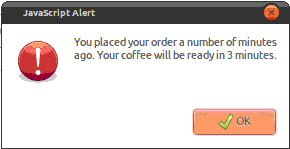
Now if we only pass in the first argument to the specified parameter, when line 41 is executed, we get…

apply

The difference with Function.apply is that it only takes 2 arguments.
The second being an array of arbitrary length.
Function.apply works with array-like objects as well as true arrays.


// show a new BINARYMIST.extension.minutes that takes an array

var minutesRemaining = 3;
var minutesSpent = 7;
var minutes = [minutesRemaining, minutesSpent];
var deliveryTime = BINARYMIST.Extensions.minutes.remaining.call(BINARYMIST.coffee, minutes);

Bind

In response to Mike Wilcox’s comments on the JavaScript Linked-in group
I’ve added some info on Function.prototype.bind introduced in Ecma 262 (I think).

This function is very similar to Function.prototype.call.
In fact the only difference I can see is that bind essentially returns a reference to the function that applies the function we want to apply to a target function.
Essentially this allows us to re-use an applied function, rather than create one each time we want to execute.
bind has the same function signature (has the same parameters) as Function.prototype.call.
This following example was taken from Mike West’s post here with some small changes and comments added.

This is tested and works as you would expect.

var first_multiply;
var second_multiply;

var first_object = {
   num: 42
};

var second_object = {
   num: 24
};

function multiply(mult) {
   return this.num * mult;
}

Function.prototype.bind = function (obj) {
   // When a function is not the property of an object, then it is invoked as a function:
   // Now because bind is a property of Function.prototype
   // and multiply inherits the bind property (which is a function of course) because multiply's prototype is Function's prototype.
   // this is bound to the bind properties object... which in this case is multiply.
   var method = this
   var temp = function () {
      return method.apply(obj, arguments);
   };
   // temp holds a reference to our bind functionality
   return temp;
}

first_multiply = multiply.bind(first_object);
document.writeln(first_multiply(5) + ''); // returns 42 * 5

second_multiply = multiply.bind(second_object);
document.writeln(second_multiply(5) + ''); // returns 24 * 5

Supporting multiple sites with a single SSL Certificate

April 9, 2012

There are a couple of ways I’m aware of you can support multiple web sites with a single SSL certificate using the same port.

  1. Wild card certificate
    Useful for when your collection of sites are on the same domain.
    For example:
    mysane.site.com, myinsane.site.com, mycrazy.site.com
  2. Unified Communications Certificate (UCC) / Subject Alternative Name (SAN) / MultiDomain
    Useful for when your collection of sites are on different domains.
    For example:
    mysanesite.com, myinsanesite.com, mycrazysite.com

You can choose to purchase a SSL cert,
you can use convergence (check out Moxie Marlinspikes talk on the subject),
or you can create a self signed one.

If you chose to create a self signed certificate

IIS 7.x

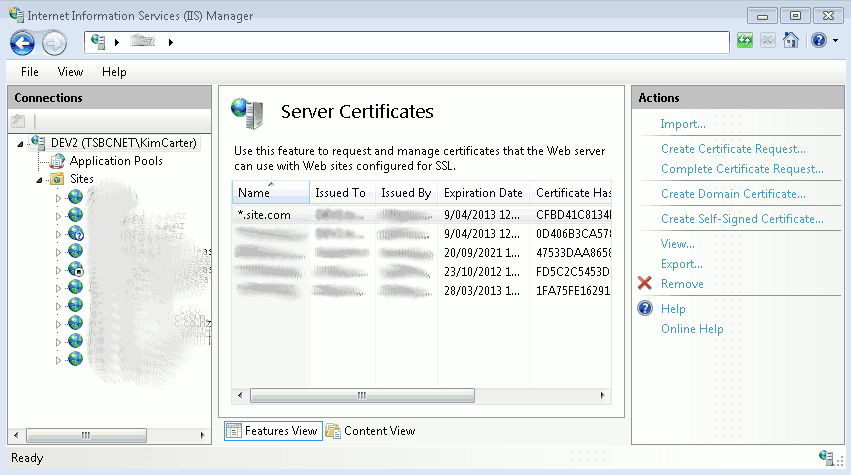
Click on the root machine node in the left tree view of IIS (7.x) manager.
Then double click the “Server Certificates” icon in the Features View.

Server Certificates

This will show you all the certificates currently registered on the server.
You will be able to see in the Actions pane,
that you can Import or create your own certificate.
To create the self signed wild card certificate,
chose “Create Self-Signed Certificate…”.
Give it the friendly name *.site.com
Ok.
The certificate will be registered on you machine.

Server Certificates

Now for each site you want to use the certificate for,
right click -> Edit Bindings… -> Add.
Select the Type to be https,
and select the certificate you just created from the SSL certificate drop down menu.
Ok -> Close.
Repeat these steps for the rest of the sites you want to share the certificate.

Using the appcmd utility

We now add the https binding and host information to our sites that need to share the wild card certificate.

Run a command prompt as administrator and

cd to %WINDIR%\system32\inetsrv

The format of the command looks like the following:

appcmd set site /site.name:"<your website name>" /+bindings.[protocol='https',bindingInformation='*:443:<your ssl domain>']

For our above three sites we wanted to use the same certificate,
mysane.site.com, myinsane.site.com, mycrazy.site.com
They may be named respectively:
mysane, myinsane, mycrazy
So for example,
we’d run the following commands:

appcmd set site /site.name:"mysane" /+bindings.[protocol='https',bindingInformation='*:443:mysane.site.com']

You should get feedback similar to the following:

SITE object "mysane.site.com" changed

if all goes well

appcmd set site /site.name:"myinsane" /+bindings.[protocol='https',bindingInformation='*:443:myinsane.site.com']

You should get feedback similar to the following:

SITE object "myinsane.site.com" changed

if all goes well

appcmd set site /site.name:"mycrazy" /+bindings.[protocol='https',bindingInformation='*:443:mycrazy.site.com']

You should get feedback similar to the following:

SITE object "mycrazy.site.com" changed

if all goes well

Although I normally keep it simple and name my sites the same as the URL (your ssl domain) I want to use.

IIS 6

Now this is a bit more work than with IIS 7.

If it’s not already installed, you’ll need the SelfSSL tool.
You can get this from the SSL Diagnostics Kit or the IIS 6.0 Resource Kit which contains lots of other stuff.
Once installed, run IIS.

Create the self signed wildcard certificate

You’ll need to generate the certificate for one existing IIS site.
For the first site take note of the site idendifier.
You can see this in the right pane when you select Web Sites from the server node in the IIS manager.
Open a command prompt, you’ll need to run the SelfSSL app.
Actually I think the easiest way to run this is Start menu -> All Programs -> IIS Resources -> SelfSSL -> SelfSSL.
The command string looks like this:

selfssl /n:cn=<your wild card domain> /s:<first website identifier> /P:<port you want to use> /v:<number of days to expiration>

So for example, we’d run the following command:

selfssl /n:cn=*.site.com /s:1 /P:443 /v:365

Options for SelfSSL

selfssl /?

some of them are:

/N: – This specifies the common name of the certificate. The computer name is used if there is no common name specified.
/K: – This specifies the key length of the certificate. The default is length 1024.
/V: – This specifies the amount of time the certificate will be valid for, calculated in days. The default setting is seven days.
/S: – This specifies the Identifier of the site, which we obtained earlier. The default will always be 1, which is the Default Web Site in IIS.

Assign the certificate to the sites that need it

Have a look at the site properties in IIS Manager -> Directory Security tab -> Server Certificate button.
This will start the IIS wizard.
Click Next -> Assign an existing certificate -> Next.
You should see the wild card certificate you created.
Select it, click next, and make sure you assign it the same port that was assigned to the first site.

Configure the SecureBindings

In order for IIS to use the host headers with SSL and secure the certificate as we did with appcmd,
you’ll need to run the following command for each of the sites that require it.
My adsutil is found in C:\Inetpub\AdminScripts\
It’s probably not in your path, so you’ll have to run it from location.
cscript adsutil.vbs set /w3svc/<website identifier>/SecureBindings ":443:<your ssl domain>"
So for example, we’d run the following command:
cscript adsutil.vbs set /w3svc/1/SecureBindings ":443:mysane.site.com"
That should be it.

Now if you need to remove a certificate from your store

Run mmc.exe
File menu -> Add/Remove Snap-in… -> Add… -> select Certificates -> Add -> select Computer account -> Next -> select Local computer -> Close -> Ok.
Select the Certificates node, expand Personal, Certificates.
Now in the right window pane, you can manage the certificates.
Delete, Renew etc.

copying with scp

March 25, 2012

I was having some trouble today copying a file (1.5GB .iso) from a notebook to a file server.
The notebook I was using was running Linux Ubuntu.
The server FreeBSD.
I was trying to copy this file using SMB/CIFS via Nautilus.
I tried several times, it failed each time.
Then I thought, what are you doing… drop to the command line.

scp to the rescue

The command I used:

From the directory on my local machine I was copying the file from

scp -P <MyPortNumberHere> MyFile.iso <MyUserName>@<MyServer>:/Path/To/Where/I/Want/MyFile/ToGo/MyFile.iso

This also took about half  the time to copy that SMB took, and SMB didn’t even complete. Not to mention the transfer is secure (SSH)

Some additional resources

http://www.linuxtutorialblog.com/post/ssh-and-scp-howto-tips-tricks

http://amath.colorado.edu/computing/software/man/scp.html

Also don’t forget to check the man page out 😉

man scp

Design a site like this with WordPress.com
Get started