rsync over SSH from Linux workstation to FreeNAS

March 6, 2011

I’ve been intending for quite some time to setup an automated or at least a thoughtless
one click backup procedure from my family members PC’s to a file server.
Now if you put files directories in the place where we are going to rsync to, and run the command we’re going to setup, those new files directories will be deleted.
So in this case, we have a master / slave model.
You can also set it up so that no files directories are automatically deleted. That’s not what I’m doing here though.

Links I found helpful

rsync man page
SSH man page
Ken Fallon’s “A private data cloud” podcast

I wanted to setup the script to mirror the local disk or several directories on it to the file server.
So the local disk would be the master.
I often use the file server as an intermediate step to pass files around my network.
So I just need to be aware not to put files in the directories that are going to get written to on the file server, but use alternative ones instead.
Otherwise they will be overwritten when rsync runs.

Objective

Provide a regular (on the hour) or one click sync of files (once the fileserver is on a decent UPS) from:

  1. My external drive to the file server.
  2. My wife’s thumb drive to the file server.
  1. /media/EXTERNAL/Applications to MyFileServer/MyShare/ExternalBackup/Applications
    /media/EXTERNAL/Documents to MyFileServer/MyShare/ExternalBackup/Documents
    /media/EXTERNAL/media/Books to MyFileServer/media/Books
    /media/EXTERNAL/media/EducationalMedia to MyFileServer/media/EducationalMedia
    /media/EXTERNAL/media/Images to MyFileServer/media/Images
  2. /media/disk to MyFileServer/WifesShare/disk

——via SSH

Until the file server is being powered by a UPS I can set up shutdown scripts for,
so when we’re not about, it will still shutdown gracefully on power outage,
we’ll be running the rsync scripts manually.
As I don’t want an hourly script syncing data to the file server when the power gets cut.
Why? because RAID arrays often get destroyed by being written to when they loose power.
Currently if we loose power the file server is on a small UPS and we can halt any sync scripts interacting with the file server before she goes down.
We can manually shutdown the file server gracefully.

You need to take good precaution with rsync as you can erase data easily.
I like to use the –dry-run or -n until I’m happy that the command I’ve got is going to actually do what I think it is.
You can use -v the verbose option with levels of verbosity up to -vvv for debugging rsync. Generally -vv is heaps.
Archive mode -a is actually -rlptgoD. Check the man page for details.
–delete delete extraneous files from dest dirs that are not on the source.
–force will delete directories from dest even if not empty
It’s a good idea to setup some test directories for source and dest.
You can also (if you want to be extra careful) mount your dest and source or just your dest directory read only.
Put a copy of some files and directories in each, and make some changes to source and/or dest.
Then once you run the command, you can check that the sync has done what you expected.

My initial test command after I created the rsyncTestSource and rsyncTestDest dirs:

rsync -vva --dry-run --delete --force /media/EXTERNAL/rsyncTestSource/ /media/EXTERNAL/rsyncTestDest/

Perform checks.

Then remove the –dry-run.

Perform checks again.

Now to file server:

You’ll have to, if you havn’t already, setup SSH on your file server.
You can follow the steps on my post here for that if you like…

The initial command I used:

rsync -vva --dry-run --delete --force -e 'ssh -p 2222' /media/EXTERNAL/rsyncTestSource/ myUser@myFileServer:/mnt/FileServer/myUserDir/rsyncTestDest/

You can specify the -e option followed by the remote shell.
rsync must be installed on both source and dest machines.
By default FreeNAS already has rsync, as does a standard debian install.

Then remove the –dry-run

Perform checks again.

Now for the first real backup, add the dry run to start with:

rsync -vva --delete --force -e 'ssh -p 2222' /media/EXTERNAL/Applications/ myUser@myFileServer:/mnt/FileServer/myUserDir/External-Backup/Applications/

Then remove the –dry-run.

Perform checks again.

I added a collection of these commands to a file (rsync_EXTERNAL_to_fileserver) to run for each directory and saved to my ~ directory.

Turn the executable bit on.
Make sure owner and group is correct.

chmod 750 rsync_EXTERNAL_to_fileserver
chown MyUserName:MyGroupName rsync_EXTERNAL_to_fileserver

Add a command drawer to the task bar.
Add a Custom Application Launcher to the drawer that points to the rsync_EXTERNAL_to_fileserver file.
You can even add an image that makes sense to the drawer.
Mine looks like this, with 1 command launcher.


Ok, it’s 2 clicks for me, but you don’t have to use a drawer 🙂

There are also other ways to do this.
Like this video.

Quick technology mash-up

January 30, 2011

I had a good friend visit from AU this weekend.
He’s the Technical Lead for Fairfax Media.
We got talking about lots of technologies.

I decided to do a little research on top of our discussions.
Following is a bit of a mash-up of the technologies we talked about.
Predominantly focused on low resource hardware and hand held devices.
Most of the detail is taken from other posts.


Code coverage

MSTest has a very handy tool that grabbed my attention and looked like it would be very useful for the unit tests we were writing at work.
Mentions in the above link that it’s a pain in the ass to set up.
Not so.
My friend has set this up for his company, and has had good success with the process.
It provides a visual interface of your code and how much of it is covered.
Also provides other views and useful statistics.
Could be good for where we are planning on going with unit testing at my work.
Visual Studio Ultimate and possibly Premium has this.
Here’s a quick overview of getting it set-up.

Then there’s TeamCity 6 which has dotCover included.

There is also NCover, but it’s not free.

Caching

Memcached
Free, light weight, high performance and open source.
If security is needed, must be provided on top.
Microsofts AppFabric previously known as Velocity… Microsofts answer to Memcached.
I’ve used AppFabric in a WCF project, but not for caching.
Plenty of info on the wiki.

SQLite

Serverless, open source.
Any process that wants to access the database, reads and writes directly from the database files on disk.
There is no intermediary server process.
Implements a database-wide multiple-readers-single-writer lock.
SQLite is transactional and fault tolerant.
More deployments of SQLite in use than any other SQL database engine.
Many low resource mobile devices using.
SQL Language used omiting a few features and adding a few of it’s own.
Support for most languages incl C/C++, C#
If you’re still using flat file databases on your mobile devices, I’d see this as an excellent replacement.

Nginx

Free, Open source, high-performance HTTP server, reverse proxy, load balancer, mail proxy server.
Written in C.
hosts nearly 7.5% of all domains.
http://nginx.org/en/
http://wiki.nginx.org/Main
Runs on most platforms.
Features.
Web hosting providers have reported 50,000 simultaneous connections using Nginx.
Examples.

nuget

A package repository.
I think nuget would be really helpful in consolidating all the dependencies on internal and/or external libraries.
Also providing a single repository for API’s supplied to clients.
Looks like TeamCity (build server) can deploy to a package repository.
Point your Visual Studio Package Manager at the package source rather than adding references from all over the place.

http://nuget.codeplex.com/
Overview
A couple of ways to find and install nuget packages

Using the Add Library Package reference dialogue box.
Using the Package Manager Console


Hosting Your Own NuGet packages
Creating and hosting packages
Hosting package feeds
Packaging your libraries

LAN Manager Authentication in EStrongs File Explorer

December 5, 2010

I started looking for a Graphical File Explorer to use on my Nexus One a few weeks ago.
My requirements were:

Needed to be able to manage files on the internal and external storage (micro SD).
Create new files, directories.
Support SMB in order to access shares on file servers, and possibly FTP.
Support different file views (list view, detail view).
Clipboard support (copy, move).
Root support.
Grep or some other file Search mechanism.
Multi select.
Easy directory and file navigation.
Needed to be intuitive.
Rename files / directories.
Accelerometer support.
Similar functionality to the *nix df command.
Secure authentication between client server.

EStrongs File Explorer satisfied all these requirements and more, except I wasn’t sure about the last one.
Couldn’t find any documentation about it either.
If I had of spent more time searching the forum I may have stumbled onto something.
I did a little bit of reading and decided to make a post on EStrongs.
I didn’t receive any answers in the few days that I waited, so decided to do my own experimentation.
Which brings me to the little bit of research I carried out on how EStrongs authenticates with SMB shares.

I followed up my original post with my findings.
Check them out.

Following are some links I’ve used quite a few times before and also came in useful for this experiment.

the LAN Manager Authentication Level setting and where to find it in your windows clients
Some easy steps to securing Samba
The all mighty smb.conf man page

EStrongs also have a selection of other useful utilities.


Which can also be found in Androids App Store.

Setting up 802.11g Wi-fi on Google’s Nexus One

November 21, 2010

I thought this was going to be a really simple, quick and drama free setup.
This wasn’t to be the case.

Process of events

Added a DHCP lease to my routers ARP table… with the MAC address of the Nexus and giving it an IP of 192.168.0.15.
Had quite a bit of trouble getting my Nexus One to establish connection with my Netgear WG102 AP.


The connection using WPA2-PSK with AES encryption most of the time wouldn’t work.
There was allot of posts about this on the net, especially on the Nexus forum.


I tried most things mentioned in the following posts, including giving Nexus a static IP.

http://www.google.com/support/forum/p/android/thread?tid=670e46135cadce1e&hl=en
http://www.google.fi/support/forum/p/android/thread?tid=0bb4d777a20330c3&hl=en
http://www.google.com/support/forum/p/android/thread?tid=07bbaac95aef0a15&hl=en&start=40

After quite a lot of reading, it seemed that the Nexus One’s support of WPA2 was flaky at best.
It also sounds like quite a few other mobile devices only support WPA1 which uses the older TKIP encryption technology.
In saying that, it’s still considered secure so long as you use a decent sized PSK. 256 bit for example.

Using the following sites, I decided to setup another wireless network on the same AP using a different SSID, using WPA-PSK with TKIP.
This worked fine. I then tried to connect to the previous WPA2 network and it worked flawlessly.
So yes, I was a little confused.
The next day after a shutdown / restart of the Nexus, comms still seems fine.
So at the point of making this post, the confusion remains, but it works :-).
If it stops working again, at least we know we still have the other option of using WPA1 with a decent PSK.

This site does a good job of explaining the differences in the wireless protocols I’ve talked about.
http://compudent.blogspot.com/2006/09/wireless-wep-vs-wpa-vs-wpa2.html
Also has a link to…
https://www.grc.com/passwords.htm

Which generates 256 bit random keys, ideal for AP WPA1 and WPA2 encryption.

If anyone has any trouble in this area, sing out and I’ll do my best to lend a hand.

A bit of an update on this

After a week the N1’s wireless interface apparently stopped trying to connect to my Wifi.
I tried the WPA1 network again, with no joy.

I talked to a friend that also has a N1 bought through Google, rather than Vodafone.
He has had the 2.2.1 ota update for a few months.

http://en.wikipedia.org/wiki/Nexus_One states:
“Although the European, Australian and New Zealand Nexus One phones sold by Vodafone are not locked to the network of the provider, they are locked to a special Vodafone-specific system software, making it impossible to receive updates from Google.”

If you for some reason haven’t received your update yet, and are still running the stock ROM, you can follow the directions here and here to get onto 2.2.1 FRG83D.

Since the update, I haven’t had any Wifi comms issues.

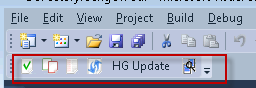
VisualHG works nicely in VS 2010 rtm

November 20, 2010


For the uninitiated…
VisualHG is a Mercurial source control plugin for MS Visual Studio


I had a bit of a problem with VisualHG a couple of weeks ago.
The overlay icons work in Visual Studio, but the context menu had no VisualHG icons and the VisualHG toolbar was inactive (had all the buttons greyed out).

Tried uninstalling / reinstalling visualhg.
Version: Visual Studio 2010 Version 10.0.30319.1 RTMRel Premium.
OS used: Windows 7 Enterprise x64.
VisualHG 1.1.0 installed.
Seems to work in VS 2008 though.

Solution

Remove all instances of VisualHG in Programs and Features.
Search the Program Files and Program Files (x86) for instances of visualhg and remove if they exist.
Search the registry for VisualHG related items (entries as well as keys). Delete them all.
Reinstall the latest version of VisualHG (currently 1.1.0).

Posts and links that provided resolution:
http://visualhg.codeplex.com/Thread/View.aspx?ThreadId=209792
http://visualhg.codeplex.com/workitem/36

Online Security – Teaching the Good Guys Bad Tricks

November 17, 2010

The company I work for during the day (PayGlobal) has been good enough to let me take the time off and pay for me to attend a half day seminar on security.
Security in software and networks is one of my passions, so hopefully I’ll get some good content out of this.

The agenda is looking pretty good.

* Cross-Site Scripting (XSS)
* Cross-Domain Request Forgery (CDRF)
* SQL Injection
* Man-In-the-Middle attacks
* Have an appreciation of how layering your defenses (defense-in-depth) that can help protect you from exploit chaining.

Check this out for details.


If anyone else is going that wants to catch up, sing out, and we can throw some ideas around 🙂


Java C# Similarities

November 14, 2010
Part 1

In this post, I’m just going to go over setting up command line compilers for C# and Java.

I was recently helping someone with a Java based project, so had to brush up on my skills in that area.
I haven’t had a need to use Java for a while.
Java is quite similar to C# in many ways.
When it comes to working out the similarities, I think it’s actually easier to work out the differences, because there are less of them.
It often feels like C# is just a more mature Java, with more features and bigger libraries.
In saying that, Java also has benefits over C#.
We’ll explore some of these in this series.

Without further ado, let’s get started.
The first thing I looked at doing, which I’d been meaning to for a while, was to set up command line compilation for both C# and Java on Windows 7.
The idea is that you can just run a command prompt and the directory that cmd puts you in (C:\Users\Me>), you have access to a source file or files you can build, debug and run.
This saves littering the world with Visual Studios File->New->Project->Console Application’s.

C# compiler setup

You’ll want to make sure you have the .net framework installed.

You’ll need to make sure you have your path variable included for csc.exe (the C# compiler).
There are several ways you can get to your path setup.
I normally just hit the keys [Windows] + [Pause-Break] combination, which brings up System Properties.


Go to the Advanced tab, and click the Environment Variables button.
I normally just enter the location of the compiler into the variables for the current user.
Select path, click edit.


I’m using .net 4. My path was C:\Windows\Microsoft.NET\Framework\v4.0.30319
If you already have other paths in the text field, past the same path in at the end of the line, but with a semi colon immediately before it.
Like so…

;C:\Windows\Microsoft.NET\Framework\v4.0.30319

If there is no existing path, add one by clicking the New button instead of the Edit button.
OK and apply all of that.
Now at your command prompt if you run path

C:\Users\Me>path

you will see all your path variables.
Now you can just add a file into C:\Users\Me\
This can be the file that you put your C# code into (I just called this “scratch”).

Once you think you’ve got your C# code compilable.
From the command prompt, type.

C:\Users\Me>csc scratch

That’s it, providing you have no errors your assembly is built.
If you’d like to know what’s in your assembly have a look here

Now if you want to debug with the likes of cordbg.exe, you’ll need the .NET SDK
You can find it here
At 600MB… I passed on this.
If you do decide to install the SDK, you’ll need to add the path, then you should be good to start using cordbg.exe.
Details on how to use cordbg.exe are here

I found the following links helpful.
http://www.johnsmiley.com/cis18/Smiley037.pdf
http://msdn.microsoft.com/en-us/library/ms379563%28VS.80%29.aspx
http://blogs.msdn.com/b/windowssdk/archive/2010/05/25/released-windows-sdk-for-windows-7-and-net-framework-4.aspx

Java compiler setup

If you haven’t already got it installed, you’ll need the Java Development Kit (JDK).
If you have the Java Runtime Environment (JRE) installed, this doesn’t mean you have the JDK.
If you have the JDK installed, you’ll have the JRE also.
In Windows you can see if you have these installed in Programs and Features in the Control Panel.

I got mine from here.
Once again open System Properties.
Go to the Advanced tab, and click the Environment Variables button.
Under the System variables, select Path, click edit.
As we did for csc.exe add the path with the semi colon in the front if there are already paths in there.

;E:\Program Files\Java\jdk1.6.0_18\bin

OK and apply all of that.
From then on, I just stick my java files in a directory in C:\Users\Me\
This way I just run cmd and cd into my dir that has my java files and I’m ready to go.

To compile your code into a bytecode file with a .class extension…

C:\Users\Me\MyDir>javac HelloWorld.java

To run your new bytecode…

C:\Users\Me\MyDir>java HelloWorld

Details here.

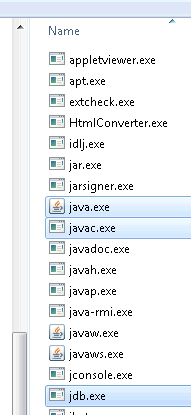
Now if you want to debug your java code on the command line,
it’s a breeze because the jdb.exe is in the same directory as java.exe and javac.exe.


All the commands and switches for jdb are here.

The Java documentation is very good, you won’t often not be able to find answers quickly.

There are also online options

Atlassian has some very comprehensive products that may suit.

Or you could go with a very light weight option.
compilr is a good one for C#, VB and Java.

Next post on this topic we’ll go into the language details.

Cya.

Garbage Collection in .NET 4.0

October 17, 2010

GC prior to .NET 4.0

Most of us know how the GC generations work, but I’ll give a very brief rundown for those that haven’t looked at them yet, or may need a refresher.
There are 3 of them. 0, 1, 2.
When an item is first created, it’s considered a gen 0 item.
If it survives subsequent collections (because it’s still in use), it becomes a gen 1 item and so on.
gen 0 items mainly consist of instance variables, where as the later generation items are generally of a more global scope.
gen 2 items often stick around for the duration of the application.

The GC operates in the following modes

server or workstation.

You can change the modes in either your app.config (that’s per app) or in the machine.config (that’s machine wide)
See here.


<Configuration>
	<runtime>
      <gcServer enabled="false" />
      <gcConcurrent enabled="true" />
   </runtime>
</Configuration>

As discussed by Tess Ferrandez (champion ASP.NET debugger)
The restrictions here are

  • you can not run the server version on a single proc box, it will default to workstation
  • you can not run concurrent while also running server
  • if the runtime is hosted, the hosts GC mode will override the configuration

workstation (the default mode), concurrent workstation (the default if >0 multi core procs exist),
Each of these modes are optimised for different scenarios.

Generally, it’s best not to change these settings, and especially on the machine level.
The .NET 4.0 GC is considerably smarter than previous versions of the framework, and there is even less reason to contemplate changing it.

Before .NET 4.0 the GC on a concurrent workstation could do most but not all of gen 0 and gen 1 reclaim at the same time as the gen 2 items.
The GC was unable to start additional collections when a current collection was in progress.
This meant that only memory in the current segment or block could be reclaimed.

In .NET 4.0 background GC has been introduced

This allows another GC (gen 0 and 1) to start at the same time as an existing full GC (gen 0, 1 and 2) is running.
This is able to significantly reduce the time a full GC takes.
Concurrent workstation GC has been replaced by background GC.
Server modes currently don’t support the background GC, but the CLR team is aiming to have this introduced in the next version of the framework.
GC in .NET 4.0 has been tested on machines with up to 128 CPU cores, with confirmed efficiency improvements.
Apparently they’ve reduced the time needed to suspend managed threads.

A couple of good informative links on background GC
http://blogs.msdn.com/b/ukadc/archive/2009/10/13/background-and-foreground-gc-in-net-4.aspx
http://channel9.msdn.com/shows/Going+Deep/Maoni-Stephens-and-Andrew-Pardoe-CLR-4-Inside-Background-GC/

Garbage Collection Notifications

In .NET 3.5SP1 onwards we’re provided with GC.RegisterForFullGCNotification.

Only available when concurrent GC is disabled (not the default).
Does not support concurrent garbage collection because memory allocations are allowed while concurrent garbage collection is in progress. See the <gcConcurrent> runtime setting for information about how to disable concurrent garbage collection.
Have a look at this example Microsoft has provided for Garbage Collection Notifications.
I’m not sure why MS has decided to implement notifications this way.
I would have thought a much better way to do this would be to simply subscribe to a notification event providing a delegate with WaitForFullGCProc (your conditional logic), rather than spin up a new thread which takes a ThreadStart delegate of WaitForFullGCProc (your conditional logic) and blocks on GC.WaitForFullGCApproach.

Thoughts / Feedback welcome.

LSP / DbC and .NET’s support

October 12, 2010
Part 2

Some Examples

Bear in mind, there are additional overloads for most/all of the following procedures.
Be sure to check them out.

Examples of Preconditions

Contract.Assert

Ensures that a condition is true when in debug mode.


Contract.Assert(MyInput != null);

Contract.Assume

Instructs code analysis tools to assume that the condition supplied as an argument is true, even if it can not be statically proven to always be true.
Good example of how this can be used.


Contract.Assume(MyInput != null);

Contract.Requires

Must be at the beginning of a method or property. Ensures that a condition is true before any other code.
The following example ensures that MyInput parameter is valid (not null in this case) before any other code is run on the same thread.


Contract.Requires(MyInput != null);

Contract.EndContractBlock

Is used to inform the compiler to treat all code before it as if it was a code contract.
This is useful for legacy code.
For example if you have parameter validation code that does not use Code Contract’s.
The contract tools recognise if/then/throw statements as preconditions when the statements appear first inside a method or property,
and the set of such statements are followed by a Contract method call, such as Requires, Ensures, EnsuresOnThrow or EndContractBlock.


if(MyInput == null)
    throw new NullReferenceException("The input is null");
Contract.EndContractBlock();

Examples of Postconditions

Contract.Ensures

Ensures that a condition is true on exit of a method or property.


Contract.Ensures(0 <= speed && speed <= 800);

Contract.EnsuresOnThrow

This method call must be at the beginning of a method or property, before any other code.
If an exception is thrown, the specified condition must be true and the exception being thrown is of the specified type parameter.


public bool AddAndProcessItem(T item)
{
	Contract.EnsuresOnThrow(!item.Added);

	try
	{
		 // add item to a collection and set it's Added property to true
	}
	catch (AdditionException)
	{
		 item.Added = false;
		 throw;
	}

	// ... other operations
	return true;
}

Contract.ForAll

Allows the iteration through a collection to ensure all members meet a specific requirement.


// first param MyCollection is of type IEnumerable
// second param is a delegate, or lambda (often called a predicate when used like this)
Contract.ForAll(MyCollection, x=>x!=null);

Object Invariants

Used to mark methods that contain object invariant specifications.
Defined by decorating a method with the ContractInvariantMethodAttribute.
ContractInvariantMethodAttribute can only be used on a single method per class.
The method must return void and carry out no operations other than a sequence of calls to Contract.Invariant


[ContractInvariantMethod]
void ObjectInvariant ()
{
   Contract. Invariant ( _y >= 0 );
   Contract. Invariant ( _x > _y );
   ...
}

Code Contract Values

There are also some useful pseudo variables that can be used when writing postconditions.

Contract.Result

A methods or properties return value can be refered to by Contract.Result<T>()
Contract.Result<T>() can be used only in the conditional expression for the Ensures contract.
Methods with a return type of void cannot refer to Contract. Result<T>() within their postconditions for the obvious reason.


Contract.Ensures(0 < Contract.Result());

Contract.OldValue

Contract.OldValue<T>(T value) can be used only in the conditional expression for the Ensures contract.
The generic type argument may be omitted whenever the compiler is able to infer its type.
There are a few restrictions around the use of OldValue. Have a look at the User Manual document. Listed at the end of the post.


Contract.Ensures(MyInput != Contract.OldValue(MyInput));

Pure

Using the PureAttribute indicates that a type, method, property, etc is pure, that is, It has no visible side-effects for callers.
You can only use a method/property/etc in a contract if it is declared Pure.
If the method/property/etc is not decorated with this attribute when called from within a contract, a warning will be given “Detected call to impure method”.

See this post, it has a good example.

Interface Contracts

Contracts for interfaces must be defined in a separate class decorated with the ContractClassForAttribute.
The interface sporting the contract must be decorated with the ContractClassAttribute specifying the type that has the interfaces contract.
The class that implements the interfaces contract is expected to be abstract.
The User Manual listed at the end of this post has some good examples of how to set up Interface Contracts.


[ContractClass(typeof(ContractForInteface))]
interface IDoSomething
{
	int DoSomething(int value);
}

[ContractClassFor(typeof(IDoSomething))]
sealed class ContractForInteface : IDoSomething
{
	int IDoSomething.DoSomething(int value)
	{
		Contract.Requires( value != 0);
		//contracts require a dummy value
		return default(int);
	}
}

There’s plenty of good documentation around Code Contracts

System.Diagnostics.Contracts Namespace
http://msdn.microsoft.com/en-us/library/system.diagnostics.contracts.aspx
The Contract Class
http://msdn.microsoft.com/en-us/library/system.diagnostics.contracts.contract.aspx
Brief description of Code Contracts and how to use them
http://msdn.microsoft.com/en-us/library/dd264808.aspx
The User Manual
http://download.microsoft.com/download/C/2/7/C2715F76-F56C-4D37-9231-EF8076B7EC13/userdoc.pdf
Code Contracts on DevLabs
http://msdn.microsoft.com/en-us/devlabs/dd491992.aspx
DimeCasts has a few web casts on Code Contracts
http://dimecasts.net/Casts/ByTag/Code%20Contracts

LSP / DbC and .NET’s support

October 11, 2010
Part 1

Two design principle’s I believe go hand in hand are

  1. Dr. Barbara Liskov’s Liskov Substitution Principle (LSP)
  2. Dr. Bertrand Meyer’s Design by Contract (DbC)

Lets keep our Object Oriented relationships adhering to the LSP and the DbC.
The LSP and the DbC provide both theory and practical guidelines of how we as software engineers can design…

  • Hierarchical components that behave the same across all layers.
  • Systems that produce predictable results on a layer, from changes made on another layer (providing architecture that can be reasoned about).
    As programmers, we need to be able to make correct assumptions about the behaviour of abstract data types and their derivatives.
    LSP and DbC provide us with the ability to create intuitive class hierarchies that support the object oriented architectural reasoning process.
  • Extensible code. Ability to add functionality without having to change existing code, but rather extending it.

LSP

The LSP states that you shouldn’t inherit from a base class unless the derived class truly “is a” more specific version of the base class (Liskov 1988).
Subtype objects must be behaviourally substitutable for supertype objects.
Programmers must be able to reason correctly about and rely upon the behaviour of subtypes using only the specification of the supertype behaviour.

Robert C. Martin wrote this excellent article on LSP.
Which I found here along with many other great articles.

Andy Hunt and Dave Thomas summarise LSP like this: “Subclasses must be usable through the base class interface without the need for the user to know the difference.”
In other words, all the routines defined in the base class should mean the same thing when they’re used in each of the derived classes.

As Steve McConnell in Code Complete puts it:
If you have a base class of Account and derived classes of CheckingAccount, SavingsAccount, and AutoLoanAccount.
A programmer should be able to invoke any of the routines derived from Account on any of Account’s subtypes without caring about which subtype a specific account object is.

If a program has been written so that the LSP is true, inheritance is a powerful tool for reducing complexity because a programmer can focus on the generic attributes of an object without worrying about the details.
If a programmer must be constantly thinking about semantic differences in a subclass implementation, then inheritance is increasing complexity rather than reducing it.
This goes against software’s primary technical imperative of managing complexity.
Suppose a programmer has to think this
“If I call the InterestRate() routine on CheckingAccount or SavingsAccount,
it returns the interest the bank pays,
but if I call InterestRate() on AutoLoanAccount I have to change the sign because it returns the interest the consumer pays to the bank.”
According to LSP, AutoLoanAccount should not inherit from the Account base class in this example
because the semantics of the InterestRate() routine are not the same as the semantics of the base class’s InterestRate() routine.

DbC

From my understanding. DbC provides constraints which enforce the LSP.
LSP is notional. DbC provides us with the practical approach.

.Net 4.0 gives us Code Contracts which directly support the DbC principle.
In looking at what the .Net framework 4.0 provides us with in the System.Diagnostics.Contracts namespace.
Bear in mind, this is not a language extension or a runtime extension. It’s just a library.
I think that using the static class’s in your code, that System.Diagnostics.Contracts provides would be a prime candidate for Aspect Oriented Programming.
It looks like the .Net CLR has support for AOP, although it doesn’t sound like it has been implemented very cleanly.
Have a look at this.
IMHO, when using AOP, the actual business code utilising the aspects, should not show any signs of the aspects (Code Contracts (in our case)).
Although it looks like there are some open source alternatives that do the job quite nicely.
Anyway, without diving into AOP, lets save it for another post and move on.

DbC is actually a registered trademark of Eiffel Software.
Bertrand Meyer when designing the Eiffel programming language came up with this term.
DbC provides us with class invariants, preconditions and postconditions.

C# for artists by Rick Miller has a good explanation of these.

Class Invariant

A class invariant is an assertion about an object property that must hold true for all valid states the object can assume.
For example, suppose an airplane object has a speed property that can be set to a range of integer values between 0 and 800.
This rule should be enforced for all valid states an airplane object can assume.
All methods that can be invoked on an airplane object must ensure they do not set the speed property to less than 0 or greater than 800.

Precondition

A precondition is an assertion about some condition that must be true before a method can be expected to perform it’s operation correctly.
For example, suppose the airplane object’s speed property can be incremented by some value and there exists in the set of airplane’s public interface methods one that increments the speed property any where from 1 to 5 depending on the value of the argument supplied to the method.
For this method to perform correctly, it must check that the argument is in fact a valid increment value of 1,2,3,4, or 5.
If the increment value tests valid then the precondition holds true and the increment method should perform correctly.
The precondition must be true before the method is called, therefore it is the responsibility of the caller to make the precondition true, and the responsibility of the called method to enforce the truth of the precondition.

Postcondition

A postcondition is an assertion that must hold true when a method completes its operations and returns to the caller.
For example, the airplane’s speed increment method should ensure that the class invariant speed property being 0<=speed<=800 holds true when the increment method completes its operations.

Code Contracts can run on .Net 4.0 or previous versions.

Code Contracts as a whole include

1)   Static methods from the Contract class

  • Express assumptions and constraints, I.E. the object invariants, pre and post conditions.

2)   Static analyzer or static checker

  • Provide compile-time analysis.
  • Checks for implicit contracts, such as null dereferences and checking array bounds, as well as the explicit developer provided contracts.
  • Only available in Microsoft’s Premium edition or above of Visual Studio.

3)   Runtime analyzer or binary rewriter

  • modifies the IL by injecting the contracts.
  • performs runtime checking.

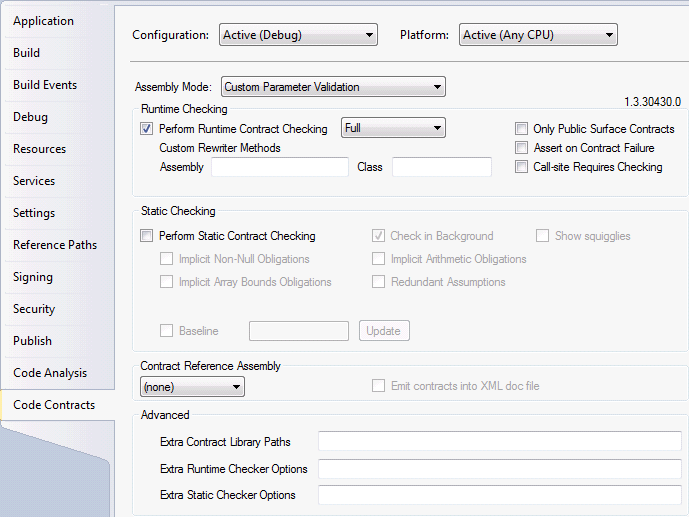
Once you’ve installed either the Standard or Premium Edition of the managed code contracts from DevLabs.
Projects within Visual Studio will now have an extra property pane entitled “Code Contracts”.
This pane provides configuration options for both static and runtime contract checking.

I think the idea is that if your project is targeting:

  1. A .Net framework version prior to 4.0, the System.Diagnostics.Contracts namespace is in the Microsoft.Contracts.dll.
  2. The .Net framework version is 4.0, the System.Diagnostics.Contracts namespace is in the mscorlib.dll.

Design a site like this with WordPress.com
Get started