How to optimise your testing effort

March 24, 2012

I recently wrote a post for the company I currently work for around the joys of doing TDD.
You can check it out here.

What is your current approach to testing?
How can you spend the little time you have on the most important areas?

I thought I’d share some thoughts around where I see the optimal areas to invest your test effort.
I got to thinking last night, and when I was asleep.
We are putting too much effort into our UI, UA and system tests.
We are writing to many of them, thus we’re creating a top heavy test structure that will sooner or later topple.
These tests have their sweet spot, but they are slow, fragile and time consuming to write.

We should have a small handful for each user story to provide some UA, and the rest should be without the UI and database (the slow and fragile bits).
We need to get our mind sets lower down the test triangle.

test triangle

I’ll try and explain why we should be doing less Manual tests, followed by GUI tests, followed by UA tests, followed by integration tests, followed by Unit tests.

Try not to test the UI with the lower architectural layers included in the tests.
UI tests should have the lower layers mocked and / or stubbed.
Check out Dummy vs Fake vs Stub vs Mock
Full end to end system tests are not required to validate UI field constraints.
Dependency injection really helps us here.

When you are explicitly testing the upper levels of the test triangle, the lower / immediate lower layers are implicitly being tested.
So you might think, cool, if we invest in the upper layers, we implicitly cover the lower layers.
That’s right, but the disadvantages of the higher level tests outweigh the advantages.
UI tests and especially ones that go from end to end, should be avoided, or very few in number,
as they are fragile and incur high maintenance costs.
If we create to many of these, confidence in their value diminishes.
Read on and you’ll find out why.

Lets look at cost vs value to the business.

Some tests cost a lot to create and modify.
Some cost little to create and modify.
Some yield high value.
Some yield low value.
We only have so much time for testing,
so lets use it in the areas that provide the greatest value to the business.
Greatest value of course, will be measured differently for each feature.
There is no stock standard answer here, only guidelines.
What we’re aiming for is to spend the minimum effort (cost) and get the maximum benefit (value).
Not the other way around…
With the following set of scales, we’ve spent to much in the wrong areas, yielding suboptimal value.

cost verse business value

It’s worth the effort to get under the UI layer and do the required setup incl mocking the layers below.
It’s also not to hard to get around the likes of the HttpContext hierarchy of classes (HttpRequest, HttpResponse, and so on) encountered in ASP.NET Web Forms and MVC.

Beware

  • the higher level tests get progressively more expensive to create and maintain.
  • They are slower to run, which means they don’t run as part of CI, but maybe the nightly build.
    Which means there is more latency in the development cycle.
    Developers are less likely to run them manually.
  • When  they break, it takes longer to locate the fault, as you have all the layers below to go through.

Unreliable tests are a major cause for teams ignoring or losing confidence in automated tests.
UI, Acceptance, followed by integration tests are usually the culprits for causing this.
Once confidence is lost, the value initially invested in the automated tests is significantly reduced.
Fixing failing tests and resolving issues associated with brittle tests should be a priority to remove false positives.

Planning the test effort

This is usually the first step we do when starting work on a user story,
or any new feature.
We usually create a set of Test Conditions (Given/When/Then)

Given When Then
There are no items in the shopping cart Customer clicks “Purchase” button for a book which is in stock 1 x book is added to shopping cart. Book is held – preventing selling it twice.
Customer clicks “Purchase” button for a book which is not in stock Dialog with “Out of stock” message is displayed and offering customer option of putting book on back order.

for Product Backlog items where there are enough use cases for it to be worth doing.
Where we don’t create Test Conditions, we have a Test Condition workshop.
In the workshop we look at the What, How, Who and Why in that order.
The test quadrant (pictured below) assists us in this.
In the workshop, we write the previously recorded Acceptance Criteria on a board (the What) and discuss the most effective way to verify that the conditions are meet (the How)
With the how we look at the test triangle and the test quadrant and decide where our time is most effectively spent.

Test condition workshop

With the test condition workshop,
when we start on a user story (generally a feature in the sprint backlog),
we plan where we are going to spend our test resource.
Think about What, and sometimes Who, but not How.
The How comes last.

Unit tests are the developers bread and butter.
They are cheap to create and modify,
and consistently yield not only good value to the developers,
but implicitly good value to most / all other areas.
This is why they sit at the bottom of the test triangle.
This is why TDD is as strong as it is today.
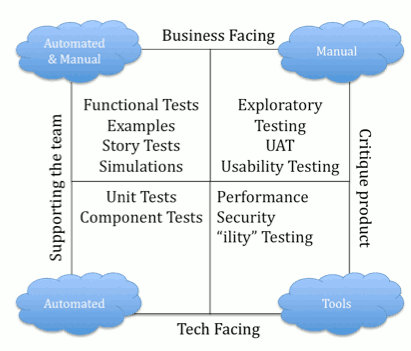
test quadrant

The hierarchy of criteria that we use to help us

  1. Release Criteria
    Ultimately controlled by the Product Owner or release manager.
  2. Acceptance Criteria
    Also owned by the Product Owner.
    Attached to each user story, or more correctly… product backlog item.
    The Development team must meet these in order to fulfill the Definition of Done.
  3. Test Conditions
    When executable, confirm the development team have satisfied the requirements of the product backlog item.

Write your tests first

TDD is  not about testing, it’s about creating better designs.
This forces us to design better software. “Testable”, “Modular”, separating concerns, Single responsibility principle.
This forces us down the path of SOLID Principles.

red green refactor

  1. Write a unit test
    Run it and watch it fail (because the production code is not yet written)
  2. Write just enough production code to make the test pass
  3. Re-run the test and watch it pass

This podcast around TDD has lots of good info.

Continuous Integration

Realise the importance of setting up CI and nightly builds.
The benefit of having your unit (fast running) tests automatically executed regularly are great.
You get rapid feedback, which is crucial to an agile team completing features on time.
Tests that are not being run regularly have the risk that they may be failing.
The sooner you find a failing test, the easier it is to fix the code.
The longer it’s left unattended, the more technical debt you accrue and the more effort is required to hunt down the fault.
Make the effort to get your tests running on each commit or push.

Nightly Builds

The slower running tests (that’s all the automated tests above unit tests on the triangle), need to be run as part of a nightly build.
We can’t have these running as part of the CI because they are just too slow.
If something gets in the way of a developers work flow, it won’t get done.

Pair Review

Don’t forget to pair review all code written.
In my current position we’ve been requesting reviews verbally and responding with emails, comments on paper.
This is not ideal and we’re currently evaluating review software, of which there are many offerings.

Professional Scrum Master

March 23, 2012

Hi all.

Looking forward to attending the PSM course on Monday 26/03.
Shortly after I’ll be going for the exam.

I’ve been mostly working in a scrum environment since around 2007.
Now I’m looking at solidifying some of that experience and knowledge, and gaining a little more hopefully?

Here’s the outline.

Scrum.org has designed the Professional Scrum Master (PSM) program to have the utmost rigor. The program’s courses, assessments, and certifications give participants the knowledge they need to use Scrum effectively and the credentials they need to communicate this ability in the marketplace.

Audience

The audience of the PSM course includes those that help lead the software development process in an organization. PSM is specifically targeted at the role of the Scrum Master, but the lessons are applicable to anyone in a role that supports a software development team’s efficiency, effectiveness, and continual improvement.

The Course

The Professional Scrum Master course is the first significant update of the Certified ScrumMaster (CSM) course that Ken Schwaber first created in 2002. This course covers Scrum basics, including the framework, mechanics, and roles of Scrum. But it also teaches how to use Scrum to optimize value, productivity, and the total cost of ownership of software products. Students learn through instruction and team-based exercises, and they are challenged to think on their feet to better understand what to do when they return to their workplaces.

Scrum.org maintains a defined curriculum for the Professional Scrum Master courses and selects only the most qualified instructors to deliver them. Each instructor brings his or her individual experiences and areas of expertise to bear, but all students learn the same core course content. This improves their ability to pass the Professional Scrum Master assessments and apply Scrum in their workplaces.

The Professional Scrum Master course (previously known as the Scrum In Depth course) covers Scrum basics, including the framework, mechanics, and roles of Scrum. But it also teaches how to use Scrum how to optimize value, productivity, and the total cost of ownership of software products. Students learn through instruction and team-based exercises, and they are challenged to think on their feet to better understand what to do when they return to their workplaces.

The course curriculum covers:

  • Scrum Basics. What is Scrum and how has it evolved?
  • Scrum Theory. Why does Scrum work and what are its core principles? How are the Scrum principles different from those of more traditional software development approaches, and what is the impact?
  • Scrum Framework and Meetings. How Scrum theory is implemented using time-boxes, roles, rules, and artifacts. How can these be used most effectively and how can they fall apart?
  • Scrum and Change. Scrum is different: what does this mean to my project and my organization? How do I best adopt Scrum given the change that is expected?
  • Scrum and Total Cost of Ownership. A system isn’t just developed, it is also sustained, maintained and enhanced. How is the Total Cost of Ownership (TCO) of our systems or products measured and optimized?
  • Scrum Teams. Scrum Teams are self-organizing and cross-functional; this is different from traditional development groups. How do we start with Scrum teams and how do we ensure their success?
  • Scrum Planning. Plan a project and estimate its cost and completion date.
  • Predictability, Risk Management, and Reporting. Scrum is empirical. How can predictions be made, risk be controlled, and progress be tracked using Scrum.
  • Scaling Scrum. Scrum works great with one team. It also works better than anything else for projects or product releases that involve hundreds or thousands of globally dispersed team members. How is scaling best accomplished using Scrum?

Prerequisites

The Professional Scrum Master course is primarily targeted at those responsible for the successful use and/or rollout of Scrum in a project or enterprise. Attendees will be able to make the most of the class if they:

  • Have attended the Professional Scrum Foundations course
  • Understand the basics of project management.
  • Understand requirements and requirements decomposition.
  • Have been on or closely involved with a project that builds or enhances a product.
  • Have studied the Scrum Guide.
  • Have read one of the Scrum books.
  • Want to know more about how Scrum works, how to use it, and how to implement it in an organization.

Assessment and Certification

As a matter of principle, Scrum.org feels that certification should be available to all those who possess a particular level of knowledge — not only to those who have taken a class. As a result, they offer the option of Professional Scrum Master I and II assessments to the public — not only to those who have taken the Professional Scrum Master course. The Professional Scrum Master program features two assessments and two levels of certification.

Keeping your events thread safe

March 11, 2012

An area I’ve noticed where engineers often forget to think about synchronization is where firing events.
Now I’m going to go over a little background on C# delegates quickly just to refresh what we learnt or should have learnt years ago at the beginnings of the C# language.

It seems to be a common misconception, that all that is needed to keep synchronisation,
is to check the delegate (technically a MulticastDelegate, or in architectural terms the publisher of the publish-subscribe pattern (more commonly known as the observer pattern)) for null.

Defining the publisher without using the event keyword

public class Publisher {
   // ...

   // Define the delegate data type
   public delegate void MyDelegateType();

   // Define the event publisher
   public MyDelegateType OnStateChange {
      get{ return _onStateChange;}
      set{ _onStateChange = value;}
   }
   private MyDelegateType _onStateChange;

   // ...
}

When you declare a delegate, you are actually declaring a MulticastDelegate.
The delegate keyword is an alias for a type derived from System.MulticastDelegate.
When you create a delegate, the compiler automatically employs the System.MulticastDelegate type rather than the System.Delegate type.
When you add a method to a multicast delegate, the MulticastDelegate class creates a new instance of the delegate type, stores the object reference and the method pointer for the added method into the new instance, and adds the new delegate instance as the next item in a list of delegate instances.
Essentially, the MulticastDelegate keeps a linked list of Delegate objects.

It’s possible to assign new subscribers to delegate instances, replacing existing subscribers with new subscribers by using the = operator.
Most of the time what is intended is actually the += operator (implemented internally by using System.Delegate.Combine()).
System.Delegate.Remove() is what’s used when you use the -+ operator on a delegate.

class Program {
   public static void Main() {

      Publisher publisher = new Publisher();
      Subscriber1 subscriber1 = new Subscriber1();
      Subscripber2 subscripber2 = new Subscripber2();

      publisher.OnStateChange = subscriber1.OnStateChanged;

      // Bug: assignment operator overrides previous assignment.
      // if using the event keyword, the assignment operator is not supported for objects outside of the containing class.
      publisher.OnStateChange = subscriber2.OnStateChanged;

   }
}

Another short coming of the delegate is that delegate instances are able to be invoked outside of the containing class.

class Program {
   public static void Main() {
      Publisher publisher = new Publisher();
      Subscriber1 subscriber1 = new Subscriber1();
      Subscriber2 subscriber2 = new Subscriber2();

      publisher.OnStateChange += subscriber1.OnStateChanged;
      publisher.OnStateChange += subscriber2.OnStateChanged;

      // lack of encapsulation
      publisher.OnStateChange();
   }
}

C# Events come to the rescue

in the form of the event keyword.
The event keyword address’s the above problems.

The modified Publisher looks like the following:

public class Publisher {
   // ...

   // Define the delegate data type
   public delegate void MyDelegateType();

   // Define the event publisher
   public event MyDelegateType OnStateChange;

   // ...
}

Now. On to synchronisation

The following is an example from the GoF guys with some small modifications I added.
You’ll also notice, that the above inadequacies are taken care of.
Now if the Stock.OnChange is not accessed by multiple threads, this code is fine.
If it is accessed by multiple threads, it’s not fine.
Why I hear you ask?
Well, between the time the null check is performed on the Change event
and when Change is fired, Change could be set to null, by another thread.
This will of course produce a NullReferenceException.

The code on lines 59,60 is not atomic.

using System;
using System.Collections.Generic;

namespace DoFactory.GangOfFour.Observer.NETOptimized {
    /// <summary>
    /// MainApp startup class for .NET optimized
    /// Observer Design Pattern.
    /// </summary>
    class MainApp {
        /// <summary>
        /// Entry point into console application.
        /// </summary>
        static void Main() {
            // Create IBM stock and attach investors
            var ibm = new IBM(120.00);

            // Attach 'listeners', i.e. Investors
            ibm.Attach(new Investor { Name = "Sorros" });
            ibm.Attach(new Investor { Name = "Berkshire" });

            // Fluctuating prices will notify listening investors
            ibm.Price = 120.10;
            ibm.Price = 121.00;
            ibm.Price = 120.50;
            ibm.Price = 120.75;

            // Wait for user
            Console.ReadKey();
        }
    }

    // Custom event arguments
    public class ChangeEventArgs : EventArgs {
        // Gets or sets symbol
        public string Symbol { get; set; }

        // Gets or sets price
        public double Price { get; set; }
    }

    /// <summary>
    /// The 'Subject' abstract class
    /// </summary>
    abstract class Stock {
        protected string _symbol;
        protected double _price;

        // Constructor
        public Stock(string symbol, double price) {
            this._symbol = symbol;
            this._price = price;
        }

        // Event
        public event EventHandler<ChangeEventArgs> Change;

        // Invoke the Change event
        private void OnChange(ChangeEventArgs e) {
            // not thread safe
            if (Change != null)
                Change(this, e);
        }

        public void Attach(IInvestor investor) {
            Change += investor.Update;
        }

        public void Detach(IInvestor investor) {
            Change -= investor.Update;
        }

        // Gets or sets the price
        public double Price {
            get { return _price; }
            set {
                if (_price != value) {
                    _price = value;
                    OnChange(new ChangeEventArgs { Symbol = _symbol, Price = _price });
                    Console.WriteLine("");
                }
            }
        }
    }

    /// <summary>
    /// The 'ConcreteSubject' class
    /// </summary>
    class IBM : Stock {
        // Constructor - symbol for IBM is always same
        public IBM(double price)
            : base("IBM", price) {
        }
    }

    /// <summary>
    /// The 'Observer' interface
    /// </summary>
    interface IInvestor {
        void Update(object sender, ChangeEventArgs e);
    }

    /// <summary>
    /// The 'ConcreteObserver' class
    /// </summary>
    class Investor : IInvestor {
        // Gets or sets the investor name
        public string Name { get; set; }

        // Gets or sets the stock
        public Stock Stock { get; set; }

        public void Update(object sender, ChangeEventArgs e) {
            Console.WriteLine("Notified {0} of {1}'s " +
                "change to {2:C}", Name, e.Symbol, e.Price);
        }
    }
}

At least we don’t have to worry about the += and -= operators. They are thread safe.

Ok. So how do we make it thread safe?
Now I’ll do my best not to make your brain hurt.
We can assign a local copy of the event and then check that instead.
How does that work you say?
The Change delegate is a reference type.
You may think that  threadSafeChange references the same location as Change,
thus any changes to Change would also be reflected in threadSafeChange.
That’s not the case though.
Change += investor.Update does not add a new delegate to Change, but assigns it a new MulticastDelegate,
which has no effect on the original MulticastDelegate that threadSafeChange also references.

The reference part of reference type local variables is stored on the stack.
A new stack frame is created for each thread with every method call
(whether its an instance or static method).
All local variables are safe…
so long as they are not reference types being passed to another thread or being passed to another thread by ref.
So, only one thread can access the threadSafeChange instance.

private void OnChange(ChangeEventArgs e) {
   // assign reference to heap allocated memory to stack allocated implements thread safety
   EventHandler<ChangeEventArgs> threadSafeChange = Change;
   if ( threadSafeChange != null)
      threadSafeChange(this, e);
}

Now for a bit of error handling

If one subscriber throws an exception, any subscribers later in the chain do not receive the publication.
One way to get around this problem, is to semantically override the enumeration of the subscribers.
Thus providing the error handling.

private void OnChange(ChangeEventArgs e) {
   // assign reference to heap allocated memory to stack allocated implements thread safety
   EventHandler<ChangeEventArgs> threadSafeChange = Change;
   if ( threadSafeChange != null) {
      foreach(EventHandler<ChangeEventArgs> handler in Change.GetInvocationList()) {
         try {
            //if subscribers delegate methods throw an exception, we'll handle in the catch and carry on with the next delegate
            handler(this, e);
            // if we only want to allow a single subscriber
            if (Change.GetInvocationList().Length > 1)
               throw new Exception("Too many subscriptions to the Stock.Change" /*, provide a meaningful inner exception*/);
         }
         catch (Exception exception) {
            // what we do here depends on what stage of development we are in.
            // if we're in early stages, pre-release, fail early and hard.
         }
      }
   }
}

Bare-metal Hypervisor Setup Evaluation

January 23, 2012

The views expressed in this post are my own and don’t reflect the views of my employer.

Recently I had the opportunity for work, to carry out some research on what’s in the market in regards to bare-metal hypervisors.

The following is the result of an in depth research and deployment project of the following bare-metal hyper-visors.
This will enable us to trial the hypervisors out for performance, ease of setup, ease of administration, and ease of use.

I’ve also looked at hardware costs, but first it needs to be decided which hypervisor we are going to go with.
As this would be a team decision, I thought the best way to go about this was to record some of my existing experience with further research into some of the product leaders offerings.

I haven’t used KVM before.
I knew it existed, but when I was last in the market comparing hypervisors, KVM was an infant.
Now it appears to have grown up and is comparable with it’s commercial rivals.
This pretty much sums up the KVM vs VMware battle
This pretty much sums up the Xen vs KVM battle


ESX(i)

I’ve used these extensively and am well aware of their pros and cons.
Supports iscsi.
I prefer not to have to pay for a product if there are FOS (Free & Open Source) offerings that get the job done just as well.
In looking at the likes of KVM and Xen, the cons of ESX/ESXi really stand out, not to mention the fact that KVM is completely free, more efficient and has a faster pace of growth.
With the free version, that’s ESXi, you get (as of version 5) 32GB vRAM, and that’s only because the community kicked up such a fuss about paying per CPU for a product that was originally free.
VMware keep changing the rules and pricing strategies when users go else where. I’d prefer not to pay at all.
I’m not going to spend time recording the pros and cons of VMware at this stage, as I think the other contenders have more to offer, and ask for less or nothing in return.
If we find that there are un-foreseen hurdles in the other products, we should look at ESXi as a backup.

Management

vSphere client (only runs on windows).
vSphere CLI (read-only, unless you pay for license)
Have very limited access to the hypervisor

Migration

  • General
  • Potential migration of KVM to VMware.
    Although this link says  the above won’t work, but has some other suggestions.

UPS

See my blog posts.


Citrix XenServer

XenServer support for iscsi

Xen is a type 1 bare-metal hypervisor. This means it runs as close to the hardware as possible.
To take full advantage of it’s speed, you have to run paravirtualised (modified OS’s).
Since most of our work at this stage would be on Windows, there would be no benefit here for us.
Runs in a small custom Linux system.
Intel VT-x or AMD-V is required to run full hardware virtualisation (HVM) rather than paravirtualised.

Licensing for XenServer Express

Be aware, Citrix can change their licensing structure at any time.
Features and current licensing model
XenServer Licensing FAQ
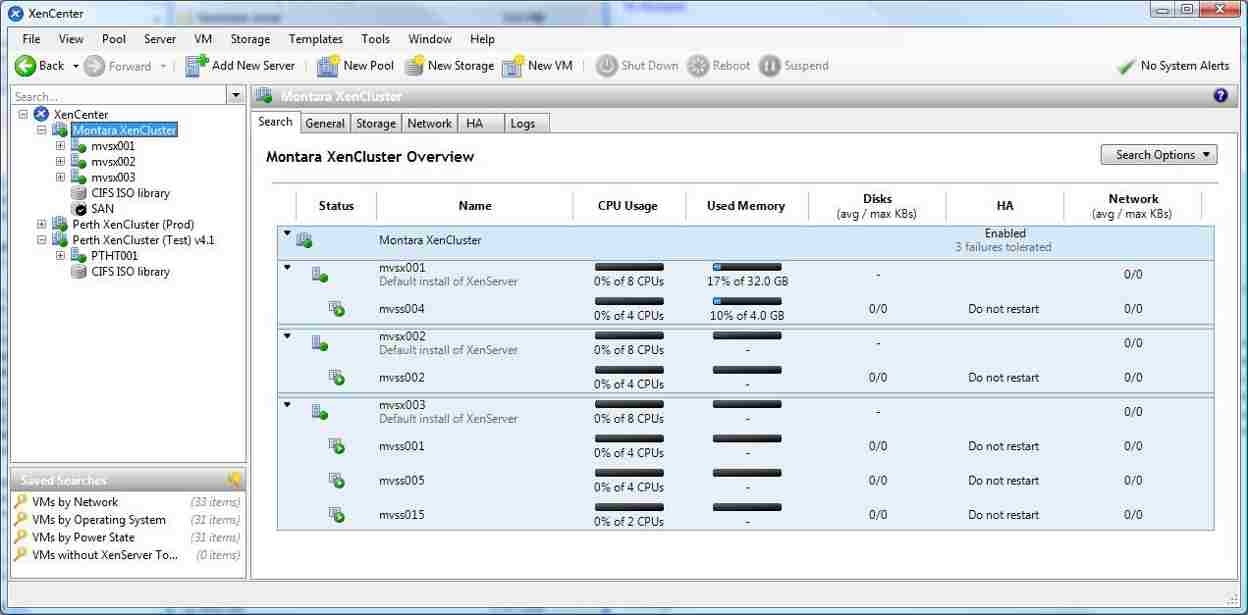
XenCenter can only connect to a single instance of XenServer at any one time.
XenServer currently free
XenCenter free
http://www.citrix.com/English/NE/news/news.asp?newsID=1687130

FAQ

Management

Migration

ESX(i) to XenServer

Seemed to have struggles (windows guest).
Seemed to be a little more successful (windows guest).

UPS

Integrating XenServer and APC PowerChute. Also see this.
Using apcupsd as KVM can.

Installation Stage

The getting started page. You can find the quick installation guide here.

The full installation guide.
The Administrators guide.

Download and install XenServer on your host.
Download and install XenCenter on your management box.

You’ll need the following details:

  1. Hostname
  2. Host IP and mask
  3. Gateway
  4. DNS Server
  5. NTP Address

This was a very straight forward install.
I was expecting some trouble, but there wasn’t any.


KVM

KVM has support for iscsi.
Expected to run all production OS’s.
Why will KVM be the leader amongst hypervisors?

Interesting articles:

Is completely free.
Considerably more resource efficient than the alternatives
There are no resource constraints. We pay for nothing and get an enterprise level product with a huge community.

KVM on Debian

Management

Web based KVM management offerings of which ProxMox VE seems to be the stand-out.
Many of these can also be used for Xen. Also see this.

ProxMoxVE

ProxMox is a commercial company.
ProxMox VE Looks Good.
From what I’ve seen, looks easier to setup than Archipel.
Proxmox VE is licensed under GPLv2 (Open source).
My understanding of the GPLv2 license, is that the suplier of the GPL’d software can decide to charge a fee for download at any time.
As far as I’m aware, Proxmox are within their rights to do so at any time.
Correct me if I’m wrong?
The ISO installer is packaged with Debian, although you can install on top of Debian.
Looks User friendly, has Web interface (multi platform). No installs required.
Support: incl free community and paid for. See here and here.
The wiki
Looks like what ever you can do on a Debian system, you can do on a ProxMox system.
See this link. Also includes ESXi comparisons.
Proxmox VE is free to use and open source.
Easy backups and restores.
Video tutorials here and here.

Archipel

Archipel Also looks good.
Free and Open Source, licensed under AGPL (which more specifically targets distributed applications).
Team of 6 voluntary developers. Lots of info here.
Supports all libvirt-supported virtualisation engines like KVM, Xen, VMware
The install on first appearance, looks more work than ProxMox.
Documentation, IRC channel (members are very helpful), etc.
The Archipel client is JavaScript, which is run locally.

Industry support

KVM is supported by major industry players such as…

  1. IBM
  2. Cisco
  3. Intel
  4. AMD
  5. Redhat
  6. Novell amongst others.

Migration

Looks like migration of guests from most platforms to KVM is covered.
VMware to Proxmox, XenServer to Proxmox.

UPS

Can be shutdown by an APC Smart-UPS
using the APCUPSD daemon This will shutdown immediately.
Or better, by using PCNS for Linux.
Using PCNS we can specify when to shutdown and all sorts of other things.

Installation Stage Archipel

Links found useful for the Debian setup

http://www.debian-tutorials.com/virtualization/kvm-virtualization-on-debian-squeeze-server

http://wiki.debian.org/KVM

http://wiki.libvirt.org/page/Networking#Bridged_networking_.28aka_.22shared_physical_device.22.29

http://wiki.kartbuilding.net/index.php/KVM_Setup_on_Debian_Squeeze

Setting up Debian

Download Debian Wheezy from here
Install it.
Give it a hostname. For example “vmhost” without the quotes.
When prompted, select the SSH Server option.
Update your package index and install the necessary packages.

As root, run:

apt-get update
apt-get install qemu-kvm libvirt-bin virtinst virt-top

virtinst is for virt-install tools etc.
qemu-kvm is the new name for the kvm package in squeeze
libvirt-bin is what will control kvm and start guests on boot etc.
virt-top is a ‘top’-like utility for virtualisation stats

Add user to groups

Add the currently logged in user that will be using the associated programmes.

usermod -a -G libvirt myusername
usermod -a -G kvm myusername

Then check that the user was added to the groups.

groups myusername

or

id myusername

or view all users in all groups

cat /etc/group | less
Setup networking

Your /etc/network/interfaces needs to have a similar section:
As root, run the following…

vi /etc/network/interfaces

# The primary network interface
allow-hotplug eth0
iface eth0 inet static
   address 192.168.1.20
   netmask 255.255.255.0
   gateway 192.168.1.254
   broadcast 192.168.1.255

Now restart your interface:

ifdown eth0
ifup eth0

Check that the changes have taken affect:

ip addr show
Setup Bridged networking

You also need to set up a network bridge on our server.
Rather than use NAT based connectivity, we need bridge networking.

install the package bridge-utils.

apt-get install bridge-utils

I’ve yet to set the bridge up.
Will add this once done

Setting up Archipel

Links I found helpful:

FAQ and supported browsers
https://github.com/primalmotion/Archipel/wiki/General%3A-FAQ&nbsp;&nbsp

Install ejabberd

apt-get install ejabberd

According to this, which is linked if you follow the install guide through,
we will need to update the path to the tls certificate.
Not sure where that is, but will have to find out.
the sample file contains the ejabberd configuration needed for Archipel.
It is not ready for production, so will need some modification. Yet to find out what.
Change all occurrences of FQDN to vmhost.mydomain.local and follow the other directions.

Once the ejabberd.cfg file is modified as suggested, download pscp.exe from here.
Put both the pscp.exe file and the ejabberd.cfg in the same folder (just to save typing paths and adding environment variables).
The help page is here if you get stuck.
Run a cmd prompt from the directory you have the 2 previous mentioned files within.
Then run:

pscp ejabberd.cfg myusername@192.168.1.20:ejabberd.cfg

Enter your password when prompted.
The file will be securely copied via SSH to your ~ dir.
You can’t copy directly to the /etc/ejabberd/ directory as you would need to be root of the destination machine.
Now go to the Debian box. cd into ~.
and move the config file to where it belongs.

su root

Enter your password when prompted.

mv ejabberd.cfg /etc/ejabberd/ejabberd.cfg

Then check that the move was successful.

Start the jabber server if it’s not already.
As root:

/etc/init.d/ejabberd start

Wait a few seconds and run:

/usr/sbin/ejabberdctl status

And you should get a result of running, with the version details.

You need to register a XMPP admin account (if you want archipel to work out of the box, just name it admin):

ejabberdctl register admin vmhost.mydomain.local MyCrazyPassWordHere

You should get something like:

User admin@vmhost.mydomain.local successfully registered.

Although I didn’t the last time because I wasn’t running as root.

Continue with the Archipel installation

The client is easy, just fetch and un-compress and your ready to go.

The agent, you will need to install qemu-utils if it’s not already.
It was for me.

As root, run:

apt-get install python-setuptools python-imaging python-numpy python-libvirt

python-libvert is Python bindings for the libvirt library which was already installed.

I also installed subversion:

apt-get install subversion

Now… as root, I chose to install the published packages on Pypi.
I ran:

easy_install archipel-agent
Post installation formalities

Finalise the installation:

archipel-initinstall

Follow the additional output instructions on the screen.

Now as root:

Create the pubsub nodes
archipel-tagnode --jid=admin@vmhost.mydomain.local --password=MyCrazyPassWordHere --create
archipel-rolesnode --jid=admin@vmhost.mydomain.local --password=MyCrazyPassWordHere --create
archipel-adminaccounts --jid=admin@vmhost.mydomain.local --password=MyCrazyPassWordHere --create
archipel-vmparkingnode --jid=admin@vmhost.mydomain.local --password=MyCrazyPassWordHere --create

The last two commands were, introduced after beta 4, so they didn’t exist on the binary I installed.

You can now start the archipel agent.

/etc/init.d/archipel start

The logs are printed to /var/log/archipel/archipel.log

To be completely sure Archipel is up and your hypervisor is connected you can run:

ejabberdctl connected_users

If you choose to just dump the archipel client somewhere and browse to the index.html,
you will have to use Safari as the browser.
Alternatively, you can use Chrome,
but you need to pass the argument… –disable-web-security
Or the better way is to just uncompress the archive into a HTTP server directory,
and access it with your browser.
I’ve been told nginx works well with serving Archipel.
At this stage I just set the client up on IIS locally.
In saying that, I’m getting the index.html,
but I’m getting 404’s for Info.plist and main.j
I need to look into this.

Using Archipel

https://github.com/primalmotion/Archipel/wiki/User-manual

Once you have the page in your browser, enter the following details into the dialog.

Jabber ID: admin@vmhost.mydomain.local
Password: MyCrazyPassWordHere
BOSH service: http://vmhost.mydomain.local:5280/http-bind

If you can’t access vmhost, try navigating to http://vmhost.mydomain.local:5280/http-bind in your browser.

You should get something like the following:

If you don’t,
try pinging vmhost.mydomain.local.
If the IP works but the host.FQDN doesn’t, it’s a dns issue.
I checked the /etc/hosts file and it had the host name as expected.

127.0.1.1   vmhost.mydomain.local   vmhost

For some reason, the Debian box’s hostname wasn’t getting registered on the DNS server.
The way around this is to add the following entry to the hosts file of the machine you have your client running from.

192.168.1.20    vmhost.mydomain.local

OpenSSH from Linux to Windows 7 via tunneled RDP

December 27, 2011

I recently acquired a new second hand Asus laptop from my work,
that will be performing a handful of responsibilities on one of my networks.

This is the process I took to set up OpenSSH on Cygwin running on the Windows 7 box.

I won’t be going over the steps to tunnel RDP as I’ve already done this in another post

Make sure your LAN Manager Authentication Level is set as high as practical.
Keeping in mind, that some networked printers using SMB may struggle with these permissions set to high.

  1. Windows Firewall -> Allowed Programs -> checked Remote Desktop.
  2. System Properties -> Remote tab -> turn radio button on to at least “Allow connections from computers running any version of Remote Desktop”
    If you like, this can be turned off once SSH is set-up, or you can just turn the firewall rule off that lets RDP in.

CopSSH which I used on my last set of Linux to Windows RDP via SSH set-ups is no longer free.
So I’m not paying for something I can get for free, but with a little extra work involved.

So I looked at some other Windows SSH offerings

  1. freeSSHd which looked like a simple set-up, but it didn’t appear to be currently maintained.
  2. OpenSSH the current latest version of 5.9 released September 6, 2011
    A while back OpenSSH wasn’t being maintained. Looks like that’s changed.

OpenSSH is part of Cygwin, so you need to create a
c:\cygwin directory and download setup.exe into it.

    1. Right click on c:\cygwin\setup.exe and select “Run as Administrator”.
      Click Next.
    2. If Install from Internet is not checked, check it. Then click Next.
    3. Accept the default “Root Directory” of C:\cygwin. Accept the default for “Install For” as All Users.
    4. Accept the default “Local Package Directory” of C:\cygwin.
    5. Accept the default “Select Your Internet Connection” of “Direct Connection”. Click Next.
    6. Select the closest mirror to you. Click Next.
    7. You can expand the list by clicking the View button, or just expand the Net node.
    8. Find openssh and click the Skip text, so that the Bin check box for the item is on.
    9. Find tcp_wrappers and click the Skip text, so that the Bin check box for the item is on.

If you selected tcp_wrappers and get the “ssh-exchange-identification: Connection closed by remote host” error,
you’ll need to edit /etc/hosts.allow and add the following two lines before the PARANOID line.

ALL: 127.0.0.1/32 : allow
 ALL: [::1]/128: allow

These lines were already in the /etc/hosts.allow

(optional) find the package “diffutils”, click on the word “skip” so that an x appears in Column B,
find the package “zlib”, click on the word “skip” (it should be already selected) so that an x appears in Column B.

Click Next to start the install.
Click Next again to… Resolving Dependencies, keep default “Select required packages…” checked.
At the end of the install, I got the “Program compatibility Assistant” stating… This program might not have installed correctly.
I clicked This program installed correctly.

Add an environment variable to your Systems Path variable.
Edit the Path and append ;c:\cygwin\bin

Right click the new Cygwin Terminal shortcut and Run as administrator.
Make sure the following files have the correct permissions.

/etc/passwd -rw-r–r–
/etc/group -rw-r–r–
/var drwxr-xr-x

Create a sshd.log file in /var/log/

touch /var/log/sshd.log
chmod 664 /var/log/sshd.log

Run ssh-host-config

  1. Cygwin will then ask Should privilege separation be used? Answer Yes
  2. Cygwin will then ask Should this script create a local user ‘sshd’ on this machine? Answer Yes
  3. Cygwin will then ask Do you want to install sshd as service? Answer Yes
  4. Cygwin will then ask for the value of CYGWIN for the daemon: []? Answer ntsec tty
  5. Cygwin will then ask Do you want to use a different name? Answer no
  6. Cygwin will then ask Please enter a password for new user cyg_server? Enter a password twice and remember it.

replicate your Windows user credentials with cygwin

mkpasswd -cl &gt; /etc/passwd
mkgroup --local &gt; /etc/group

I think (although I haven’t tried it yet) when you change your user password, which you should do regularly,
you should be able to run the above 2 commands again to update your password.
As I haven’t done this yet, I would take a backup of these files before I ran the commands.

to start the service, type the following:

net start sshd

Test SSH

ssh localhost

When you make changes to the /etc/sshd_config,
because it’s owned by cyg_server, you’ll need to make any changes as the owner.
I added the following line to the end of the file:

Ciphers blowfish-cbc,aes128-cbc,3des-cbc

As it sounds like Blowfish runs faster than the default AES-128

There are also a collection of changes to be made to the /etc/sshd_config

for example:

  • Change the LoginGraceTime to as small as possible number.
  • PermitRootLogin no
  • Set PasswordAuthentication to no once you get key pair auth set-up.
  • PermitEmptyPasswords no
  • You can also setup AllowUsers and DenyUsers.

The options available are here in the man page (link updated 2013-10-06).
This is also helpful, I used this for my CopSSH setup.

Open firewalls TCP port 22 and close the RDP port once SSH is working.

As my blog post says:
ssh-copy-id MyUserName@MyWindows7Box

I already had a key pair with pass phrase, so I used that.
Now we should be able to ssh without being prompted for a password, but instead using key pair auth.

http://pigtail.net/LRP/printsrv/cygwin-sshd.html
http://www.petri.co.il/setup-ssh-server-vista.htm
http://www.scottmurphy.info/open-ssh-server-sshd-cygwin-windows

JavaScript Reserved Words

December 19, 2011

Funnily enough, most of these are not used in the language.
They cannot be used to name variables or parameters.
In saying that,
I did some testing below and that statement’s not entirely accurate.

Usage of keywords in red should be avoided.

Reserved Keyword Comments
abstract  no
boolean  no
break  yes
byte  no  No type of byte in JavaScript
case  yes
catch  yes
char  no  JavaScript doesn’t have char. Use string instead
class  no  technically JavaScript doesn’t have class
const  no  no const, but read-only can be implemented
continue  yes
debugger  yes
default  yes
delete  yes
do  yes
double  no  JavaScript only has number (64 bit floating point)
else  yes
enum  no
export  no
extends  no
false  yes
final  no
finally  yes
float  no  JavaScript only has number (64 bit floating point)
for  yes
function  yes
goto  no
if  yes
implements  no  JavaScript uses prototypal inheritance. Reserved in strict mode
import  no
in  yes
instanceof  yes
int  no  JavaScript only has number (64 bit floating point)
interface  no  technically no interfaces, but they can be implemented. Reserved in strict mode
let  no Reserved in strict mode
long  no  JavaScript only has number (64 bit floating point)
native  no
new  yes  use in moderation. See comments in Responses below
null  yes
package  no Reserved in strict mode
private  no  access is inferred. Reserved in strict mode
protected  no  JavaScript has privileged, but it’s inferred. Reserved in strict mode
public  no  access is inferred. Reserved in strict mode
return  yes
short  no  JavaScript only has number (64 bit floating point)
static  no Reserved in strict mode
super  no
switch  yes
synchronized  no
this  yes
throw  yes
throws  no
transient  no
true  yes
try  yes
typeof  yes
var  yes
volatile  no
void  yes
while  yes
with  yes
yeild  no Reserved in strict mode

When reserved words are used as keys in object literals,
they must be quoted.
They cannot be used with the dot notation,
so it is sometimes necessary to use the bracket notation instead.
Or better, just don’t use them for your names.

var method;                  // ok
var class;                   // illegal
object = {box: value};       // ok
object = {case: value};      // illegal
object = {'case': value};    // ok
object.box = value;          // ok
object.case = value;         // illegal
object['case'] = value;      // ok

I noticed in Doug Crockfords JavaScript The Good Parts
in Chapter 2 under Names, where he talks about reserved words.
It says:
“It is not permitted to name a variable or parameter with a reserved
word.
Worse, it is not permitted to use a reserved word as the name of an object
property in an object literal or following a dot in a refinement.”

I tested this in Chrome and FireFox with the following results.

var private = 'Oh yuk'; // if strict mode is on: Uncaught SyntaxError: Unexpected strict mode reserved word
var break = 'break me'; // Uncaught SyntaxError: Unexpected token break


var myFunc = function (private, break) {
   // if strict mode is on or off: Uncaught SyntaxError: Unexpected token break
   // strangly enough, private is always fine as a parameter.
}


var myObj = {
   private: 'dung', // no problem
   break: 'beetle' // no problem
}
console.log('myObj.private: ' + myObj.private) // myObj.private: dung
console.log(' myObj.break: ' + myObj.break); // myObj.break: beetle


JavaScript also predefines a number of global variables and functions
that you should also avoid using their names for your own variables and functions.
Here’s a list:

  • arguments
  • Array
  • Boolean
  • Date
  • decodeURI
  • decodeURIComponent
  • encodeURI
  • encodeURIComponent
  • Error
  • eval
  • EvalError
  • Function
  • Infinity
  • isFinite
  • isNaN
  • JSON
  • Math
  • NaN
  • Number
  • Object
  • parseFloat
  • parseInt
  • RangeError
  • ReferenceError
  • RegExp
  • String
  • SyntaxError
  • TypeError
  • undefined
  • URIError

DVCS vs CVCS

December 3, 2011

Some differences between Distributed Version Control Systems (DVCS) and Centralised Version Control Systems (CVCS)

The central server dilemma

I hear a number of people being fearful about what they hear about DVCS not having a central repository.
In most cases this is not entirely true.
There are a number of DVCS models that work very well utilising one or more central servers.
In fact all the DVCS I’ve worked with or set-up have used one or more central repositories.

One of the key differences between Distributed and Centralised.
Is with distributed, the authoritative or central source is the source you want it to be, rather than being constrained by the system into having to have your source in one place.
There has been occasions where we have had to use one of the developers local repositories when the central server has been down.
This is simply making a decision that the entire team is aware of, that you are going to push / pull to / from an alternative repository.
Hg has it’s own inbuilt web server, so this is very easy to do.

One of the big advantages with a DVCS is the flexibility.
With increased flexibility and power, comes the increased likelihood of someone screwing something up.
Personally I’d much rather have the extra flexibility.

Branching Merging

Is easy and encouraged in DVCS.
DVCS are designed with branching and merging to be a common task.
Therefore they do it well, and some of the paranoia around this concept is no longer justified when you go distributed.

Mercurial (Hg) vs Git commits

Both Hg and Git are distributed.
Git has this extra step between your working directory and your repository called the Index (strangely enough)
All changes in git go into a staging area, then into your repository.
The index is used to combine a set of changes that you want to commit as one operation.
When you commit, what is committed is the contents of your index rather than your working directory.

The idea of the index, is that some of the history is erased once a commit is made, as multiple changes and their details are wrapped into a single commit.
There is a philosophical debate as to which way is better.
Is it better to have every change recorded, or is it better to have a bunch of changes wrapped into an atomic change, so that some detail is negated.
I’m kind of on the fence about this one, as I think there are pros and cons for both arguments.

Interfacing with Hg and Git for Windows users

There are currently several options here.

command line

file explorer

  1. TortoiseHg
  2. TortoiseGit
  3. GitExtensions for Explorer and Visual Studio integration

For Visual Studio users

  1. Git Source Control Provider also http://gitscc.codeplex.com/
  2. VisualHg

Centerim, Irssi, Alpine on Screen

November 27, 2011

I’ve recently acquired access to my own shell from anapnea.net

This allows me to carry out development, testing, and any on-line activity anonymously.
All via SSH.

One of the tasks I needed to do,
was to set up my date/time to my local time zone.
Rather than set the system wide time,
because there are many users on this machine,
I needed to set the time zone on a per user basis.

The behaviour of your interactive shell is defined by your ~/.bashrc and ~/.bash_profile files.
Edit one of these files and append or alter the TZ as follows:

 vim /home/myuser/.bashrc

where myuser is just that, my user name.

Append the following:

export TZ="/usr/share/zoneinfo/yourcountry"

Where yourcountry is one of the country files in /usr/share/zoneinfo/

Screen

Screen is a Linux shell session manager.
It’s great, because you can leave multiple sessions running and switch between them,
all in a single console.
Then you can just detatch from screen, leaving your programmes running on it.
Terminate your SSH session, and re-connect from another machine,
re-attach to screen, and carry on working where you left off,
with your programmes all still running.

This is a quick run down on what it is and how to use it.

Create a new screen session:

screen

List screens:

screen -ls

Detaching:

Ctrl-a, d

To re-attach to a screen:

screen -r

Or

screen -raAd

Reattach (-r), do some sizing stuff (a,A), and detach (d) before reattaching if necessary.
If your screen session is attached elsewhere, using -raAd will detach that session, and reattach it here.

Cycle through each screen:

Ctrl-a n
Ctrl-a p

You can kill a screen by typing exit.

Terminate a screen:

screen -X -S ID kill

Where ID is the id of the screen you want to terminate.

Useful links
http://quadpoint.org/articles/irssi
Full list of commands and their usage http://www.math.utah.edu/docs/info/screen_5.html

CenterIM

CenterIM is a Linux command line instant messenger client.
Getting started
with CenterIM

Setting up GTalk in CenterIM:
Assuming you have centerim installed.
cd into your .centerim directory and edit the config file.

vim config

Add the following to the file:

jab_nick MyUser@gmail.com
jab_pass
jab_server talk.google.com:5223
jab_osinfo 1
jab_prio 4
jab_ssl 1

Enter the command mode by pressing the Esc key.

:wq

This will write and quit.
run centerim:

centerim

or better, run it in screen…

screen centerim

Press F4 for the general menu.
Select Accounts..

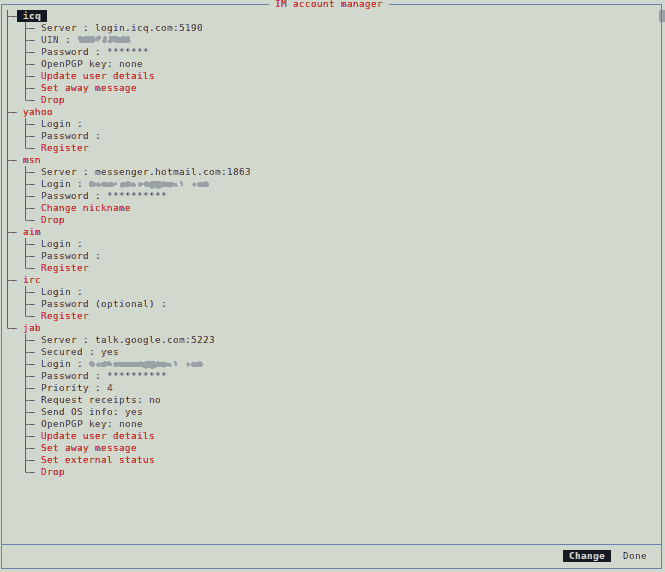
Under the Jab protocol, you will now see the connection details reflected.

Irssi

Irssi is a Linux command line IRC client.
When I use Irssi,
these are the links I use most commonly.
http://pthree.org/2010/02/02/irssis-channel-network-server-and-connect-what-it-means/
http://quadpoint.org/articles/irssi
http://linuxreviews.org/software/irc/irssi/#toc6
IRC command reference http://www.ircle.com/reference/commands.shtml
and full help for commands http://static.quadpoint.org/irssi-docs/help-full.html
For the beginner
The Full manual
Splitting Windows

I’ll probably end up adding more to this.

Alpine

Alpine is a Linux command line mail client.
Here
is an accurate guide on how to setup your GMail accounts using IMAP in alpine.
I used this for my first account setup.

When you need to setup multiple accounts,
you have to do a little bit more configuration.
I followed this.

Then create a Role.

I run all my external shell apps on screen.
So I run the following command…

screen alpine

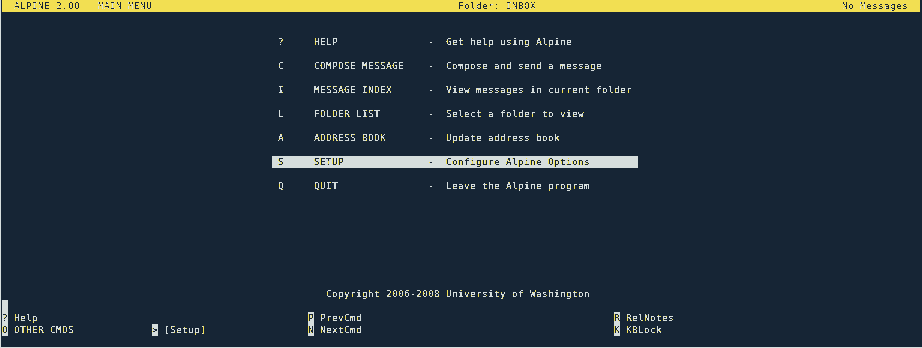
You should be presented with the Main Menu.

Press S (Setup), L (collectionLists)

Press A (Add Cltn)
Add a Nickname that makes sense to you to reference your account by,
and the Server, as you did in the initial account setup,
save as you did in the initial setup.
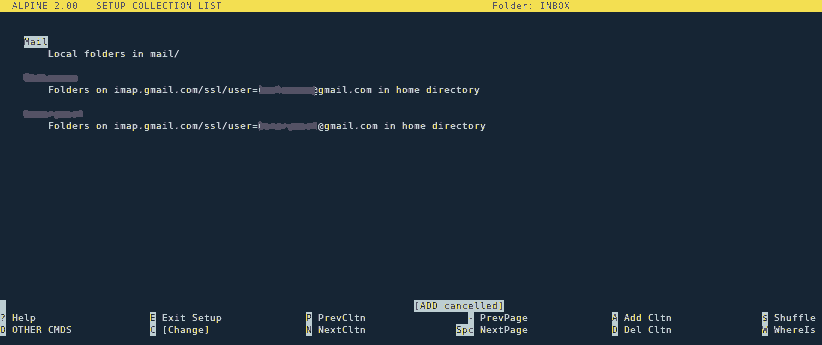
Your Setup Collection List should look similar to the following.

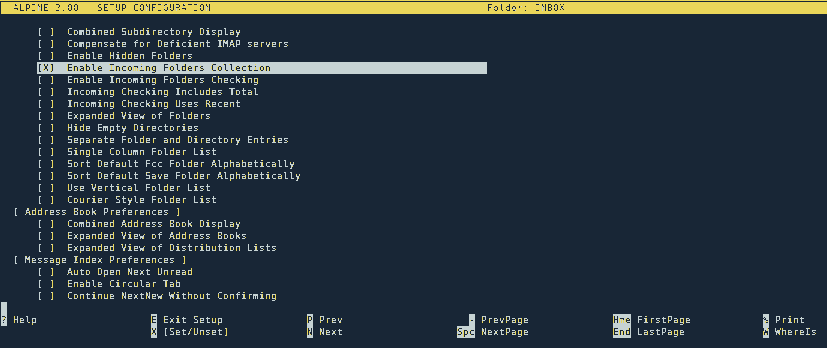
From the Main Menu, press S (Setup), C (Config).
Scroll down until you find “Enable Incoming Folders Collection” and turn the radio button on.

Press E (Exit), and Y (Yes) to the Commit changes prompt.
You should be back on the Main Menu now.
Now you need to add a role for each account you’ve just setup.
Press S (Setup), R (Rules).

Then choose R (Roles).
Press A (Add).
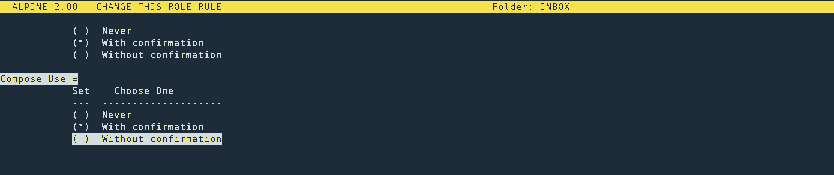
Setup each role like the following.

Press E (Exit Setup), and Y to the save prompt.

Again in the S (Setup), C (Config).
Some of the settings that need to be turned on are:

  • alternate-compose-menu is optional
  • confirm-role-even-for-default

I set the following fields, so they show up in new messages you are composing.

Create a new message

There are a few ways you can compose a new email message.
This depends on where you start the process from.
If you’re in one of your mail folders,
you can press C (Compose).
You’ll be asked which role you would like to use to compose the message.
These are the role’s you set up before,
each one applies to one of your email accounts.
Once you choose one,
you’ll see a template with the fields you set up before.
Fill out the fields.
When your done composing your message,
press Ctrl-X to send.

Move a message from folder to another folder

  1. Select the message you want to move.
  2. Press the S (Save) key.
  3. If you have multiple email accounts, press Ctrl+N (Next Collection) or Ctrl+P (Prev Collection) to cycle through your accounts.
  4. Press Ctrl+T (To Folders).
    You will be presented with the collection of your email folders for your account.
  5. Select Which folder you want to put your message into.
  6. Press enter, unless you have to move the message down another level.
  7. If this is the case, press ‘/’ (the slash key).
  8. Then either the Tab key twice, or Ctrl+X (List matches).
    This will show you the next layer of folders to choose from.
    Either select the folder you want to move your message to and press Enter,
    or to go to another level, repeat steps 5 to 8.
  9. Once you’ve located the target folder (and selected it) to save (move) your message to,
    you’ll be provided with the path that you are about to save to.
  10. Press Enter. The message [Saving DONE] will be displayed.
    You message is now moved.
    When you return to the source folder,
    you will be asked if you want the message that is there deleted,
    so that you have moved, not copied the message.
    You have the option to either copy or move.

Multi selecting (Selecting multiple emails)

  1. Select the email and press the ‘;’ (semicolon) key.
  2. You will be prompted chose a selection criteria.
    I selected C (just select current message).
    When you do this, zoom will come into effect.
    So you will only see the currently selected messages.
  3. To un-zoom, so you can see all messages from the folder you were in, just press Z
    You will now see an ‘X’ next to the messages you have multi selected.
  4. Press the Z key again to zoom to the selected messages.
  5. Press A (Apply), then select the command you want to apply and that’s it.
  1. Select the link.
  2. Press Enter.
  3. Right click the link and select “Open link”.

Enable Spell Check in Alpine

First check that it’s not enabled

When composing a message, press  Ctrl+T
If you don’t get spell check, you’ll need to do the following.

Make sure you have aspell installed

On a debian based system, you can run

dpkg-query -l '*aspell*'

This will show you the aspell components installed

Or more precisely, just search for aspell

dpkg -l aspell

Once you find it, you can run

dpkg-query -W -f='${Status} ${Version}\n' aspell

This will tell you whether or not it’s installed.
If it’s not, you’ll need to install it:

sudo apt-get install aspell

From the Main menu in Alpine, S (Setup), C (Config).
Look for “spell”.
You can press ‘W’ to search and type in “spell” without the quotes.
Press Enter.
The first option you will find should be “Spell Check Before Sending”.
You can turn this on if you like.
Press ‘W’ again, accept the default, press Enter.
You should now see the option “Speller”.
Press Enter, and type in

aspell -c

Press Enter to accept.
Press ‘E’ to exit config.
Press ‘Y’ to the Commit changes prompt.

If you run the following at the command prompt

aspell

You should get a little information about what the -c switch does.

Scoping & Hoisting in JavaScript

November 14, 2011

Scoping

JavaScript scoping is different to classical languages, and can take some getting used to for programmers used to languages such as C, C++, C#, Java.
Classical languages like the before mentioned have block scope.
JavaScript has function scope.

In the following example “5” will be alerted.

var foo = 1;
function bar() {
   if (!foo) {
      var foo = 5;
   }
   alert(foo);
}
bar();


In the following example “1” will be alerted.

var a = 1;
function b() {
   a = 10;
   return;
   function a() {}
}
b();
alert(a);


In the following example Firebug will show 1, 2, 2.

var x = 1;
console.log(x); // 1
if (true) {
   var x = 2;
   console.log(x); // 2
}
console.log(x); // 2


In JavaScript, blocks such as if statements, do not create new scope. Only functions create new scope.

There is a workaround though 😉
JavaScript has Closure.
If you need to create a temporary scope within a function, do the following.

function foo() {
   var x = 1;
   if (x) {
      (function () {
         var x = 2;
         // some other code
      }());
   }
// x is still 1.
}

Line 3: begins a closure
Line 6: the closure invokes itself with ()

I discuss closure in depth in a later post.

Hoisting

Terminoligy

As far as I know…
function declaration or function statement
are the same thing.
function expression or variable declaration with function assignment
are the same thing.


A function statement looks like the following:

function foo( ) {}


A function expression looks like the following:

var foo = function foo( ) {};


A function expression must not start with the word “function”.

//anonymous function expression
var a = function () {
   return 3;
};

//named function expression
var a = function bar() {
   return 3;
};

//self invoking named function expression.
(function sayHello() {
   alert('hello!');
})();

//self invoking anonymous function expression.
(function ( ) {
   var hidden_variable;
   // This function can have some impact on
   // the environment, but introduces no new
   // global variables.
}() );


In JavaScript, a name enters a scope in one of four basic ways:

  1. Language-defined: All scopes are, by default, given the names this and arguments.
  2. Formal parameters: Functions can have named formal parameters, which are scoped to the body of that function.
  3. Function declarations: These are of the form function foo() {}.
  4. Variable declarations: These take the form var foo;.

Function declarations and variable declarations are always hoisted
invisibly to the top of their containing scope by the JavaScript interpreter.
Function parameters and language-defined names are, obviously, already there. This means that code like this:

function foo() {
   bar();
   var x = 1;
}

Is actually interpreted like this:

function foo() {
   var x;
   bar();
   x = 1;
}


It turns out that it doesn’t matter whether the line that contains the declaration would ever be executed.
The following two functions are equivalent:

function foo() {
   if (false) {
      var x = 1;
   }
   return;
   var y = 1;
}
function foo() {
   var x, y;
   if (false) {
      x = 1;
   }
   return;
   y = 1;
}

The assignment portion of the declaration is not hoisted.
Only the identifier is hoisted.
This is not the case with function declarations, where the entire function body will be hoisted as well,
but remember that there are two normal ways to declare functions. Consider the following JavaScript:

function test() {
   foo(); // TypeError 'foo is not a function'
   bar(); // 'this will run!'
   var foo = function () { // function expression assigned to local variable 'foo'
      alert('this won't run!');
   }
   function bar() { // function declaration, given the name 'bar'
      alert('this will run!');
   }
}
test();

In this case, only the function declaration has its body hoisted to the top. The name ‘foo’ is hoisted, but the body is left behind, to be assigned during execution.

Including named function expressions added to the local object

//'use strict';

var container;

function Container() {

   var that = this;
   var descender = 3;
   var targetMin = 0;
   var ascender = 0;
   var targetMax = 3;    

   this.inc = function () {

      if (ascender < targetMax) {
         ascender += 1;
         console.log('ascender incremented: now equals ' + ascender);
         return that;
      } else {
         that.inc = function () {
            console.log('inc now modified to return ' + targetMax);
         };
         that.inc();
         return that;
      }
   };

   alert(dec); // Uncaught ReferenceError: dec is not defined. we're actually looking for the global objects dec property which doesn't exist.
   alert(this.dec); // Prints 'undefined' because this.dec is hoisted and declared, but of course not yet defined.
   // If this.dec was not hoisted, we would get the same 'Uncaught ReferenceError: this.dec is not defined'.

   this.dec = function () {

      if (descender > targetMin) {
         descender -= 1;
         console.log('descender decremented: now equals ' + descender);
         return that;
      } else {
         that.dec = function () {
            console.log('dec now modified to return ' + targetMin);
         };
         that.inc();
         return that;
      }
   };
}

container = new Container();
container.inc().inc().inc().inc();
console.log(container.inc);
container.dec().dec().dec().dec();
console.log(container.dec);

Out of interest, the output looks like the following:

modify routine on the fly

Name Resolution Order

The most important special case to keep in mind is name resolution order. Remember that there are four ways for names to enter a given scope. The order I listed them above is the order they are resolved in. In general, if a name has already been defined, it is never overridden by another property of the same name. This means that a function declaration takes priority over a variable declaration. This does not mean that an assignment to that name will not work, just that the declaration portion will be ignored. There are a few exceptions:

  • The built-in name arguments behaves oddly. It seems to be declared following the formal parameters, but before function declarations. This means that a formal parameter with the name arguments will take precedence over the built-in, even if it is undefined. This is a bad feature. Don’t use the name arguments as a formal parameter.
  • Trying to use the name this as an identifier anywhere will cause a Syntax Error. This is a good feature.
  • If multiple formal parameters have the same name, the one occurring latest in the list will take precedence, even if it is undefined.

Now that you understand scoping and hoisting, what does that mean for coding in JavaScript?
The most important thing is to always declare your variables with var statements.
Declare your variables at the top of the scope (as already mentioned JavaScript only has function scope). See the Variable Declarations section.
If you force yourself to do this, you will never have hoisting-related confusion.
However, doing this can make it hard to keep track of which variables have actually been declared in the current scope.
I generally like to follow these coding standards with JavaScript.

function foo(a, b, c) {
   var x = 1;
   var bar;
   var baz = 'something';
   // other non hoistable code here
}

Getting MVC 4 running on Server 2003

October 24, 2011

For many of us, just updating to the latest Server software isn’t in all cases an option.

Make sure .NET 4.0 is installed.

The most reliable way to check the .NET framework and service pack versions is to consult the registry.
This is a good table that will tell you this.
If you find .NET 4.0 isn’t installed, you’ll have to download and install it.

Make sure ASP.NET 4.0 is activated for your web site

First you’ll need your web sites SiteID.
Open IIS Manager.
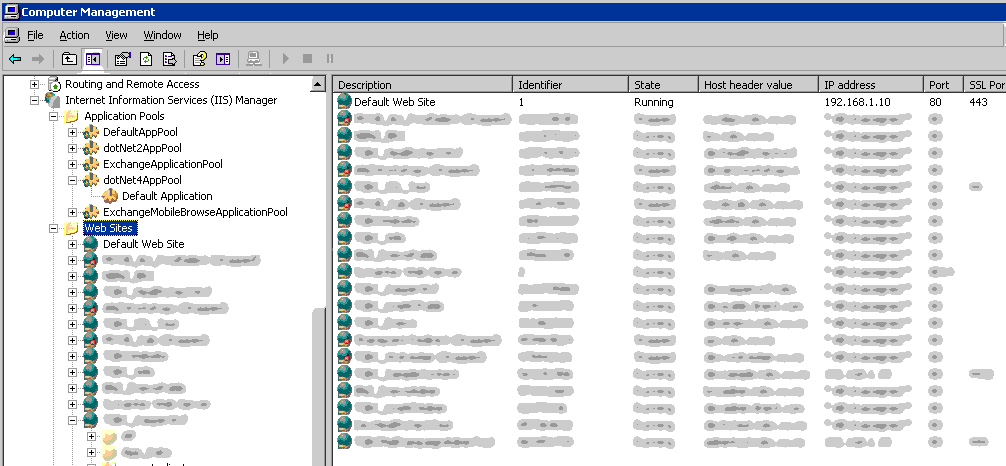
Click the Web Sites folder in the left pane. In the right pane, you’ll see all your web sites listed.
There should be a column called “Identifier”. The fields beneath are the web sites SiteID’s.
Take note of your web sites Id.

Navigate to ASP.NET’s default path C:\WINDOWS\Microsoft.NET\Framework\v4.0.30319
You’ll then need to run the following command:

aspnet_regiis -lk | find "Id"

Where “Id” is your web sites Id as you recorded above.
You need the quotes too.

This should produce the following:

"W3SVC/Id/ROOT/ [your .NET framework version number]"

That’s what your website’s virtual path in IIS6.0 looks like with the .NET framework version tacked on the end, without the quotes.
Id of course will be your web sites Id.

If the .NET framework version isn’t v4.0.30319, you’ll need to register it.
Run the following command:

aspnet_regiis.exe -norestart -s "W3SVC/Id/ROOT/"

Id is once again your web sites Id.
This should register ASP.NET 4.0 with your web site.
IIS won’t need restarting.

Make sure the App pool your web site is going to run in is dedicated to .NET 4.0

Here’s some doc for aspnet_regiis.exe

Make sure ASP.NET MVC 4 is installed on the target machine

or the project is set to bin deploy
I prefer to bin deploy, so we don’t clutter up the old server.
Any additional libraries I need,
I include by using NuGet at solution level,
This allows many projects to use the same packages.

It looked like after some research,
but before I actually started on this,
that we would run into this problem, but no,
It turned out that our .NET 4 ASP.NET ISAPI extension was already enabled.

File extension mapping

The file extension in the URL (.aspx for example) must be mapped to aspnet_isapi.dll.
If it is, and there’s a .aspx in the URL,
aspnet_isapi.dll invokes ASP.NET.
If ASP.NET is invoked, (because UrlRoutingModule is a .NET IHttpModule) UrlRoutingModule gets invoked.

IIS 6 only invokes ASP.NET when it sees a “filename extension” in the URL that’s mapped to aspnet_isapi.dll
This means we have to do some work to get IIS 6 to recognise files that don’t have this mapping.
As this was a test deployment, I wasn’t too concerned about speed.
So decided to use wildcard mapping for aspnet_isapi.dll, as it was the easiest to setup.

Open IIS Manager

1. Right click on your web app and select Properties
2. Select the HomeDirectory tab
3. Click on Configuration

4. Under the Wildcard application maps edit box,
—-click Insert (not Add)
5. Enter C:\WINDOWS\Microsoft.NET\Framework\v4.0.30319
—-\aspnet_isapi.dll for the “Executable:”
6. Uncheck “Verify that file exists”

7. Click OK, OK

There are a few ways of achieving a similar result.
Here are some ideas:

http://haacked.com/archive/2008/11/26/asp.net-mvc-on-iis-6-walkthrough.aspx
http://blog.stevensanderson.com/2008/07/04/options-for-deploying-aspnet-mvc-to-iis-6/
Another resource that’s well worth a read is the “Test Drive ASP.NET MVC” book.
In chapter 12 it talks a little about this also in the section… IIS 6.0 on Windows Server 2003 or XP Pro x64


Design a site like this with WordPress.com
Get started