Archive for the ‘Web’ Category

Extending, Currying and Monkey Patching. part 3

May 27, 2012

Monkey Patching

Or sometimes known as Duck Punching.

So what we’ve got here is an arbitrary object kimsObject (line 01) thrown in the BINARYMIST global, with a public method kimsMethod (line 03).
The trace method is passed an object and a method name (line 10). It replaces the specified
method with a new method that “wraps” additional functionality around the original method.
The call is made from line 23

var BINARYMIST = {};
BINARYMIST.kimsObject = (function () {
  return {
    kimsMethod: function () {
      alert("Now inside kimsMethod.");
    }
  };
}());

BINARYMIST.trace = (function () {
  return function (targetObject, targetMethod) {
    var originalMethod = targetObject[targetMethod];
    var that = this;
    (function () {
      console.log(new Date(), "Entering:", targetMethod);
      var result = originalMethod.apply(that, arguments);
      console.log(new Date(), "Exiting:", targetMethod);
      return result;
    }(/*execute me!*/));
  };
}());

(function () {
  BINARYMIST.trace(BINARYMIST.kimsObject, 'kimsMethod')
}());

I believe if used with care, and in moderation.
Monkey Patching can support and provide implementation for
Dr. Barbara Liskov’s Liskov Substitution Principle (LSP)

Consider the developer that uses a function he/she thinks does something, but it actually does something entirely unexpected.
Be sure to make known to the team and those what will use your code what you have done, and what they can expect.
Make sure this is documented in code around the API, whether it be with comments or simply in the way you write your code.

monkey patching

Jeff Atwood has a good post on the dangers of using Monkey Patching.
Be sure to check it out.

You may or may not need the Object.create function. It’s part of the ECMA Standard 262
which is the vendor-neutral standard for what was originally Netscape’s JavaScript.
This allows us to specify the object we want to be the prototype for our new object, I.E. our base class.
Properties added to an object‘s prototype are shared, through inheritance, by all objects sharing the prototype.
Alternatively, a new object may be created with an explicitly specified
prototype by using the Object.create built-in function.

This also makes me think of what we try to achieve with Aspect Orientation in .NET.
Below I’ve had an attempt at trying to make the BINARYMIST.createAspectedObjectWithTracing as generic as possible.
So that on the last line you can instantiate a BINARYMIST.kimsObject and call the kimsMethod method.
The way I’ve setup the BINARYMIST.createAspectedObjectWithTracing, you should be able to instantiate any object and call which ever method on it that you desire.
You get the tracing functionality for free.
Using this sort of approach, you should be able to apply any functionality you want to any method you want.

I’m keen on hearing how this could be improved.
Making the call even more transparent.

BINARYMIST.kimsObject = (function () {
  return {
    kimsMethod: function () {
      alert("Now inside kimsMethod.");
    }
  };
}());

BINARYMIST.trace = (function () {
  return function (targetObject, targetMethod) {
    var originalMethod = targetObject[targetMethod];
    var that = this;
    (function () {
      console.log(new Date(), "Entering:", targetMethod);
      // We can pass any number of args to the original method we wanted to call.
      // We also handle any return value. So hopefully this should be able to be used for any method.
      var result = originalMethod.apply(that, arguments);
      console.log(new Date(), "Exiting:", targetMethod);
      return result;
    }(/*execute me!*/));
  };
}());

// Add create method to the Object function
// Gives us dynamic control of what a base class should look like.
// method (create) that takes an object argument, returns a new object that has the parameter assigned to it's prototype.
// Creates a function on Object (create) that takes an object argument.
// Creates a function (Func) and assigns the object parameter to the function definition's prototype.
// Instantiates and assigns the new function (Func) to the "create" function definition on Object.
(function () {
  if (typeof Object.create !== 'function') {
    Object.create = function (o) {
      var Func = function () {};
      Func.prototype = o;
      return new Func();
    };
  }
}());

BINARYMIST.createAspectedObjectWithTracing = (function (anyObject, anyFunction) {
  var localObject = Object.create(anyObject);
  localObject[anyFunction] = function () {
    return BINARYMIST.trace(anyObject, anyFunction);
  };
  return localObject;
});

// Instantiate your object (any object) and call a method on it.
BINARYMIST.createAspectedObjectWithTracing(BINARYMIST.kimsObject, 'kimsMethod').kimsMethod();

Now as you can see again, all of the objects I’ve defined are sitting tidily out of the global object.

javascript global abatement

Now as you can see below, our BINARYMIST.kimsObject is now part of the new object’s (that localObject references) prototype object.
and it’s method is clearly visible.

javascript prototype

On line 42 above, we set the localObject‘s kimsMethod  to reference a wrapped version of BINARYMIST.kimsObject.kimsMethod.
The wrapped version has the tracing added.

We then return the localObject which references BINARYMIST.kimsObject and call the most specific kimsMethod
which has the functionality we just set.

return BINARYMIST.trace(anyObject, anyFunction);

and as you can see below, we’re now ready to start playing with our target method (kimsMethod).

javascript tracing

We then assign the this. We then execute the  anonymous closure.
In doing so, this is bound to the global object.
So to access the outer scope we need the that.
We then apply the originalMethod to that (BINARYMIST in our case).

Extending, Currying and Monkey Patching. part 2

May 14, 2012

Currying

Currying got it’s name from Haskell Curry,

Haskell Curry

originally discovered by Moses Schönfinkel.

schonfinkel

The programming language Haskell named after Haskell Curry is a purely functional language.
So the concept of Currying has it’s roots in functional programming.

It seems that the concepts of Currying and Partial Function Application are often used interchangeably, although they are different.
Lets try and shed some light on the confusion.

Function Application

In carrying on from part 1 of this topic “Extending, Currying and Monkey Patching”
When it comes to functional programming languages, strictly speaking we don’t so much use the terms calling or invoking a function.
We apply functions.
As you can see in the next example, calling or applying a function has the same effect.
Lines 36, 40 and 45 all do the same thing.

// In JavaScript
var coffeeAttributes;
var BINARYMIST;

BINARYMIST = (function (binMist) {
   return binMist;
} (BINARYMIST || {}));

BINARYMIST = (function (binMist) {

  var capitaliseFirstChar = function (target) {
    return target.replace(/^\w/, function (character) { return character.toUpperCase(); });
  };

   binMist.coffeeAttributes = function (myPoison) {
      try {
        // If String.prototype.toLowerCase fails, myPoison isn't a string
        var poison = (myPoison || "").toLowerCase();
      } catch (e) {
        return "Looks like the argument you passed wasn't a string.";
      }

      if(poison === "real coffee")
        return capitaliseFirstChar(poison) + " provides great taste and a good buzz.";
      if(poison === "instant coffee")
        return capitaliseFirstChar(poison) + " provides terrible taste and minimal buzz.";
      if(poison)
        return "I don't recognise " + poison + ". It's attrbutes could be anyones guess.";

      return "well it depends on what type of coffee we're talking about.";
  };
  return binMist;
}(BINARYMIST || {}));

// Call or invoke your function.
coffeeAttributes = BINARYMIST.coffeeAttributes( new String("Real coffee"));
document.writeln(coffeeAttributes + '<br>');
// Real coffee provides great taste and a good buzz.

coffeeAttributes = BINARYMIST.coffeeAttributes('instant Coffee');
document.writeln(coffeeAttributes + '<br>');
// Instant coffee provides terrible taste and minimal buzz.

// Apply your function.
coffeeAttributes = BINARYMIST.coffeeAttributes.apply(null, ["pseudo coffee"]);
document.writeln(coffeeAttributes + '<br>');
// I don't recognise pseudo coffee. It's attrbutes could be anyones guess.

In essence, how we code  a function call / invocation is syntactic sugar for the slightly longer form “function application”.

Partial Application

Or partial function application…

  • returns a function which behaves like the function you pass in but which takes fewer arguments, because the others have been bound into the returned function.
  • takes a function and from it builds a function which takes fewer arguments.

Implementing Partial Application

Now we could continue with the same theme as above, but for the purpose of providing easy understanding, I’m going to use a simpler theme.
I’ve seen the add function used a few times to explain the topic, so I’m going to use it as well.
We’re going to look at the examples in both JavaScript and C#.
Don’t get to caught up on the C# examples, as I’ve never had a need to curry in C#.
They’re just there to provide some contrast.

// In JavaScript
var BINARYMIST;
var fullApplicationResult;
var add9;
var partialApplicationResult;

BINARYMIST = (function (binMist) {
   return binMist;
} (BINARYMIST || {}));

BINARYMIST = (function (binMist) {
  binMist.add = function (firstParam, secondParam) {
    var firstLocal = (typeof firstParam === 'number') ? firstParam : 0;
    var secondLocal = (typeof secondParam === 'number') ? secondParam : 0;
    return firstLocal + secondLocal;
  }
  return binMist;
}(BINARYMIST || {}));

BINARYMIST.partialApply = (function () {
  return function (localFunction, param2) {
    return function (param3) {
      return localFunction(param2, param3);
    }
  }
}());

fullApplicationResult = BINARYMIST.add.apply(null, [9, 6]);
document.writeln('Full Function Application results: ' + fullApplicationResult + '<br>');
// Full Function Application results: 15

add9 = BINARYMIST.partialApply.apply(null, [BINARYMIST.add, 9]);
partialApplicationResult = add9(6);
document.writeln('Partial Function Application results: ' + partialApplicationResult + '<br>');
// Partial Function Application results: 15
// In C#
using System;

namespace BinaryMist {
    class Program {

        static string Add(int firstParam, int secondParam) {
            return (firstParam + secondParam).ToString();
        }

        static Func<T2, TResult> PartialApply<T1, T2, TResult>(Func<T1, T2, TResult> localFunction, T1 param2) {
            return (param3) => localFunction(param2, param3);
        }

        static void Main(string[] args) {
            Func<int, int, string> kimsAdd = Add;

            Func<int, string> add9 = PartialApply(kimsAdd, 9);
            string partialApplicationResult = add9(6);
            Console.WriteLine("Partial Function Application results: {0}", partialApplicationResult);
            // Partial Function Application results: 15
        }
    }
}

Now with an add method that takes 3 arguments:

// In JavaScript
var BINARYMIST;
var add9;
var partialApplicationResult;

BINARYMIST = (function (binMist) {
   return binMist;
} (BINARYMIST || {}));

BINARYMIST = (function (binMist) {
  binMist.add = function (firstParam, secondParam, thirdParam) {
    var firstLocal = (typeof firstParam === 'number') ? firstParam : 0;
    var secondLocal = (typeof secondParam === 'number') ? secondParam : 0;
    var thirdLocal = (typeof thirdParam === 'number') ? thirdParam : 0;
    return firstLocal + secondLocal + thirdLocal;
  }
  return binMist;
}(BINARYMIST || {}));

BINARYMIST.partialApply = (function () {
  return function (localFunction, param2) {
    return function (param3, param4) {
      return localFunction(param2, param3, param4);
    }
  }
}());

add9 = BINARYMIST.partialApply.apply(null, [BINARYMIST.add, 9]);
partialApplicationResult = add9(6, 2);
document.writeln('Partial Function Application results: ' + partialApplicationResult + '<br>');
// Partial Function Application results: 17
// In C#
using System;

namespace BinaryMist {
    class Program {

        static string Add(int firstParam, int secondParam, int thirdParam) {
            return (firstParam + secondParam + thirdParam).ToString();
        }

        static Func<T2, T3, TResult> PartialApply<T1, T2, T3, TResult>(Func<T1, T2, T3, TResult> localFunction, T1 param2) {
            return (param3, param4) => localFunction(param2, param3, param4);
        }

        static void Main(string[] args) {
            Func<int, int, int, string> kimsAdd = Add;

            Func<int, int, string> add9 = PartialApply(kimsAdd, 9);
            string partialApplicationResult = add9(6, 2);
            Console.WriteLine("Partial Function Application results: {0}", partialApplicationResult);
            // Partial Function Application results: 17
        }
    }
}

and again, but broken out into stages:

// In JavaScript
var BINARYMIST;
var add9;
var add6;
var add2;
var partialApplicationResult;

BINARYMIST = (function (binMist) {
   return binMist;
} (BINARYMIST || {}));

BINARYMIST = (function (binMist) {
  binMist.add = function (firstParam, secondParam, thirdParam) {
    var firstLocal = (typeof firstParam === 'number') ? firstParam : 0;
    var secondLocal = (typeof secondParam === 'number') ? secondParam : 0;
    var thirdLocal = (typeof thirdParam === 'number') ? thirdParam : 0;
    // Time to un-wind the call stack
    return firstLocal + secondLocal + thirdLocal;
  }
  return binMist;
}(BINARYMIST || {}));

BINARYMIST.partialApply = (function () {
  // Because of JavaScript's dynamic typing, we don't need to overload our methods.
  return function (localFunction, param2) {
    return function (param3, param4) {
      return localFunction(param2, param3, param4);
    }
  }
}());

add9 = BINARYMIST.partialApply.apply(null, [BINARYMIST.add, 9]);
add6 = BINARYMIST.partialApply.apply(null, [add9, 6]);
add2 = BINARYMIST.partialApply.apply(null, [add6, 2]);
// Time to wind the call stack up.
partialApplicationResult = add2();
document.writeln('Partial Function Application results: ' + partialApplicationResult + '<br>');


// In C#
using System;

namespace BinaryMist {
    class Program {

        static string Add(int firstParam, int secondParam, int thirdParam) {
            // Time to un-wind the call stack.
            return (firstParam + secondParam + thirdParam).ToString();
        }

        // Because of C#'s static typing, we need 3 overloaded methods.
        static Func<T2, T3, TResult> PartialApply<T1, T2, T3, TResult>(Func<T1, T2, T3, TResult> localFunction, T1 param2) {
            return (param3, param4) => localFunction(param2, param3, param4);
        }

        // Because of C#'s static typing, we need 3 overloaded methods.
        static Func<T2, TResult> PartialApply<T1, T2, TResult>(Func<T1, T2, TResult> localFunction, T1 param2) {
            return param3 => localFunction(param2, param3);
        }

        // Because of C#'s static typing, we need 3 overloaded methods.
        static Func<TResult> PartialApply<T1, TResult>(Func<T1, TResult> localFunction, T1 param2) {
            return () => localFunction(param2);
        }

        static void Main(string[] args) {
            Func<int, int, int, string> kimsAdd = Add;

            Func<int, int, string> add9 = PartialApply(kimsAdd, 9);
            Func<int, string> add6 = PartialApply(add9, 6);
            Func<string> add2 = PartialApply(add6, 2);
            // Time to wind the call stack up.
            string partialApplicationResult = add2();
            Console.WriteLine("Partial Function Application results: {0}", partialApplicationResult);
            // Partial Function Application results: 17
        }
    }
}

Currying

  • is creating a function that understands partial application and implements it.
  • builds functions which take multiple arguments by composition of functions which each take a single argument.

Implementing Currying

Now the function that takes the single argument is on line 48.
The composition of functions is performed in the same function where we return that (which is the original add applied to the parameter of 9 for the first test).
So in this function we actually return add applied to 9 concatenated to 6.
The original 9 is held in argumentsArray.
I’ve also modified the add method to be a little more flexible and deal with n number of arguments.

// In JavaScript
// Setup our global
var BINARYMIST;

// Variables for testing
var add9;
var sixteen;
var addOne;
var fortyOne;
var addSix;

// First up we add a method to Function's prototype.
// In JavaScript every object (incl Function) is linked to a prototype object
// This allows us to add any function to Function's prototype
Function.prototype.method = (function (name, func) {
  // Add the function (func) as a property of Function's prototype object.
  this.prototype[name] = func;
  return this;
});

// This is our add method repeated from above.
BINARYMIST = (function (binMist) {
  binMist.add = function () {
    var addend;
    var sum = 0;
    for (arg in arguments) {
      if (arguments.hasOwnProperty(arg)) {
        addend = arguments[arg];
        sum += (typeof addend === 'number') ? addend : 0
      }
    }
    return sum;
  }
  return binMist;
}(BINARYMIST || {}));

// Second we add a function called curry to the global Functions prototype.
Function.method('curry', function ( ) {
  // Because we want to concatenate 2 lots of the arguments, we need arguments to be of type Array.
  // Because the arguments parameter is not a real array, we need to borrow the slice method from Array.prototype.
  var slice = Array.prototype.slice;
  // Create an array from arguments.
  var argumentsArray = slice.apply(arguments);
  // In our case, this is bound to add because it's add's prototype's curry method that we invoked.
  var that = this;
  return function ( ) {
    // We now apply add (which is referenced by that) to the current scope, which is the curried function (add9, in this case).
    return that.apply(null, argumentsArray.concat(slice.apply(arguments)/*Create a real array from arguments.*/)/*Concatenate it with the curry parameter*/);
  };
});

Testing curry

// In JavaScript

// Execute the curry method which is a member of add's prototype.
add9 = BINARYMIST.add.curry(9);
document.writeln("Curry results: " + add9(6) + '<br>'); // Curry results: 15

// Single-step currying. Works with any number of arguments.
addSixteen = BINARYMIST.add.curry(1, 2, 3)(5, 5);
document.writeln("Curry results: " + addSixteen + '<br>'); // Curry  results: 16

// Two-step currying.
addOne = BINARYMIST.add.curry(1);
addSix = BINARYMIST.add.curry(3, 1, 2);
fortyOne = addOne(10, 10, 10, 10);
six = addOne(2, 3);
sixteen = addSix(5, 5);

As you can see from the C# example below, dynamic languages such as JavaScript, make currying less verbose and provide considerably more flexibility.

Currying in C# feels a little awkward.

// In C#
using System;

namespace BinaryMist {
    class Program {

        static int Add(int firstParam, int secondParam, int thirdParam) {
            // Time to un-wind the call stack.
            return firstParam + secondParam + thirdParam;
        }

        static Func<T1, Func<T2, Func<T3, TResult>>> Curry<T1, T2, T3, TResult>(Func<T1, T2, T3, TResult> function) {
            return a => b => c => function(a, b, c);
        }

        // Testing curry
        static void Main(string[] args) {
            Func<int, int, int, int> kimsAdd = Add;

            string curryResult = "Curry results: {0}";

            // Single-step currying.
            var curried = Curry(kimsAdd);
            Console.WriteLine(curryResult, curried(9)(6)(3));
            // Curry results: 18

            // Two-step currying.
            Func<int, Func<int, Func<int, int>>> curryAdd = Curry(kimsAdd);
            Func<int, Func<int, int>> add9 = curryAdd(9);
            Func<int, int> add15 = add9(6);
            Console.WriteLine(curryResult, add15(3));
            // Curry results: 18
        }
    }
}

Why / where would we want to Curry

If you are making calls to a particular function with some of the same arguments every time.
You could dynamically create a function that holds on to the previously repeated parameters, thus saving you the effort of passing them every time.
This function will supply the original function with it’s saved parameters, so the original function has the full set.
Currying is not really needed in C#. The examples provided are for academic purposes only.

To wrap up:

Although I don’t think there is much use for explicit Partial Application or Currying in C#,
Jon Skeet has an interesting blog post on Partial Application and Currying in C#, with:

  1. some sample code useful for stepping through
  2. a good controversial and thought provoking conversation following

This post also provided some clarification.

Other Insights obtained from the excellent:

  1. Doug Crockfords JavaScript The Good Parts
  2. Stoyan Stefanov’s JavaScript Patterns

Extending, Currying and Monkey Patching. part 1

April 29, 2012

Extending

The JavaScript Function.prototype.call and Function.prototype.apply methods allow us to extend an object with additional functionality.
The first argument to Function.prototype.call and Function.prototype.apply is the object on which the function is to be:
temporarily added to, invoked, then removed again.
The first argument is bound to this for the current scope (within the current function body).
Be wary of what this is bound to. I talk a little more about this below.
If you have no arguments to pass to the applied method, call or apply will achieve the same result.

The way I remember how the call and apply functions work, is like the following:

BINARYMIST.extensions.minutes.remaining applied to (BINARYMIST.coffee)
Method on the left is applied to the object on the right.

First we create our single global object (line 01) that will be used as a namespace
On line 05 we declare the extensions object and augment it to our single BINARYMIST object.
You can see on line 07, this is how we create extension methods in JavaScript.
If we replaced the apply method from line 34 with call,  the outcome would be exactly the same.
You’ll also notice on line 34 and 35, that the remaining method of BINARYMIST.extensions.minutes returns a minutes property.
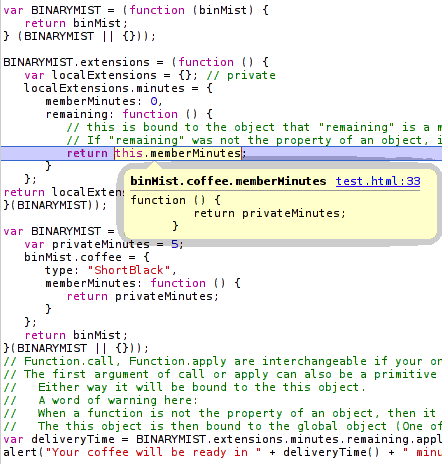
Once BINARYMIST.extensions.minutes.remaining is applied to BINARYMIST.coffee, return this.minutes now returns a function that returns privateMinutes.

javascript binding callback

You can copy past the below code:

var BINARYMIST = (function (binMist) {
   return binMist;
} (BINARYMIST || {/*if BINARYMIST is falsy, create a new object and pass it*/}));

BINARYMIST.extensions = (function () {
   var localExtensions = {}; // private
   localExtensions.minutes = {
      minutes: 0,
      remaining: function () {
         // this is bound to the object that "remaining" is a member of at runtime, because "remaining" is a property of the object "localExtensions.minutes".
         // If "remaining" was not the property of an object, it would be invoked as a function rather than a method. "this" would be bound to the global object.
         return this.minutes;
      }
   };

   return localExtensions;
}());

var BINARYMIST = (function (binMist) {
   var privateMinutes = 5;
   binMist.coffee = {
      type: "ShortBlack",
      member: function () {
         return privateMinutes;
      }
   };
   return binMist;
}(BINARYMIST || {}));
// Function.call, Function.apply are interchangeable if your only using a single parameter.
// The first argument of call or apply can also be a primitive value, null or undefined.
// Either way it will be bound to the this object.
// A word of warning here:
// When a function is not the property of an object, then it is invoked as a function.
// The this object is then bound to the global object (One of the poor design decisions in JavaScript).
var deliveryTime = BINARYMIST.extensions.minutes.remaining.apply(BINARYMIST.coffee);
alert("Your coffee will be ready in " + deliveryTime() + " minutes");

In continuing with the code comment immediately above:
If the first parameter to apply or call is null, then the this is bound to the global object upon invocation.
When you invoke a function that is not a method, this is exactly what happens.

You may have noticed, I’m using the module pattern in the above example.
This pattern is effective for getting our objects nicely nested into a single namespace (or more correctly an object ) that sits in the global object.
This stops us from littering the global space with every object we create.
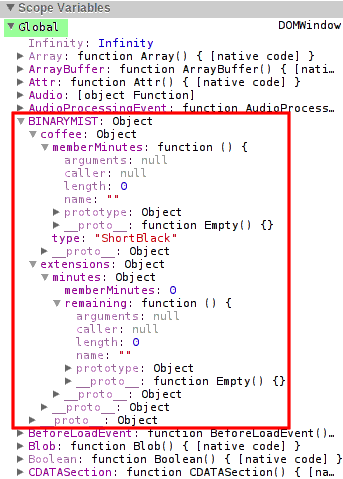
You can also see from the following image, what’s private and what’s public.
So we can easily define accessibility.

JavaScript global scope abatement

What are the differences between apply and call then?

call

You can think of Function.prototype.call as being syntax sugar on top of Function.prototype.apply.
If you only have a single parameter after the first, your better off to use Function.prototype.call as it’s more efficient than creating an array for a single value.

The difference is in the parameters after the first invocation context argument.
With call, an arbitrary number of arguments can be passed.
Following the first argument, each argument will be passed to the extension method. In our case remaining (line 09 above).
So we could make the following changes to the above code.
You’ll notice on line 8 below once applied to BINARYMIST.coffee, no longer returns a function, because we explicitly set this.minutes to a number… 3.
Now in the below example on line 16, if we fail to pass an argument to BINARYMIST.extensions.minutes.remaining, by default our coffee will be ready in 10 minutes.

BINARYMIST.extensions = (function () {
   var localExtensions = {}; //private
   localExtensions.minutes = {
      minutes: 0,
      remaining: function (numberOfMinutes) {

         var defaultMinutes = 10;
         this.minutes = numberOfMinutes || defaultMinutes;

         return this.minutes;
      }
   };
   return localExtensions;
}());

var deliveryTime = BINARYMIST.extensions.minutes.remaining.call(BINARYMIST.coffee, 3);
alert("Your coffee will be ready in " + deliveryTime + " minutes");

Better still, lets pass a couple of arguments..
While we’re at it, lets tidy things up a bit.
Lets put the code we use to test the extensions on our coffee into an immediately invoked function expression,
also known as an anonymous closure.
You can see this on line 36.

On line 15 we assign localSpent the second argument we passed in (minutesSpent),
but only if we’re sure it’s a number,
else we assign the undefined value.

var BINARYMIST = (function (binMist) {
   return binMist;
} (BINARYMIST || {/*if BINARYMIST is falsy, create a new object and pass it*/}));

BINARYMIST.extensions = (function () {
   var localExtensions = {}; // private
   localExtensions.minutes = {
      minutes: 0,
      remaining: function (numberOfMinutes) {
         var defaultMinutes = 10;

         // check our numbers are actually numbers.
         var isNumber = function isNumber(num) { return typeof num === 'number' && isFinite(num);}
         var localRemaining = isNumber(numberOfMinutes) ? numberOfMinutes : defaultMinutes;
         var localSpent = isNumber(arguments[1]) ? arguments[1] : undefined;

         this.minutes = {remaining: localRemaining, spent: localSpent}
         return this.minutes;
      }
   };
   return localExtensions;
}());

// lets add some coffee
var BINARYMIST = (function (binMist) {
   var privateMinutes = 5;
   binMist.coffee = {
      type: "ShortBlack",
      minutes: function () {
         return privateMinutes;
      }
   };
   return binMist;
}(BINARYMIST || {}));

(function () {
   var minutesRemaining = 3;
   var minutesSpent = 7;
   var deliveryTime = BINARYMIST.extensions.minutes.remaining.call(BINARYMIST.coffee, minutesRemaining, minutesSpent);
   var minutesSinceOrder = deliveryTime.spent || 'a number of';
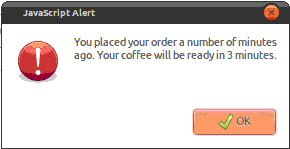
   alert("You placed your order " + minutesSinceOrder + " minutes ago. Your coffee will be ready in " + deliveryTime.remaining + " minutes.");
}());

On line 39 we pass in a couple of arguments.
Now to show another cool feature of JavaScript,
because I hate to miss a good opportunity.
All functions come with an arguments array.
This parameter is populated with all the arguments that were supplied to the function on invocation.
This includes any arguments that were not assigned to parameters.
As you can see below, arguments holds both values we passed in.

JavaScript argument's array

Now if we only pass in the first argument to the specified parameter, when line 41 is executed, we get…

apply

The difference with Function.apply is that it only takes 2 arguments.
The second being an array of arbitrary length.
Function.apply works with array-like objects as well as true arrays.


// show a new BINARYMIST.extension.minutes that takes an array

var minutesRemaining = 3;
var minutesSpent = 7;
var minutes = [minutesRemaining, minutesSpent];
var deliveryTime = BINARYMIST.Extensions.minutes.remaining.call(BINARYMIST.coffee, minutes);

Bind

In response to Mike Wilcox’s comments on the JavaScript Linked-in group
I’ve added some info on Function.prototype.bind introduced in Ecma 262 (I think).

This function is very similar to Function.prototype.call.
In fact the only difference I can see is that bind essentially returns a reference to the function that applies the function we want to apply to a target function.
Essentially this allows us to re-use an applied function, rather than create one each time we want to execute.
bind has the same function signature (has the same parameters) as Function.prototype.call.
This following example was taken from Mike West’s post here with some small changes and comments added.

This is tested and works as you would expect.

var first_multiply;
var second_multiply;

var first_object = {
   num: 42
};

var second_object = {
   num: 24
};

function multiply(mult) {
   return this.num * mult;
}

Function.prototype.bind = function (obj) {
   // When a function is not the property of an object, then it is invoked as a function:
   // Now because bind is a property of Function.prototype
   // and multiply inherits the bind property (which is a function of course) because multiply's prototype is Function's prototype.
   // this is bound to the bind properties object... which in this case is multiply.
   var method = this
   var temp = function () {
      return method.apply(obj, arguments);
   };
   // temp holds a reference to our bind functionality
   return temp;
}

first_multiply = multiply.bind(first_object);
document.writeln(first_multiply(5) + ''); // returns 42 * 5

second_multiply = multiply.bind(second_object);
document.writeln(second_multiply(5) + ''); // returns 24 * 5

Supporting multiple sites with a single SSL Certificate

April 9, 2012

There are a couple of ways I’m aware of you can support multiple web sites with a single SSL certificate using the same port.

  1. Wild card certificate
    Useful for when your collection of sites are on the same domain.
    For example:
    mysane.site.com, myinsane.site.com, mycrazy.site.com
  2. Unified Communications Certificate (UCC) / Subject Alternative Name (SAN) / MultiDomain
    Useful for when your collection of sites are on different domains.
    For example:
    mysanesite.com, myinsanesite.com, mycrazysite.com

You can choose to purchase a SSL cert,
you can use convergence (check out Moxie Marlinspikes talk on the subject),
or you can create a self signed one.

If you chose to create a self signed certificate

IIS 7.x

Click on the root machine node in the left tree view of IIS (7.x) manager.
Then double click the “Server Certificates” icon in the Features View.

Server Certificates

This will show you all the certificates currently registered on the server.
You will be able to see in the Actions pane,
that you can Import or create your own certificate.
To create the self signed wild card certificate,
chose “Create Self-Signed Certificate…”.
Give it the friendly name *.site.com
Ok.
The certificate will be registered on you machine.

Server Certificates

Now for each site you want to use the certificate for,
right click -> Edit Bindings… -> Add.
Select the Type to be https,
and select the certificate you just created from the SSL certificate drop down menu.
Ok -> Close.
Repeat these steps for the rest of the sites you want to share the certificate.

Using the appcmd utility

We now add the https binding and host information to our sites that need to share the wild card certificate.

Run a command prompt as administrator and

cd to %WINDIR%\system32\inetsrv

The format of the command looks like the following:

appcmd set site /site.name:"<your website name>" /+bindings.[protocol='https',bindingInformation='*:443:<your ssl domain>']

For our above three sites we wanted to use the same certificate,
mysane.site.com, myinsane.site.com, mycrazy.site.com
They may be named respectively:
mysane, myinsane, mycrazy
So for example,
we’d run the following commands:

appcmd set site /site.name:"mysane" /+bindings.[protocol='https',bindingInformation='*:443:mysane.site.com']

You should get feedback similar to the following:

SITE object "mysane.site.com" changed

if all goes well

appcmd set site /site.name:"myinsane" /+bindings.[protocol='https',bindingInformation='*:443:myinsane.site.com']

You should get feedback similar to the following:

SITE object "myinsane.site.com" changed

if all goes well

appcmd set site /site.name:"mycrazy" /+bindings.[protocol='https',bindingInformation='*:443:mycrazy.site.com']

You should get feedback similar to the following:

SITE object "mycrazy.site.com" changed

if all goes well

Although I normally keep it simple and name my sites the same as the URL (your ssl domain) I want to use.

IIS 6

Now this is a bit more work than with IIS 7.

If it’s not already installed, you’ll need the SelfSSL tool.
You can get this from the SSL Diagnostics Kit or the IIS 6.0 Resource Kit which contains lots of other stuff.
Once installed, run IIS.

Create the self signed wildcard certificate

You’ll need to generate the certificate for one existing IIS site.
For the first site take note of the site idendifier.
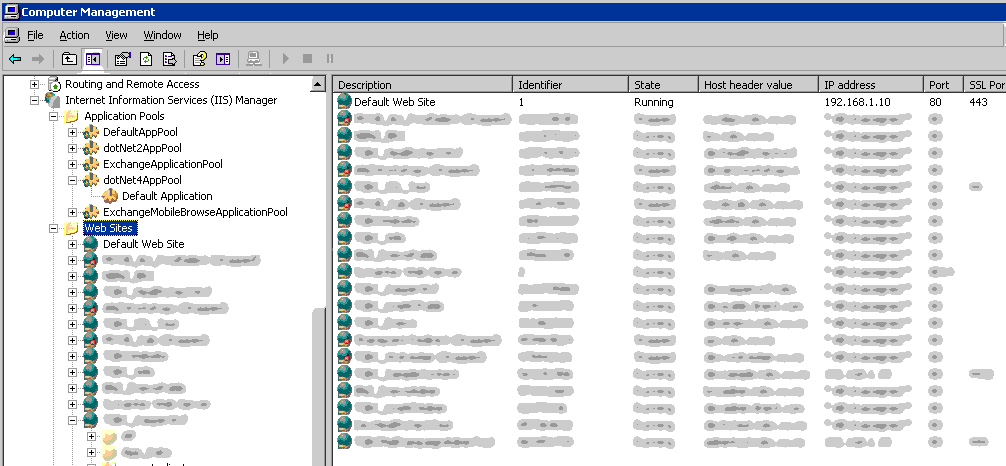
You can see this in the right pane when you select Web Sites from the server node in the IIS manager.
Open a command prompt, you’ll need to run the SelfSSL app.
Actually I think the easiest way to run this is Start menu -> All Programs -> IIS Resources -> SelfSSL -> SelfSSL.
The command string looks like this:

selfssl /n:cn=<your wild card domain> /s:<first website identifier> /P:<port you want to use> /v:<number of days to expiration>

So for example, we’d run the following command:

selfssl /n:cn=*.site.com /s:1 /P:443 /v:365

Options for SelfSSL

selfssl /?

some of them are:

/N: – This specifies the common name of the certificate. The computer name is used if there is no common name specified.
/K: – This specifies the key length of the certificate. The default is length 1024.
/V: – This specifies the amount of time the certificate will be valid for, calculated in days. The default setting is seven days.
/S: – This specifies the Identifier of the site, which we obtained earlier. The default will always be 1, which is the Default Web Site in IIS.

Assign the certificate to the sites that need it

Have a look at the site properties in IIS Manager -> Directory Security tab -> Server Certificate button.
This will start the IIS wizard.
Click Next -> Assign an existing certificate -> Next.
You should see the wild card certificate you created.
Select it, click next, and make sure you assign it the same port that was assigned to the first site.

Configure the SecureBindings

In order for IIS to use the host headers with SSL and secure the certificate as we did with appcmd,
you’ll need to run the following command for each of the sites that require it.
My adsutil is found in C:\Inetpub\AdminScripts\
It’s probably not in your path, so you’ll have to run it from location.
cscript adsutil.vbs set /w3svc/<website identifier>/SecureBindings ":443:<your ssl domain>"
So for example, we’d run the following command:
cscript adsutil.vbs set /w3svc/1/SecureBindings ":443:mysane.site.com"
That should be it.

Now if you need to remove a certificate from your store

Run mmc.exe
File menu -> Add/Remove Snap-in… -> Add… -> select Certificates -> Add -> select Computer account -> Next -> select Local computer -> Close -> Ok.
Select the Certificates node, expand Personal, Certificates.
Now in the right window pane, you can manage the certificates.
Delete, Renew etc.

How to optimise your testing effort

March 24, 2012

I recently wrote a post for the company I currently work for around the joys of doing TDD.
You can check it out here.

What is your current approach to testing?
How can you spend the little time you have on the most important areas?

I thought I’d share some thoughts around where I see the optimal areas to invest your test effort.
I got to thinking last night, and when I was asleep.
We are putting too much effort into our UI, UA and system tests.
We are writing to many of them, thus we’re creating a top heavy test structure that will sooner or later topple.
These tests have their sweet spot, but they are slow, fragile and time consuming to write.

We should have a small handful for each user story to provide some UA, and the rest should be without the UI and database (the slow and fragile bits).
We need to get our mind sets lower down the test triangle.

test triangle

I’ll try and explain why we should be doing less Manual tests, followed by GUI tests, followed by UA tests, followed by integration tests, followed by Unit tests.

Try not to test the UI with the lower architectural layers included in the tests.
UI tests should have the lower layers mocked and / or stubbed.
Check out Dummy vs Fake vs Stub vs Mock
Full end to end system tests are not required to validate UI field constraints.
Dependency injection really helps us here.

When you are explicitly testing the upper levels of the test triangle, the lower / immediate lower layers are implicitly being tested.
So you might think, cool, if we invest in the upper layers, we implicitly cover the lower layers.
That’s right, but the disadvantages of the higher level tests outweigh the advantages.
UI tests and especially ones that go from end to end, should be avoided, or very few in number,
as they are fragile and incur high maintenance costs.
If we create to many of these, confidence in their value diminishes.
Read on and you’ll find out why.

Lets look at cost vs value to the business.

Some tests cost a lot to create and modify.
Some cost little to create and modify.
Some yield high value.
Some yield low value.
We only have so much time for testing,
so lets use it in the areas that provide the greatest value to the business.
Greatest value of course, will be measured differently for each feature.
There is no stock standard answer here, only guidelines.
What we’re aiming for is to spend the minimum effort (cost) and get the maximum benefit (value).
Not the other way around…
With the following set of scales, we’ve spent to much in the wrong areas, yielding suboptimal value.

cost verse business value

It’s worth the effort to get under the UI layer and do the required setup incl mocking the layers below.
It’s also not to hard to get around the likes of the HttpContext hierarchy of classes (HttpRequest, HttpResponse, and so on) encountered in ASP.NET Web Forms and MVC.

Beware

  • the higher level tests get progressively more expensive to create and maintain.
  • They are slower to run, which means they don’t run as part of CI, but maybe the nightly build.
    Which means there is more latency in the development cycle.
    Developers are less likely to run them manually.
  • When  they break, it takes longer to locate the fault, as you have all the layers below to go through.

Unreliable tests are a major cause for teams ignoring or losing confidence in automated tests.
UI, Acceptance, followed by integration tests are usually the culprits for causing this.
Once confidence is lost, the value initially invested in the automated tests is significantly reduced.
Fixing failing tests and resolving issues associated with brittle tests should be a priority to remove false positives.

Planning the test effort

This is usually the first step we do when starting work on a user story,
or any new feature.
We usually create a set of Test Conditions (Given/When/Then)

Given When Then
There are no items in the shopping cart Customer clicks “Purchase” button for a book which is in stock 1 x book is added to shopping cart. Book is held – preventing selling it twice.
Customer clicks “Purchase” button for a book which is not in stock Dialog with “Out of stock” message is displayed and offering customer option of putting book on back order.

for Product Backlog items where there are enough use cases for it to be worth doing.
Where we don’t create Test Conditions, we have a Test Condition workshop.
In the workshop we look at the What, How, Who and Why in that order.
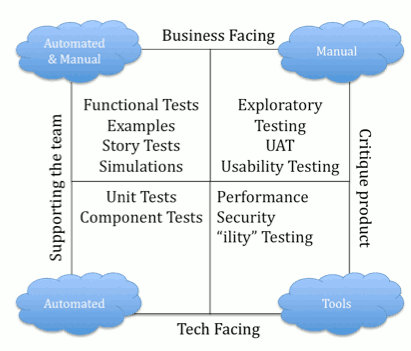
The test quadrant (pictured below) assists us in this.
In the workshop, we write the previously recorded Acceptance Criteria on a board (the What) and discuss the most effective way to verify that the conditions are meet (the How)
With the how we look at the test triangle and the test quadrant and decide where our time is most effectively spent.

Test condition workshop

With the test condition workshop,
when we start on a user story (generally a feature in the sprint backlog),
we plan where we are going to spend our test resource.
Think about What, and sometimes Who, but not How.
The How comes last.

Unit tests are the developers bread and butter.
They are cheap to create and modify,
and consistently yield not only good value to the developers,
but implicitly good value to most / all other areas.
This is why they sit at the bottom of the test triangle.
This is why TDD is as strong as it is today.
test quadrant

The hierarchy of criteria that we use to help us

  1. Release Criteria
    Ultimately controlled by the Product Owner or release manager.
  2. Acceptance Criteria
    Also owned by the Product Owner.
    Attached to each user story, or more correctly… product backlog item.
    The Development team must meet these in order to fulfill the Definition of Done.
  3. Test Conditions
    When executable, confirm the development team have satisfied the requirements of the product backlog item.

Write your tests first

TDD is  not about testing, it’s about creating better designs.
This forces us to design better software. “Testable”, “Modular”, separating concerns, Single responsibility principle.
This forces us down the path of SOLID Principles.

red green refactor

  1. Write a unit test
    Run it and watch it fail (because the production code is not yet written)
  2. Write just enough production code to make the test pass
  3. Re-run the test and watch it pass

This podcast around TDD has lots of good info.

Continuous Integration

Realise the importance of setting up CI and nightly builds.
The benefit of having your unit (fast running) tests automatically executed regularly are great.
You get rapid feedback, which is crucial to an agile team completing features on time.
Tests that are not being run regularly have the risk that they may be failing.
The sooner you find a failing test, the easier it is to fix the code.
The longer it’s left unattended, the more technical debt you accrue and the more effort is required to hunt down the fault.
Make the effort to get your tests running on each commit or push.

Nightly Builds

The slower running tests (that’s all the automated tests above unit tests on the triangle), need to be run as part of a nightly build.
We can’t have these running as part of the CI because they are just too slow.
If something gets in the way of a developers work flow, it won’t get done.

Pair Review

Don’t forget to pair review all code written.
In my current position we’ve been requesting reviews verbally and responding with emails, comments on paper.
This is not ideal and we’re currently evaluating review software, of which there are many offerings.

JavaScript Reserved Words

December 19, 2011

Funnily enough, most of these are not used in the language.
They cannot be used to name variables or parameters.
In saying that,
I did some testing below and that statement’s not entirely accurate.

Usage of keywords in red should be avoided.

Reserved Keyword Comments
abstract  no
boolean  no
break  yes
byte  no  No type of byte in JavaScript
case  yes
catch  yes
char  no  JavaScript doesn’t have char. Use string instead
class  no  technically JavaScript doesn’t have class
const  no  no const, but read-only can be implemented
continue  yes
debugger  yes
default  yes
delete  yes
do  yes
double  no  JavaScript only has number (64 bit floating point)
else  yes
enum  no
export  no
extends  no
false  yes
final  no
finally  yes
float  no  JavaScript only has number (64 bit floating point)
for  yes
function  yes
goto  no
if  yes
implements  no  JavaScript uses prototypal inheritance. Reserved in strict mode
import  no
in  yes
instanceof  yes
int  no  JavaScript only has number (64 bit floating point)
interface  no  technically no interfaces, but they can be implemented. Reserved in strict mode
let  no Reserved in strict mode
long  no  JavaScript only has number (64 bit floating point)
native  no
new  yes  use in moderation. See comments in Responses below
null  yes
package  no Reserved in strict mode
private  no  access is inferred. Reserved in strict mode
protected  no  JavaScript has privileged, but it’s inferred. Reserved in strict mode
public  no  access is inferred. Reserved in strict mode
return  yes
short  no  JavaScript only has number (64 bit floating point)
static  no Reserved in strict mode
super  no
switch  yes
synchronized  no
this  yes
throw  yes
throws  no
transient  no
true  yes
try  yes
typeof  yes
var  yes
volatile  no
void  yes
while  yes
with  yes
yeild  no Reserved in strict mode

When reserved words are used as keys in object literals,
they must be quoted.
They cannot be used with the dot notation,
so it is sometimes necessary to use the bracket notation instead.
Or better, just don’t use them for your names.

var method;                  // ok
var class;                   // illegal
object = {box: value};       // ok
object = {case: value};      // illegal
object = {'case': value};    // ok
object.box = value;          // ok
object.case = value;         // illegal
object['case'] = value;      // ok

I noticed in Doug Crockfords JavaScript The Good Parts
in Chapter 2 under Names, where he talks about reserved words.
It says:
“It is not permitted to name a variable or parameter with a reserved
word.
Worse, it is not permitted to use a reserved word as the name of an object
property in an object literal or following a dot in a refinement.”

I tested this in Chrome and FireFox with the following results.

var private = 'Oh yuk'; // if strict mode is on: Uncaught SyntaxError: Unexpected strict mode reserved word
var break = 'break me'; // Uncaught SyntaxError: Unexpected token break


var myFunc = function (private, break) {
   // if strict mode is on or off: Uncaught SyntaxError: Unexpected token break
   // strangly enough, private is always fine as a parameter.
}


var myObj = {
   private: 'dung', // no problem
   break: 'beetle' // no problem
}
console.log('myObj.private: ' + myObj.private) // myObj.private: dung
console.log(' myObj.break: ' + myObj.break); // myObj.break: beetle


JavaScript also predefines a number of global variables and functions
that you should also avoid using their names for your own variables and functions.
Here’s a list:

  • arguments
  • Array
  • Boolean
  • Date
  • decodeURI
  • decodeURIComponent
  • encodeURI
  • encodeURIComponent
  • Error
  • eval
  • EvalError
  • Function
  • Infinity
  • isFinite
  • isNaN
  • JSON
  • Math
  • NaN
  • Number
  • Object
  • parseFloat
  • parseInt
  • RangeError
  • ReferenceError
  • RegExp
  • String
  • SyntaxError
  • TypeError
  • undefined
  • URIError

Scoping & Hoisting in JavaScript

November 14, 2011

Scoping

JavaScript scoping is different to classical languages, and can take some getting used to for programmers used to languages such as C, C++, C#, Java.
Classical languages like the before mentioned have block scope.
JavaScript has function scope.

In the following example “5” will be alerted.

var foo = 1;
function bar() {
   if (!foo) {
      var foo = 5;
   }
   alert(foo);
}
bar();


In the following example “1” will be alerted.

var a = 1;
function b() {
   a = 10;
   return;
   function a() {}
}
b();
alert(a);


In the following example Firebug will show 1, 2, 2.

var x = 1;
console.log(x); // 1
if (true) {
   var x = 2;
   console.log(x); // 2
}
console.log(x); // 2


In JavaScript, blocks such as if statements, do not create new scope. Only functions create new scope.

There is a workaround though 😉
JavaScript has Closure.
If you need to create a temporary scope within a function, do the following.

function foo() {
   var x = 1;
   if (x) {
      (function () {
         var x = 2;
         // some other code
      }());
   }
// x is still 1.
}

Line 3: begins a closure
Line 6: the closure invokes itself with ()

I discuss closure in depth in a later post.

Hoisting

Terminoligy

As far as I know…
function declaration or function statement
are the same thing.
function expression or variable declaration with function assignment
are the same thing.


A function statement looks like the following:

function foo( ) {}


A function expression looks like the following:

var foo = function foo( ) {};


A function expression must not start with the word “function”.

//anonymous function expression
var a = function () {
   return 3;
};

//named function expression
var a = function bar() {
   return 3;
};

//self invoking named function expression.
(function sayHello() {
   alert('hello!');
})();

//self invoking anonymous function expression.
(function ( ) {
   var hidden_variable;
   // This function can have some impact on
   // the environment, but introduces no new
   // global variables.
}() );


In JavaScript, a name enters a scope in one of four basic ways:

  1. Language-defined: All scopes are, by default, given the names this and arguments.
  2. Formal parameters: Functions can have named formal parameters, which are scoped to the body of that function.
  3. Function declarations: These are of the form function foo() {}.
  4. Variable declarations: These take the form var foo;.

Function declarations and variable declarations are always hoisted
invisibly to the top of their containing scope by the JavaScript interpreter.
Function parameters and language-defined names are, obviously, already there. This means that code like this:

function foo() {
   bar();
   var x = 1;
}

Is actually interpreted like this:

function foo() {
   var x;
   bar();
   x = 1;
}


It turns out that it doesn’t matter whether the line that contains the declaration would ever be executed.
The following two functions are equivalent:

function foo() {
   if (false) {
      var x = 1;
   }
   return;
   var y = 1;
}
function foo() {
   var x, y;
   if (false) {
      x = 1;
   }
   return;
   y = 1;
}

The assignment portion of the declaration is not hoisted.
Only the identifier is hoisted.
This is not the case with function declarations, where the entire function body will be hoisted as well,
but remember that there are two normal ways to declare functions. Consider the following JavaScript:

function test() {
   foo(); // TypeError 'foo is not a function'
   bar(); // 'this will run!'
   var foo = function () { // function expression assigned to local variable 'foo'
      alert('this won't run!');
   }
   function bar() { // function declaration, given the name 'bar'
      alert('this will run!');
   }
}
test();

In this case, only the function declaration has its body hoisted to the top. The name ‘foo’ is hoisted, but the body is left behind, to be assigned during execution.

Including named function expressions added to the local object

//'use strict';

var container;

function Container() {

   var that = this;
   var descender = 3;
   var targetMin = 0;
   var ascender = 0;
   var targetMax = 3;    

   this.inc = function () {

      if (ascender < targetMax) {
         ascender += 1;
         console.log('ascender incremented: now equals ' + ascender);
         return that;
      } else {
         that.inc = function () {
            console.log('inc now modified to return ' + targetMax);
         };
         that.inc();
         return that;
      }
   };

   alert(dec); // Uncaught ReferenceError: dec is not defined. we're actually looking for the global objects dec property which doesn't exist.
   alert(this.dec); // Prints 'undefined' because this.dec is hoisted and declared, but of course not yet defined.
   // If this.dec was not hoisted, we would get the same 'Uncaught ReferenceError: this.dec is not defined'.

   this.dec = function () {

      if (descender > targetMin) {
         descender -= 1;
         console.log('descender decremented: now equals ' + descender);
         return that;
      } else {
         that.dec = function () {
            console.log('dec now modified to return ' + targetMin);
         };
         that.inc();
         return that;
      }
   };
}

container = new Container();
container.inc().inc().inc().inc();
console.log(container.inc);
container.dec().dec().dec().dec();
console.log(container.dec);

Out of interest, the output looks like the following:

modify routine on the fly

Name Resolution Order

The most important special case to keep in mind is name resolution order. Remember that there are four ways for names to enter a given scope. The order I listed them above is the order they are resolved in. In general, if a name has already been defined, it is never overridden by another property of the same name. This means that a function declaration takes priority over a variable declaration. This does not mean that an assignment to that name will not work, just that the declaration portion will be ignored. There are a few exceptions:

  • The built-in name arguments behaves oddly. It seems to be declared following the formal parameters, but before function declarations. This means that a formal parameter with the name arguments will take precedence over the built-in, even if it is undefined. This is a bad feature. Don’t use the name arguments as a formal parameter.
  • Trying to use the name this as an identifier anywhere will cause a Syntax Error. This is a good feature.
  • If multiple formal parameters have the same name, the one occurring latest in the list will take precedence, even if it is undefined.

Now that you understand scoping and hoisting, what does that mean for coding in JavaScript?
The most important thing is to always declare your variables with var statements.
Declare your variables at the top of the scope (as already mentioned JavaScript only has function scope). See the Variable Declarations section.
If you force yourself to do this, you will never have hoisting-related confusion.
However, doing this can make it hard to keep track of which variables have actually been declared in the current scope.
I generally like to follow these coding standards with JavaScript.

function foo(a, b, c) {
   var x = 1;
   var bar;
   var baz = 'something';
   // other non hoistable code here
}

Getting MVC 4 running on Server 2003

October 24, 2011

For many of us, just updating to the latest Server software isn’t in all cases an option.

Make sure .NET 4.0 is installed.

The most reliable way to check the .NET framework and service pack versions is to consult the registry.
This is a good table that will tell you this.
If you find .NET 4.0 isn’t installed, you’ll have to download and install it.

Make sure ASP.NET 4.0 is activated for your web site

First you’ll need your web sites SiteID.
Open IIS Manager.
Click the Web Sites folder in the left pane. In the right pane, you’ll see all your web sites listed.
There should be a column called “Identifier”. The fields beneath are the web sites SiteID’s.
Take note of your web sites Id.

Navigate to ASP.NET’s default path C:\WINDOWS\Microsoft.NET\Framework\v4.0.30319
You’ll then need to run the following command:

aspnet_regiis -lk | find "Id"

Where “Id” is your web sites Id as you recorded above.
You need the quotes too.

This should produce the following:

"W3SVC/Id/ROOT/ [your .NET framework version number]"

That’s what your website’s virtual path in IIS6.0 looks like with the .NET framework version tacked on the end, without the quotes.
Id of course will be your web sites Id.

If the .NET framework version isn’t v4.0.30319, you’ll need to register it.
Run the following command:

aspnet_regiis.exe -norestart -s "W3SVC/Id/ROOT/"

Id is once again your web sites Id.
This should register ASP.NET 4.0 with your web site.
IIS won’t need restarting.

Make sure the App pool your web site is going to run in is dedicated to .NET 4.0

Here’s some doc for aspnet_regiis.exe

Make sure ASP.NET MVC 4 is installed on the target machine

or the project is set to bin deploy
I prefer to bin deploy, so we don’t clutter up the old server.
Any additional libraries I need,
I include by using NuGet at solution level,
This allows many projects to use the same packages.

It looked like after some research,
but before I actually started on this,
that we would run into this problem, but no,
It turned out that our .NET 4 ASP.NET ISAPI extension was already enabled.

File extension mapping

The file extension in the URL (.aspx for example) must be mapped to aspnet_isapi.dll.
If it is, and there’s a .aspx in the URL,
aspnet_isapi.dll invokes ASP.NET.
If ASP.NET is invoked, (because UrlRoutingModule is a .NET IHttpModule) UrlRoutingModule gets invoked.

IIS 6 only invokes ASP.NET when it sees a “filename extension” in the URL that’s mapped to aspnet_isapi.dll
This means we have to do some work to get IIS 6 to recognise files that don’t have this mapping.
As this was a test deployment, I wasn’t too concerned about speed.
So decided to use wildcard mapping for aspnet_isapi.dll, as it was the easiest to setup.

Open IIS Manager

1. Right click on your web app and select Properties
2. Select the HomeDirectory tab
3. Click on Configuration

4. Under the Wildcard application maps edit box,
—-click Insert (not Add)
5. Enter C:\WINDOWS\Microsoft.NET\Framework\v4.0.30319
—-\aspnet_isapi.dll for the “Executable:”
6. Uncheck “Verify that file exists”

7. Click OK, OK

There are a few ways of achieving a similar result.
Here are some ideas:

http://haacked.com/archive/2008/11/26/asp.net-mvc-on-iis-6-walkthrough.aspx
http://blog.stevensanderson.com/2008/07/04/options-for-deploying-aspnet-mvc-to-iis-6/
Another resource that’s well worth a read is the “Test Drive ASP.NET MVC” book.
In chapter 12 it talks a little about this also in the section… IIS 6.0 on Windows Server 2003 or XP Pro x64

Multiple ASP.NET sites on same port

October 23, 2011

How to get multiple ASP.NET web sites running on a single machine using the same default port.

Say I have myfirstsite, mysecondsite

Open your hosts file as administrator (UAC will only let you do this as admin).
On the machine I’m using (Windows 7) it’s C:\windows\system32\drivers\etc\hosts
Add the following lines:

127.0.0.1 myfirstsite
127.0.0.1 mysecondsite

In IIS for both myfirstsite and mysecondsite,
you’ll need to make sure the bindings bind to all IP addresses on port 80.
The HostName will probably need to be changed to the name of your website

In IIS 7 / 7.5 To add a host header entry for a Web Site in IIS 7 / 7.5

  1.     Right click the Web Site.
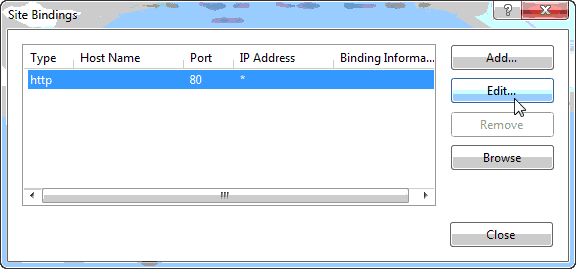
  2.     Click Edit Bindings…

  1.     Click on http and click Edit…

  1.     Type the host header in the text box “Host name:” and click OK.

If you still have the great joy of working with IIS 6.0

  1.     Right click Web Site
  2.     Click on Properties.
  3.     Click Advanced… button in the Web Site tab
  4.     Click on Default and click Edit…
  5.     Type the host header in the text box “Host Header value:”

You should now be able to browse to http://myfirstsite and also http://mysecondsite using the default port 80


Design a site like this with WordPress.com
Get started